
Note
This is a community plugin, an external project maintained by its respective author. Community plugins are not part of FiftyOne core and may change independently. Please review each plugin’s documentation and license before use.

Gemma vLLM Metrics: FiftyOne Plugin#
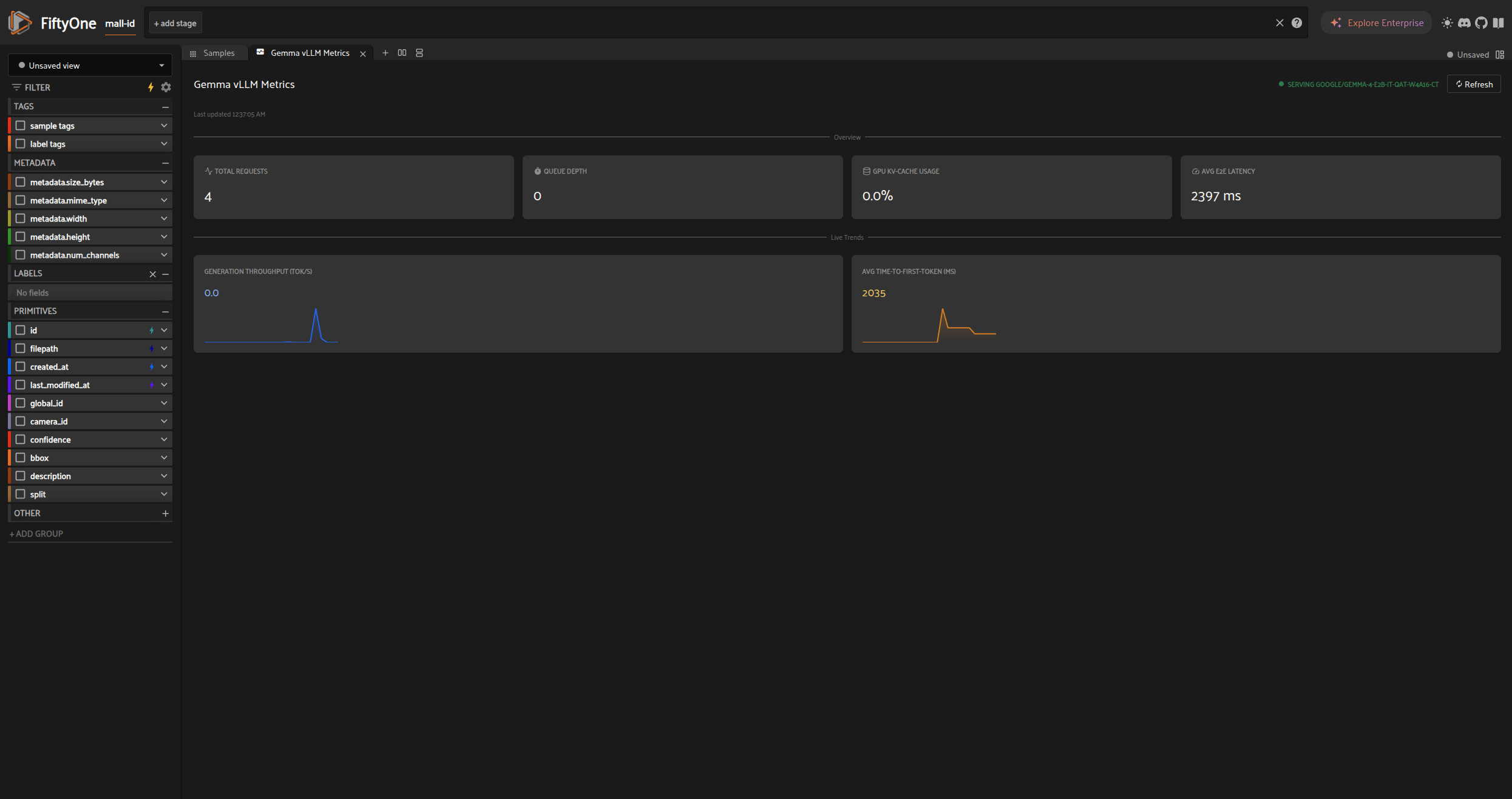
A FiftyOne plugin that watches a Gemma 4 model you serve yourself. It gives you a real, local inference endpoint (via vLLM) that any standard chat client can talk to, plus a panel inside the FiftyOne App that shows the server’s own live numbers: request volume, token throughput, latency, GPU cache usage, and queue depth.
How it works#
vLLM serves the model and already exposes a Prometheus /metrics endpoint
with everything worth watching, so this plugin adds no logging of its own
and no database. It just polls that endpoint and renders what’s already
there.
Two different things talk to the same vLLM server. Your chat client sends
it real chat requests, and this plugin separately polls its /metrics
endpoint to show what those requests are costing. On the plugin side, a
Python backend
(gemma_vllm_metrics/panel.py) polls vLLM
through
gemma_vllm_metrics/metrics_client.py,
and a React frontend (src/) renders the result as the panel shown
above.
The plugin never manages the vLLM process itself. FiftyOne panels run per
request, not as a background daemon, so they’re the wrong place to own a
long lived server. vLLM comes up separately through docker compose
(scripts/serve.sh), and the plugin is purely an HTTP
client against it: check status, poll /metrics, render both.
Metric names can drift between vLLM versions. The client is tested against
a real captured response in
tests/fixtures/sample_metrics.txt.
If you bump the vLLM image tag, diff a fresh curl localhost:8000/metrics
against that fixture before trusting the panel’s numbers.
The model#
This defaults to Google’s own quantized checkpoint,
google/gemma-4-E2B-it-qat-w4a16-ct,
which fits comfortably on a single 12GB consumer GPU alongside its cache
and tool calling support. The larger E4B checkpoint needs more headroom
than that leaves free; swap MODEL_ID in docker/.env to it if you have
more VRAM.
A few flags in docker/compose.yml are worth
knowing if you’re tuning this for your own hardware:
--enforce-eagertrades some throughput for memory, since a 12GB card has little room left for CUDA graph capture.--max-num-seqs 1with--max-model-len 65536trades concurrency for a longer context window, since this plugin is built for one interactive user at a time, not several.--enable-auto-tool-choice --tool-call-parser gemma4is required because most agent frameworks send atoolslist withtool_choice="auto"on every request, and vLLM refuses that otherwise.
If you have more VRAM, raise --max-num-seqs and drop --enforce-eager
for better throughput.
Prerequisites#
Docker with the NVIDIA Container Toolkit (
docker info | grep -i nvidiashould shownvidiaas an available runtime)An NVIDIA GPU with a CUDA 12.9 or newer driver (check with
nvidia-smi); this repo pins thegemma4image tag, which targets thatAbout 10GB free disk for the model weights and the vLLM image
Python 3.10+ with
fiftyoneinstalledngrok, only if exposing the endpoint outside this machine
Quickstart#
Serve the model:
./scripts/serve.sh
This copies docker/.env.example to docker/.env on first run, brings up
vLLM, and waits for /v1/models to answer. First run also downloads the
model weights, so it can take a few minutes.
Install the plugin into your FiftyOne plugins directory:
PLUGINS_DIR=$(python -c "import fiftyone as fo; print(fo.config.plugins_dir)")
ln -s "$(pwd)" "$PLUGINS_DIR/gemma_vllm_metrics"
Launch the FiftyOne App and open the Gemma vLLM Metrics panel from the
+ New panel menu.
Point any standard chat client at the endpoint:
Base URL:  http://localhost:8000/v1
Model:     google/gemma-4-E2B-it-qat-w4a16-ct   (or your own MODEL_ID)
API key:   not required locally, any placeholder value works
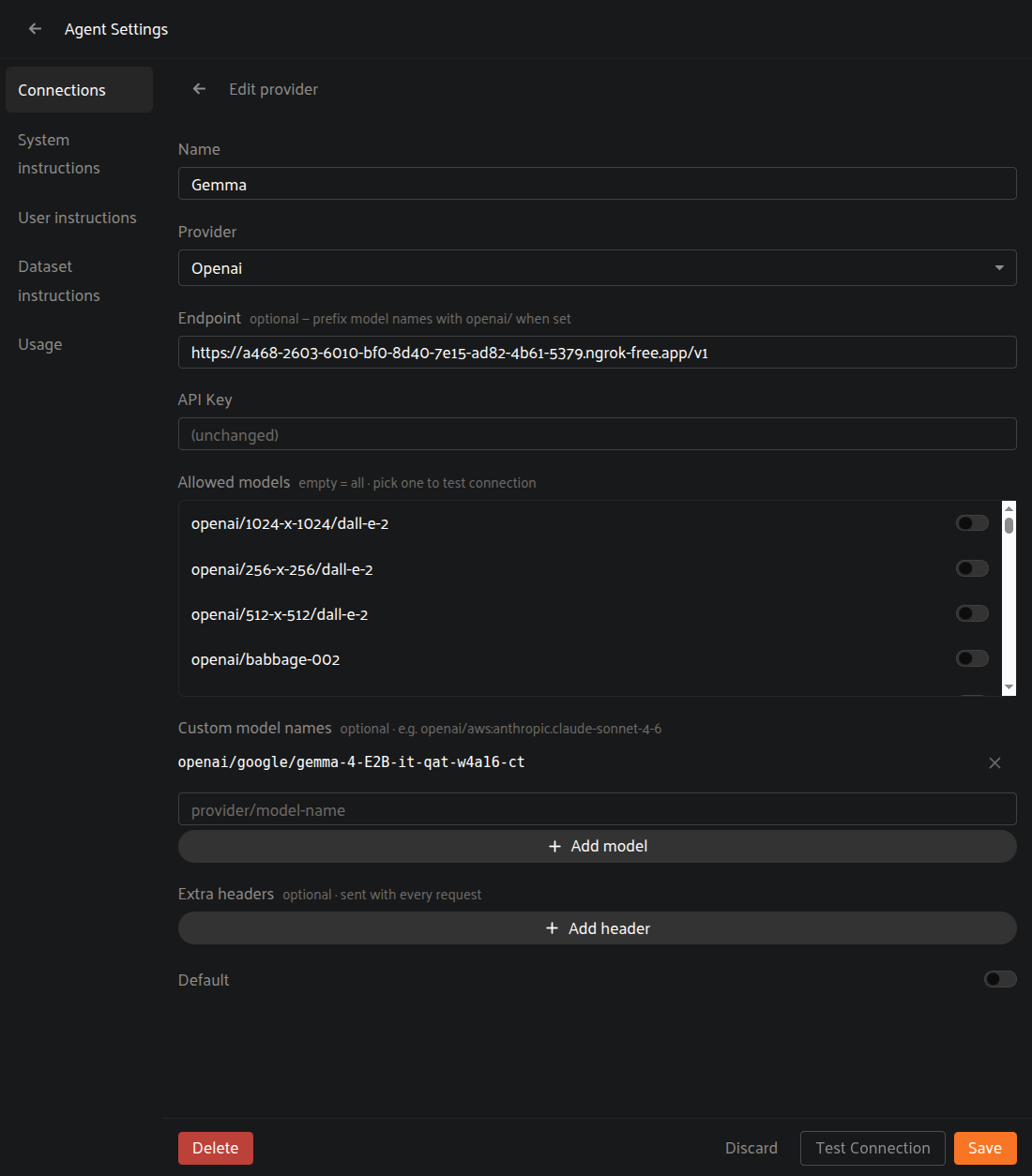
Here’s that same endpoint added as a custom provider in FiftyOne’s own Agent Settings:
Exposing the endpoint on the internet#
If your client isn’t running on this machine, tunnel the vLLM port with
ngrok. This needs a free account and an authtoken; run
ngrok config add-authtoken <token> once, then:
./scripts/tunnel.sh
This generates a random bearer token on first run (saved to
docker/.env.ngrok, gitignored) and starts an ngrok tunnel that checks
that token at the edge, so requests without a matching
Authorization: Bearer <token> header get rejected before they ever reach
vLLM. The script prints the token and the URL to use:
Base URL:  https://<your-subdomain>.ngrok-free.app/v1
API key:   <the bearer token printed by scripts/tunnel.sh>
vLLM itself has no authentication built in, so never expose port 8000 directly without something like this in front of it.
Configuration#
Variable |
Where |
Default |
Purpose |
|---|---|---|---|
|
|
|
Model vLLM serves |
|
|
|
|
|
|
|
Port for the API and |
|
FiftyOne plugin secret or env var |
|
Where the plugin looks for the server |
|
|
random |
Token |
Plugin secrets are declared in fiftyone.yml’s secrets:
block and resolved through ctx.secrets, falling back to the environment
variable of the same name.
Development#
# Python
pip install -r requirements.txt
pytest

# JS (hybrid panel frontend)
npm install
npm run build   # one shot build, outputs dist/index.umd.js
npm run dev     # watch mode
Notes on the frontend#
The installed @voxel51/voodo version behaves a little differently from
its own type declarations, worth knowing before touching src/:
FiftyOne only loads a plugin’s JS, never its CSS, so
src/index.tsximports VOODO’s theme CSS directly and injects it as a style tag.VOODO’s colors default to light mode unless a
.darkclass is present on an ancestor, so the panel’s root element sets that itself, scoped to just this panel.Icon components ignore their
sizeprop in this version, soStatTilewraps each icon in a small fixed size container instead.Pill’s icon and status dot have the same sizing problem, soStatusBadgebuilds its own badge and dot instead of usingPill.
License#
Apache 2.0. See LICENSE. Matches the license of Gemma 4 and vLLM.