Evaluating Detections#
You can use the
evaluate_detections()
method to evaluate the predictions of an object detection model stored in a
Detections, Polylines, or Keypoints field of your dataset or of a
temporal detection model stored in a TemporalDetections field of your
dataset.
Invoking
evaluate_detections()
returns a DetectionResults instance that provides a variety of methods for
generating various aggregate evaluation reports about your model.
In addition, when you specify an eval_key parameter, a number of helpful
fields will be populated on each sample and its predicted/ground truth
objects that you can leverage via the FiftyOne App to
interactively explore the strengths and weaknesses of your model on individual
samples.
Note
FiftyOne uses the COCO-style evaluation by default, but Open Images-style evaluation is also natively supported.
Supported types#
The evaluate_detections()
method supports all of the following task types:
The only difference between each task type is in how the IoU between objects is calculated:
For object detections, IoUs are computed between each pair of bounding boxes
For instance segmentations, when
use_masks=True, IoUs are computed between the dense pixel masks rather than their rectangular bounding boxesFor polygons, IoUs are computed between the polygonal shapes
For keypoint tasks, object keypoint similarity is computed for each pair of objects, using the extent of the ground truth keypoints as a proxy for the area of the object’s bounding box. By default, uniform falloff (\(\kappa\)) is assumed, but you can provide
keypoint_sigmasto customize the per-keypoint OKS falloffFor temporal detections, IoU is computed between the 1D support of two temporal segments
For object detection tasks, the ground truth and predicted objects should be
stored in Detections format.
For instance segmentation tasks, the ground truth and predicted objects should
be stored in Detections format, and each Detection instance should have its
mask populated to define the extent of the object within its bounding box.
Note
In order to use instance masks for IoU calculations, pass use_masks=True
to evaluate_detections().
For polygon detection tasks, the ground truth and predicted objects should be
stored in Polylines format with their
filled attribute set to
True to indicate that they represent closed polygons (as opposed to
polylines).
Note
If you are evaluating polygons but would rather use bounding boxes rather
than the actual polygonal geometries for IoU calculations, you can pass
use_boxes=True to
evaluate_detections().
For keypoint tasks, each Keypoint instance must contain point arrays of equal
length and semantic ordering.
Note
If a particular point is missing or not visible for a Keypoint instance,
use nan values for its coordinates. See here for more
information about structuring keypoints.
For temporal detection tasks, the ground truth and predicted objects should be
stored in TemporalDetections format.
Evaluation patches views#
Once you have run
evaluate_detections()
on a dataset, you can use
to_evaluation_patches()
to transform the dataset (or a view into it) into a new view that contains one
sample for each true positive, false positive, and false negative example.
True positive examples will result in samples with both their ground truth and predicted fields populated, while false positive/negative examples will only have one of their corresponding predicted/ground truth fields populated, respectively.
If multiple predictions are matched to a ground truth object (e.g., if the evaluation protocol includes a crowd attribute), then all matched predictions will be stored in the single sample along with the ground truth object.
Evaluation patches views also have top-level type and iou fields
populated based on the evaluation results for that example, as well as a
sample_id field recording the sample ID of the example, and a crowd
field if the evaluation protocol defines a crowd attribute.
Note
Evaluation patches views generate patches for only the contents of the
current view, which may differ from the view on which the eval_key
evaluation was performed. This may exclude some labels that were evaluated
and/or include labels that were not evaluated.
If you would like to see patches for the exact view on which an
evaluation was performed, first call
load_evaluation_view()
to load the view and then convert to patches.
The example below demonstrates loading an evaluation patches view for the results of an evaluation on the quickstart dataset:
 1import fiftyone as fo
 2import fiftyone.zoo as foz
 3
 4dataset = foz.load_zoo_dataset("quickstart")
 5
 6# Evaluate `predictions` w.r.t. labels in `ground_truth` field
 7dataset.evaluate_detections(
 8    "predictions", gt_field="ground_truth", eval_key="eval"
 9)
10
11session = fo.launch_app(dataset)
12
13# Convert to evaluation patches
14eval_patches = dataset.to_evaluation_patches("eval")
15print(eval_patches)
16
17print(eval_patches.count_values("type"))
18# {'fn': 246, 'fp': 4131, 'tp': 986}
19
20# View patches in the App
21session.view = eval_patches
Dataset:     quickstart
Media type:  image
Num patches: 5363
Patch fields:
    filepath:     fiftyone.core.fields.StringField
    tags:         fiftyone.core.fields.ListField(fiftyone.core.fields.StringField)
    metadata:     fiftyone.core.fields.EmbeddedDocumentField(fiftyone.core.metadata.ImageMetadata)
    predictions:  fiftyone.core.fields.EmbeddedDocumentField(fiftyone.core.labels.Detections)
    ground_truth: fiftyone.core.fields.EmbeddedDocumentField(fiftyone.core.labels.Detections)
    sample_id:    fiftyone.core.fields.StringField
    type:         fiftyone.core.fields.StringField
    iou:          fiftyone.core.fields.FloatField
    crowd:        fiftyone.core.fields.BooleanField
View stages:
    1. ToEvaluationPatches(eval_key='eval', config=None)
Note
Did you know? You can convert to evaluation patches view directly from the App!
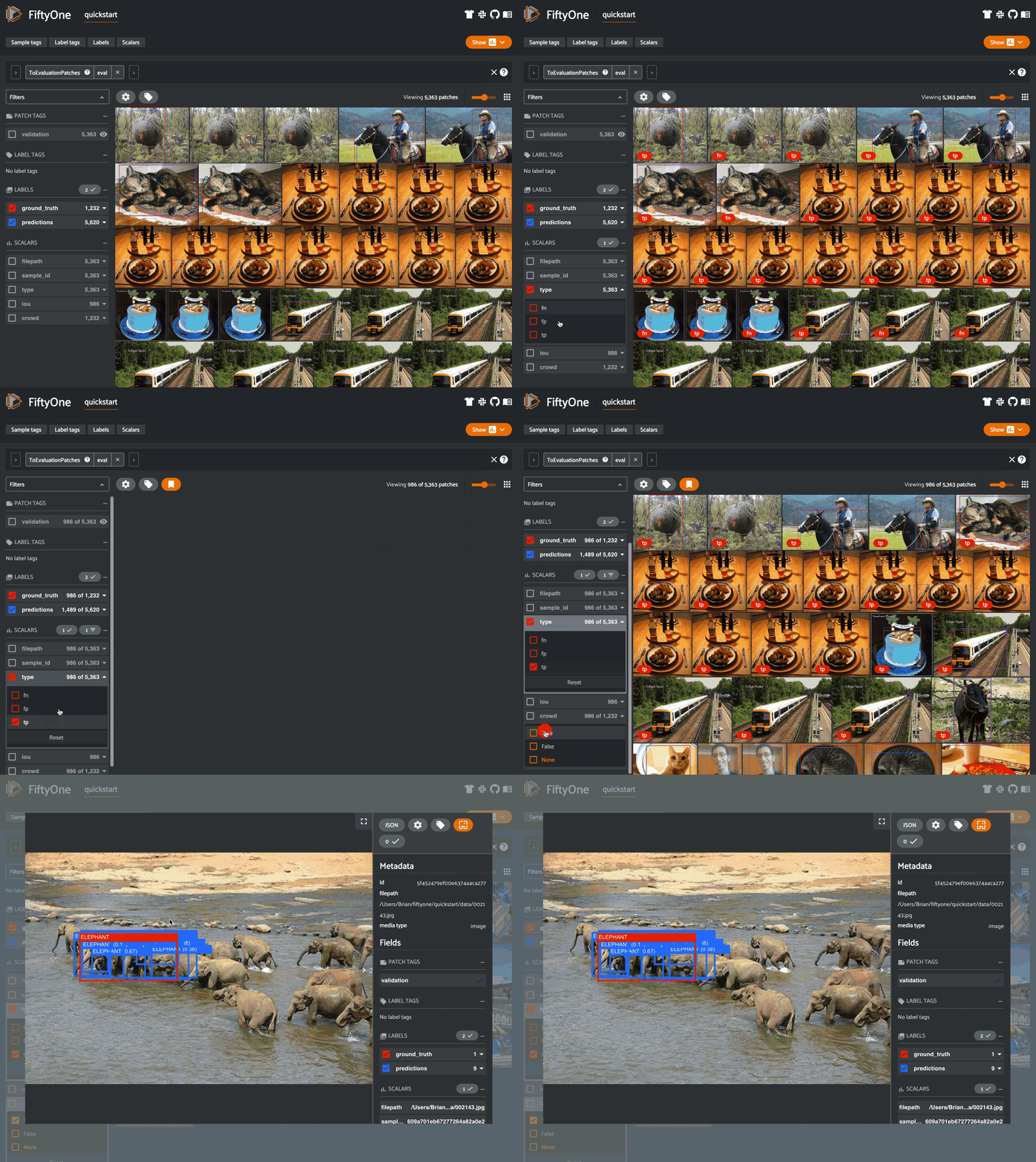
Evaluation patches views are just like any other
dataset view in the sense that:
You can append view stages via the App view bar or views API
Any modifications to ground truth or predicted label tags that you make via the App’s tagging menu or via API methods like
tag_labels()anduntag_labels()will be reflected on the source datasetAny modifications to the predicted or ground truth
Labelelements in the patches view that you make by iterating over the contents of the view or callingset_values()will be reflected on the source datasetCalling
save()on an evaluation patches view (typically one that contains additional view stages that filter or modify its contents) will sync anyLabeledits or deletions with the source dataset
However, because evaluation patches views only contain a subset of the contents
of a Sample from the source dataset, there are some differences in behavior
compared to non-patch views:
Tagging or untagging patches themselves (as opposed to their labels) will not affect the tags of the underlying
SampleAny new fields that you add to an evaluation patches view will not be added to the source dataset
COCO-style evaluation (default spatial)#
By default,
evaluate_detections()
will use COCO-style evaluation to
analyze predictions when the specified label fields are Detections or
Polylines.
You can also explicitly request that COCO-style evaluation be used by setting
the method parameter to "coco".
Note
FiftyOne’s implementation of COCO-style evaluation matches the reference implementation available via pycocotools.
Overview#
When running COCO-style evaluation using
evaluate_detections():
Predicted and ground truth objects are matched using a specified IoU threshold (default = 0.50). This threshold can be customized via the
iouparameterBy default, only objects with the same
labelwill be matched. Classwise matching can be disabled via theclasswiseparameterGround truth objects can have an
iscrowdattribute that indicates whether the annotation contains a crowd of objects. Multiple predictions can be matched to crowd ground truth objects. The name of this attribute can be customized by passing the optionaliscrowdattribute ofCOCOEvaluationConfigtoevaluate_detections()
When you specify an eval_key parameter, a number of helpful fields will be
populated on each sample and its predicted/ground truth objects:
True positive (TP), false positive (FP), and false negative (FN) counts for each sample are saved in top-level fields of each sample:
TP: sample.<eval_key>_tp
FP: sample.<eval_key>_fp
FN: sample.<eval_key>_fn
The fields listed below are populated on each individual object instance; these fields tabulate the TP/FP/FN status of the object, the ID of the matching object (if any), and the matching IoU:
TP/FP/FN: object.<eval_key>
      ID: object.<eval_key>_id
     IoU: object.<eval_key>_iou
Note
See COCOEvaluationConfig for complete descriptions of the optional
keyword arguments that you can pass to
evaluate_detections()
when running COCO-style evaluation.
Example evaluation#
The example below demonstrates COCO-style detection evaluation on the quickstart dataset:
 1import fiftyone as fo
 2import fiftyone.zoo as foz
 3from fiftyone import ViewField as F
 4
 5dataset = foz.load_zoo_dataset("quickstart")
 6print(dataset)
 7
 8# Evaluate the objects in the `predictions` field with respect to the
 9# objects in the `ground_truth` field
10results = dataset.evaluate_detections(
11    "predictions",
12    gt_field="ground_truth",
13    eval_key="eval",
14)
15
16# Get the 10 most common classes in the dataset
17counts = dataset.count_values("ground_truth.detections.label")
18classes = sorted(counts, key=counts.get, reverse=True)[:10]
19
20# Print a classification report for the top-10 classes
21results.print_report(classes=classes)
22
23# Print some statistics about the total TP/FP/FN counts
24print("TP: %d" % dataset.sum("eval_tp"))
25print("FP: %d" % dataset.sum("eval_fp"))
26print("FN: %d" % dataset.sum("eval_fn"))
27
28# Create a view that has samples with the most false positives first, and
29# only includes false positive boxes in the `predictions` field
30view = (
31    dataset
32    .sort_by("eval_fp", reverse=True)
33    .filter_labels("predictions", F("eval") == "fp")
34)
35
36# Visualize results in the App
37session = fo.launch_app(view=view)
               precision    recall  f1-score   support

       person       0.45      0.74      0.56       783
         kite       0.55      0.72      0.62       156
          car       0.12      0.54      0.20        61
         bird       0.63      0.67      0.65       126
       carrot       0.06      0.49      0.11        47
         boat       0.05      0.24      0.08        37
    surfboard       0.10      0.43      0.17        30
     airplane       0.29      0.67      0.40        24
traffic light       0.22      0.54      0.31        24
        bench       0.10      0.30      0.15        23

    micro avg       0.32      0.68      0.43      1311
    macro avg       0.26      0.54      0.32      1311
 weighted avg       0.42      0.68      0.50      1311

Note
The easiest way to analyze models in FiftyOne is via the Model Evaluation panel!
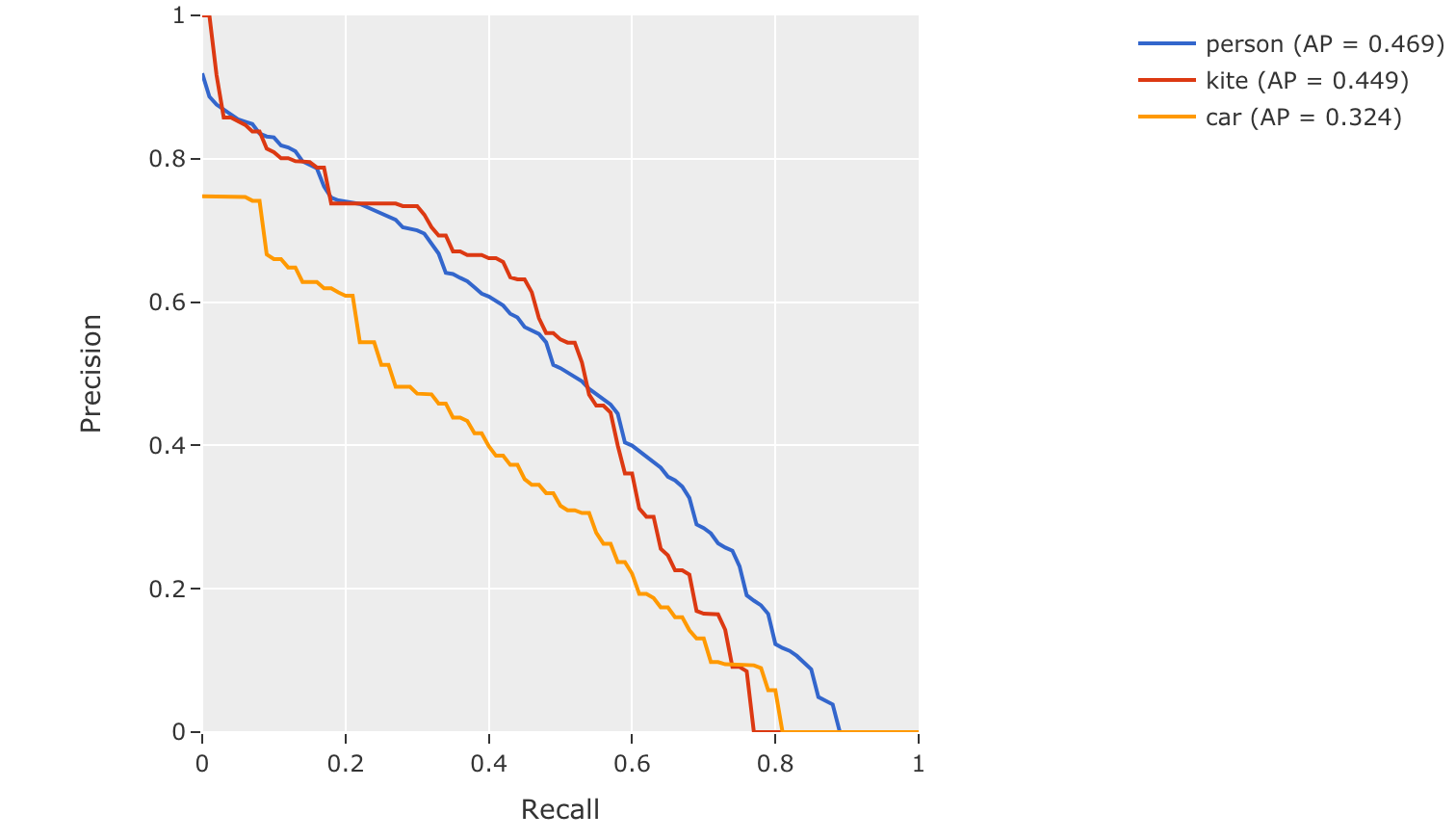
mAP, mAR and PR curves#
You can compute mean average precision (mAP), mean average recall (mAR), and
precision-recall (PR) curves for your predictions by passing the
compute_mAP=True flag to
evaluate_detections():
Note
All mAP and mAR calculations are performed according to the COCO evaluation protocol.
 1import fiftyone as fo
 2import fiftyone.zoo as foz
 3
 4dataset = foz.load_zoo_dataset("quickstart")
 5print(dataset)
 6
 7# Performs an IoU sweep so that mAP, mAR, and PR curves can be computed
 8results = dataset.evaluate_detections(
 9    "predictions",
10    gt_field="ground_truth",
11    compute_mAP=True,
12)
13
14print(results.mAP())
15# 0.3957
16
17print(results.mAR())
18# 0.5210
19
20plot = results.plot_pr_curves(classes=["person", "kite", "car"])
21plot.show()
Confusion matrices#
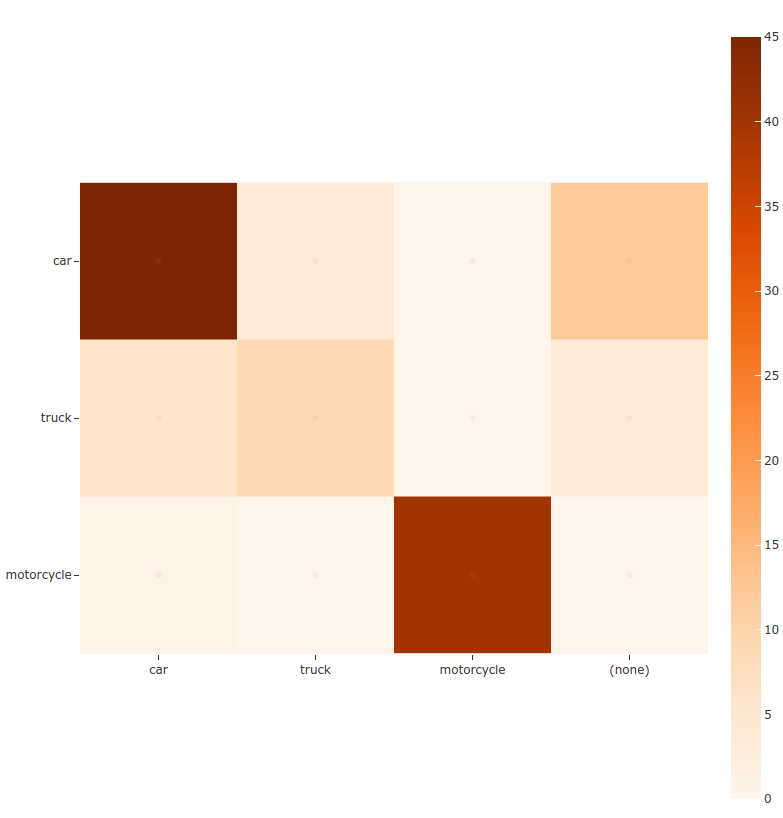
You can also easily generate confusion matrices for the results of COCO-style evaluations.
In order for the confusion matrix to capture anything other than false
positive/negative counts, you will likely want to set the
classwise parameter
to False during evaluation so that predicted objects can be matched with
ground truth objects of different classes.
 1import fiftyone as fo
 2import fiftyone.zoo as foz
 3
 4dataset = foz.load_zoo_dataset("quickstart")
 5
 6# Perform evaluation, allowing objects to be matched between classes
 7results = dataset.evaluate_detections(
 8    "predictions", gt_field="ground_truth", classwise=False
 9)
10
11# Generate a confusion matrix for the specified classes
12plot = results.plot_confusion_matrix(classes=["car", "truck", "motorcycle"])
13plot.show()
Open Images-style evaluation#
The evaluate_detections()
method also supports
Open Images-style evaluation.
In order to run Open Images-style evaluation, simply set the method
parameter to "open-images".
Note
FiftyOne’s implementation of Open Images-style evaluation matches the reference implementation available via the TF Object Detection API.
Overview#
Open Images-style evaluation provides additional features not found in COCO-style evaluation that you may find useful when evaluating your custom datasets.
The two primary differences are:
Non-exhaustive image labeling: positive and negative sample-level
Classificationsfields can be provided to indicate which object classes were considered when annotating the image. Predicted objects whose classes are not included in the sample-level labels for a sample are ignored. The names of these fields can be specified via thepos_label_fieldandneg_label_fieldparametersClass hierarchies: If your dataset includes a class hierarchy, you can configure this evaluation protocol to automatically expand ground truth and/or predicted leaf classes so that all levels of the hierarchy can be correctly evaluated. You can provide a label hierarchy via the
hierarchyparameter. By default, if you provide a hierarchy, then image-level label fields and ground truth detections will be expanded to incorporate parent classes (child classes for negative image-level labels). You can disable this feature by setting theexpand_gt_hierarchyparameter toFalse. Alternatively, you can expand predictions by setting theexpand_pred_hierarchyparameter toTrue
In addition, note that:
Like VOC-style evaluation, only one IoU (default = 0.5) is used to calculate mAP. You can customize this value via the
iouparameterWhen dealing with crowd objects, Open Images-style evaluation dictates that if a crowd is matched with multiple predictions, each counts as one true positive when computing mAP
When you specify an eval_key parameter, a number of helpful fields will be
populated on each sample and its predicted/ground truth objects:
True positive (TP), false positive (FP), and false negative (FN) counts for each sample are saved in top-level fields of each sample:
TP: sample.<eval_key>_tp
FP: sample.<eval_key>_fp
FN: sample.<eval_key>_fn
The fields listed below are populated on each individual
Detectioninstance; these fields tabulate the TP/FP/FN status of the object, the ID of the matching object (if any), and the matching IoU:TP/FP/FN: object.<eval_key> ID: object.<eval_key>_id IoU: object.<eval_key>_iou
Note
See OpenImagesEvaluationConfig for complete descriptions of the optional
keyword arguments that you can pass to
evaluate_detections()
when running Open Images-style evaluation.
Example evaluation#
The example below demonstrates Open Images-style detection evaluation on the quickstart dataset:
 1import fiftyone as fo
 2import fiftyone.zoo as foz
 3from fiftyone import ViewField as F
 4
 5dataset = foz.load_zoo_dataset("quickstart")
 6print(dataset)
 7
 8# Evaluate the objects in the `predictions` field with respect to the
 9# objects in the `ground_truth` field
10results = dataset.evaluate_detections(
11    "predictions",
12    gt_field="ground_truth",
13    method="open-images",
14    eval_key="eval",
15)
16
17# Get the 10 most common classes in the dataset
18counts = dataset.count_values("ground_truth.detections.label")
19classes = sorted(counts, key=counts.get, reverse=True)[:10]
20
21# Print a classification report for the top-10 classes
22results.print_report(classes=classes)
23
24# Print some statistics about the total TP/FP/FN counts
25print("TP: %d" % dataset.sum("eval_tp"))
26print("FP: %d" % dataset.sum("eval_fp"))
27print("FN: %d" % dataset.sum("eval_fn"))
28
29# Create a view that has samples with the most false positives first, and
30# only includes false positive boxes in the `predictions` field
31view = (
32    dataset
33    .sort_by("eval_fp", reverse=True)
34    .filter_labels("predictions", F("eval") == "fp")
35)
36
37# Visualize results in the App
38session = fo.launch_app(view=view)
               precision    recall  f1-score   support

       person       0.25      0.86      0.39       378
         kite       0.27      0.75      0.40        75
          car       0.18      0.80      0.29        61
         bird       0.20      0.51      0.28        51
       carrot       0.09      0.74      0.16        47
         boat       0.09      0.46      0.16        37
    surfboard       0.17      0.73      0.28        30
     airplane       0.36      0.83      0.50        24
traffic light       0.32      0.79      0.45        24
      giraffe       0.36      0.91      0.52        23

    micro avg       0.21      0.79      0.34       750
    macro avg       0.23      0.74      0.34       750
 weighted avg       0.23      0.79      0.36       750

Note
The easiest way to analyze models in FiftyOne is via the Model Evaluation panel!
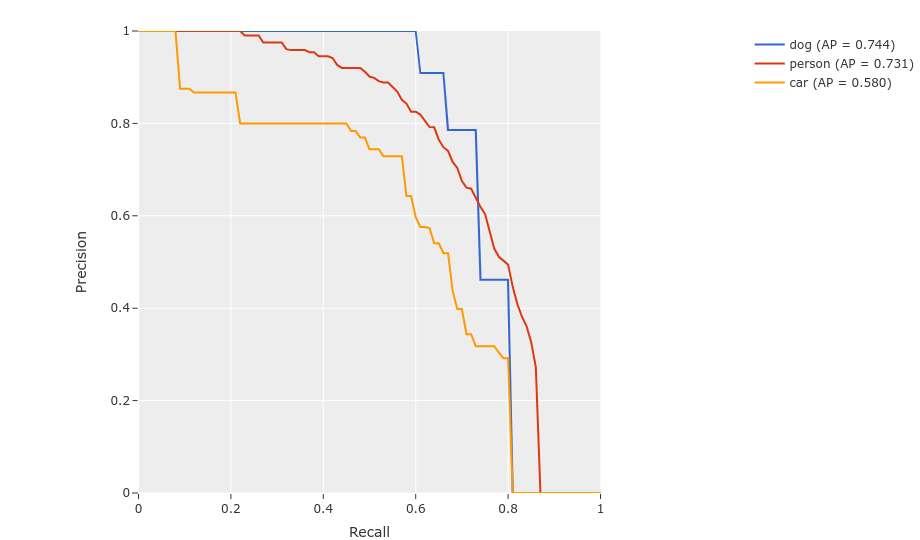
mAP and PR curves#
You can easily compute mean average precision (mAP) and precision-recall (PR)
curves using the results object returned by
evaluate_detections():
Note
FiftyOne’s implementation of Open Images-style evaluation matches the reference implementation available via the TF Object Detection API.
 1import fiftyone as fo
 2import fiftyone.zoo as foz
 3
 4dataset = foz.load_zoo_dataset("quickstart")
 5print(dataset)
 6
 7results = dataset.evaluate_detections(
 8    "predictions",
 9    gt_field="ground_truth",
10    method="open-images",
11)
12
13print(results.mAP())
14# 0.599
15
16plot = results.plot_pr_curves(classes=["person", "dog", "car"])
17plot.show()
Confusion matrices#
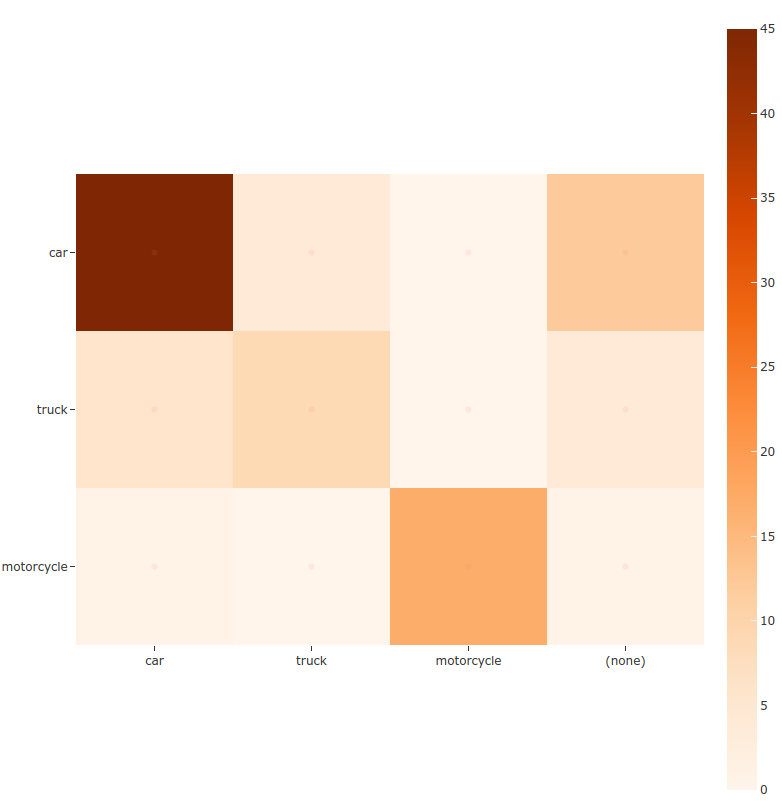
You can also easily generate confusion matrices for the results of Open Images-style evaluations.
In order for the confusion matrix to capture anything other than false
positive/negative counts, you will likely want to set the
classwise
parameter to False during evaluation so that predicted objects can be
matched with ground truth objects of different classes.
 1import fiftyone as fo
 2import fiftyone.zoo as foz
 3
 4dataset = foz.load_zoo_dataset("quickstart")
 5
 6# Perform evaluation, allowing objects to be matched between classes
 7results = dataset.evaluate_detections(
 8    "predictions",
 9    gt_field="ground_truth",
10    method="open-images",
11    classwise=False,
12)
13
14# Generate a confusion matrix for the specified classes
15plot = results.plot_confusion_matrix(classes=["car", "truck", "motorcycle"])
16plot.show()
ActivityNet-style evaluation (default temporal)#
By default,
evaluate_detections()
will use
ActivityNet-style temporal detection evaluation.
to analyze predictions when the specified label fields are TemporalDetections.
You can also explicitly request that ActivityNet-style evaluation be used by setting
the method parameter to "activitynet".
Note
FiftyOne’s implementation of ActivityNet-style evaluation matches the reference implementation available via the ActivityNet API.
Overview#
When running ActivityNet-style evaluation using
evaluate_detections():
Predicted and ground truth segments are matched using a specified IoU threshold (default = 0.50). This threshold can be customized via the
iouparameterBy default, only segments with the same
labelwill be matched. Classwise matching can be disabled by passingclasswise=FalsemAP is computed by averaging over the same range of IoU values used by COCO
When you specify an eval_key parameter, a number of helpful fields will be
populated on each sample and its predicted/ground truth segments:
True positive (TP), false positive (FP), and false negative (FN) counts for each sample are saved in top-level fields of each sample:
TP: sample.<eval_key>_tp
FP: sample.<eval_key>_fp
FN: sample.<eval_key>_fn
The fields listed below are populated on each individual temporal detection segment; these fields tabulate the TP/FP/FN status of the segment, the ID of the matching segment (if any), and the matching IoU:
TP/FP/FN: segment.<eval_key>
      ID: segment.<eval_key>_id
     IoU: segment.<eval_key>_iou
Note
See ActivityNetEvaluationConfig for complete descriptions of the optional
keyword arguments that you can pass to
evaluate_detections()
when running ActivityNet-style evaluation.
Example evaluation#
The example below demonstrates ActivityNet-style temporal detection evaluation on the ActivityNet 200 dataset:
 1import fiftyone as fo
 2import fiftyone.zoo as foz
 3from fiftyone import ViewField as F
 4
 5import random
 6
 7# Load subset of ActivityNet 200
 8classes = ["Bathing dog", "Walking the dog"]
 9dataset = foz.load_zoo_dataset(
10    "activitynet-200",
11    split="validation",
12    classes=classes,
13    max_samples=10,
14)
15print(dataset)
16
17# Generate some fake predictions for this example
18random.seed(51)
19dataset.clone_sample_field("ground_truth", "predictions")
20for sample in dataset:
21    for det in sample.predictions.detections:
22        det.support[0] += random.randint(-10,10)
23        det.support[1] += random.randint(-10,10)
24        det.support[0] = max(det.support[0], 1)
25        det.support[1] = max(det.support[1], det.support[0] + 1)
26        det.confidence = random.random()
27        det.label = random.choice(classes)
28
29    sample.save()
30
31# Evaluate the segments in the `predictions` field with respect to the
32# segments in the `ground_truth` field
33results = dataset.evaluate_detections(
34    "predictions",
35    gt_field="ground_truth",
36    eval_key="eval",
37)
38
39# Print a classification report for the classes
40results.print_report(classes=classes)
41
42# Print some statistics about the total TP/FP/FN counts
43print("TP: %d" % dataset.sum("eval_tp"))
44print("FP: %d" % dataset.sum("eval_fp"))
45print("FN: %d" % dataset.sum("eval_fn"))
46
47# Create a view that has samples with the most false positives first, and
48# only includes false positive segments in the `predictions` field
49view = (
50    dataset
51    .sort_by("eval_fp", reverse=True)
52    .filter_labels("predictions", F("eval") == "fp")
53)
54
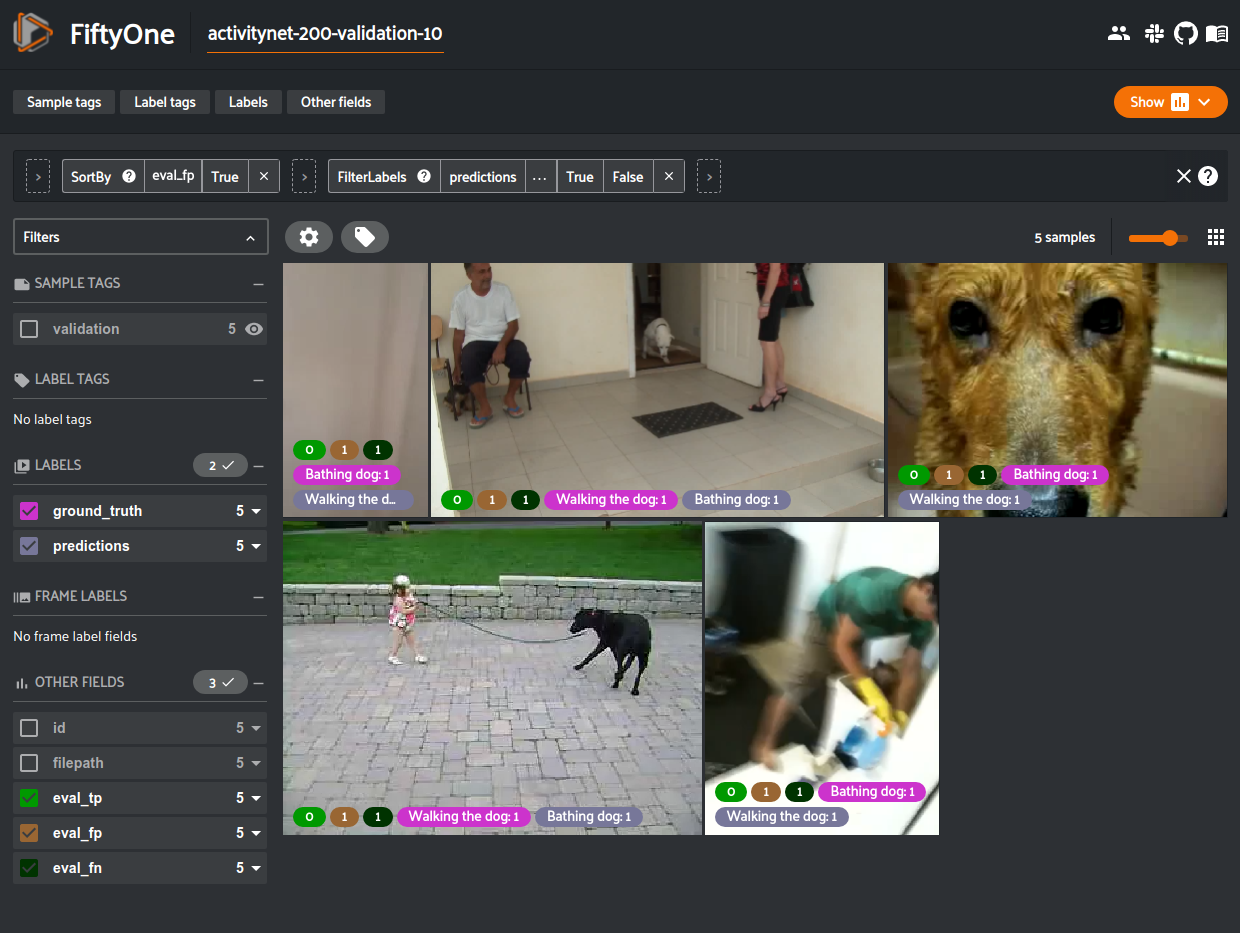
55# Visualize results in the App
56session = fo.launch_app(view=view)
                 precision    recall  f1-score   support

    Bathing dog       0.50      0.40      0.44         5
Walking the dog       0.50      0.60      0.55         5

      micro avg       0.50      0.50      0.50        10
      macro avg       0.50      0.50      0.49        10
   weighted avg       0.50      0.50      0.49        10
Note
The easiest way to analyze models in FiftyOne is via the Model Evaluation panel!
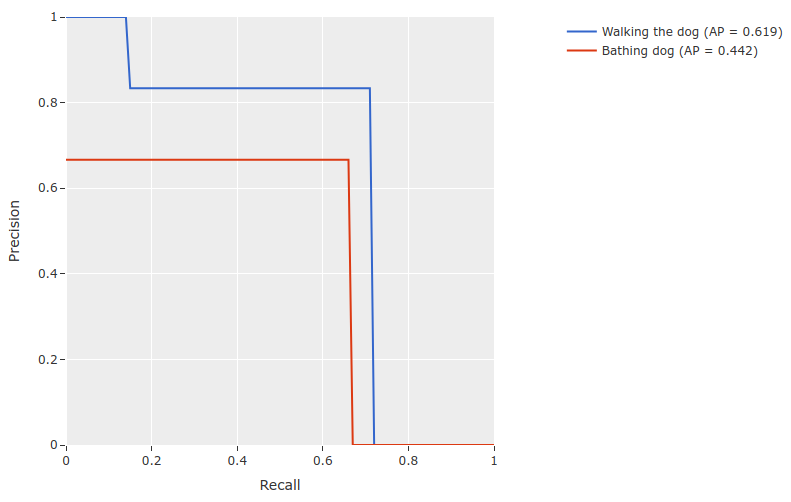
mAP and PR curves#
You can compute mean average precision (mAP) and precision-recall (PR) curves
for your segments by passing the compute_mAP=True flag to
evaluate_detections():
Note
All mAP calculations are performed according to the ActivityNet evaluation protocol.
 1import random
 2
 3import fiftyone as fo
 4import fiftyone.zoo as foz
 5
 6# Load subset of ActivityNet 200
 7classes = ["Bathing dog", "Walking the dog"]
 8dataset = foz.load_zoo_dataset(
 9    "activitynet-200",
10    split="validation",
11    classes=classes,
12    max_samples=10,
13)
14print(dataset)
15
16# Generate some fake predictions for this example
17random.seed(51)
18dataset.clone_sample_field("ground_truth", "predictions")
19for sample in dataset:
20    for det in sample.predictions.detections:
21        det.support[0] += random.randint(-10,10)
22        det.support[1] += random.randint(-10,10)
23        det.support[0] = max(det.support[0], 1)
24        det.support[1] = max(det.support[1], det.support[0] + 1)
25        det.confidence = random.random()
26        det.label = random.choice(classes)
27
28    sample.save()
29
30# Performs an IoU sweep so that mAP and PR curves can be computed
31results = dataset.evaluate_detections(
32    "predictions",
33    gt_field="ground_truth",
34    eval_key="eval",
35    compute_mAP=True,
36)
37
38print(results.mAP())
39# 0.367
40
41plot = results.plot_pr_curves(classes=classes)
42plot.show()
Confusion matrices#
You can also easily generate confusion matrices for the results of ActivityNet-style evaluations.
In order for the confusion matrix to capture anything other than false
positive/negative counts, you will likely want to set the
classwise
parameter to False during evaluation so that predicted segments can be
matched with ground truth segments of different classes.
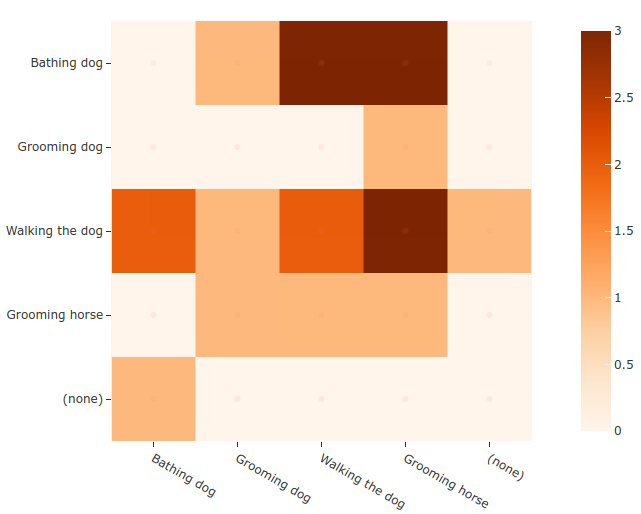
 1import random
 2
 3import fiftyone as fo
 4import fiftyone.zoo as foz
 5
 6# Load subset of ActivityNet 200
 7classes = ["Bathing dog", "Grooming dog", "Grooming horse", "Walking the dog"]
 8dataset = foz.load_zoo_dataset(
 9    "activitynet-200",
10    split="validation",
11    classes=classes,
12    max_samples=20,
13)
14print(dataset)
15
16# Generate some fake predictions for this example
17random.seed(51)
18dataset.clone_sample_field("ground_truth", "predictions")
19for sample in dataset:
20    for det in sample.predictions.detections:
21        det.support[0] += random.randint(-10,10)
22        det.support[1] += random.randint(-10,10)
23        det.support[0] = max(det.support[0], 1)
24        det.support[1] = max(det.support[1], det.support[0] + 1)
25        det.confidence = random.random()
26        det.label = random.choice(classes)
27
28    sample.save()
29
30# Perform evaluation, allowing objects to be matched between classes
31results = dataset.evaluate_detections(
32    "predictions", gt_field="ground_truth", classwise=False
33)
34
35# Generate a confusion matrix for the specified classes
36plot = results.plot_confusion_matrix(classes=classes)
37plot.show()