
Evaluating Classifications#
You can use the
evaluate_classifications()
method to evaluate the predictions of a classifier stored in a
Classification field of your dataset.
By default, the classifications will be treated as a generic multiclass
classification task, but you can specify other evaluation strategies such as
top-k accuracy or binary evaluation via the method parameter.
Invoking
evaluate_classifications()
returns a ClassificationResults instance that provides a variety of methods
for generating various aggregate evaluation reports about your model.
In addition, when you specify an eval_key parameter, a number of helpful
fields will be populated on each sample that you can leverage via the
FiftyOne App to interactively explore the strengths and
weaknesses of your model on individual samples.
Simple evaluation (default)#
By default,
evaluate_classifications()
will treat your classifications as generic multiclass predictions, and it will
evaluate each prediction by directly comparing its label to the associated
ground truth prediction.
You can explicitly request that simple evaluation be used by setting the
method parameter to "simple".
When you specify an eval_key parameter, a boolean eval_key field will
be populated on each sample that records whether that sample’s prediction is
correct.
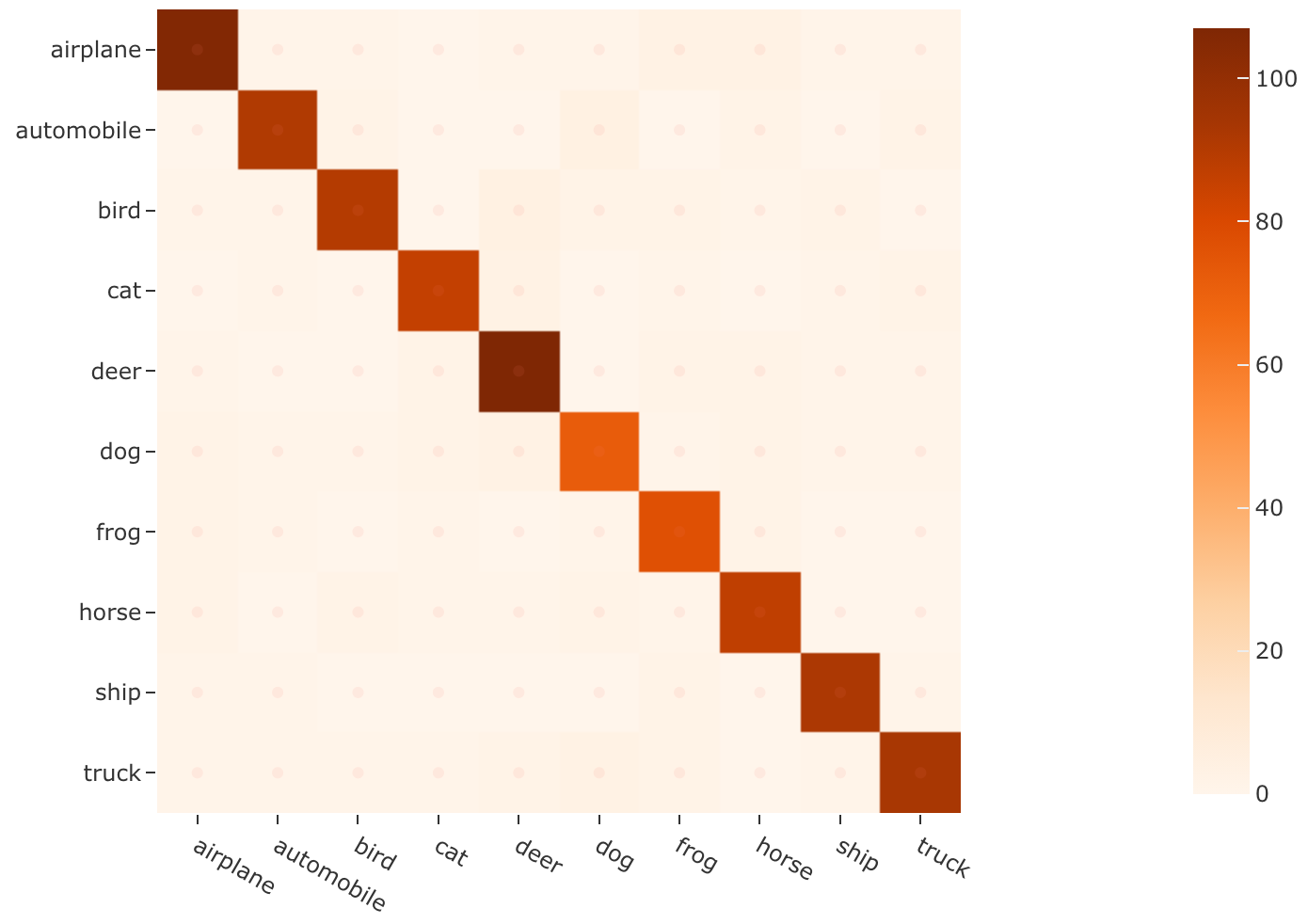
The example below demonstrates simple evaluation on the CIFAR-10 dataset with some fake predictions added to it to demonstrate the workflow:
 1import random
 2
 3import fiftyone as fo
 4import fiftyone.zoo as foz
 5from fiftyone import ViewField as F
 6
 7dataset = foz.load_zoo_dataset(
 8    "cifar10",
 9    split="test",
10    max_samples=1000,
11    shuffle=True,
12)
13
14#
15# Create some test predictions by copying the ground truth labels into a
16# new `predictions` field with 10% of the labels perturbed at random
17#
18
19classes = dataset.distinct("ground_truth.label")
20
21def jitter(val):
22    if random.random() < 0.10:
23        return random.choice(classes)
24
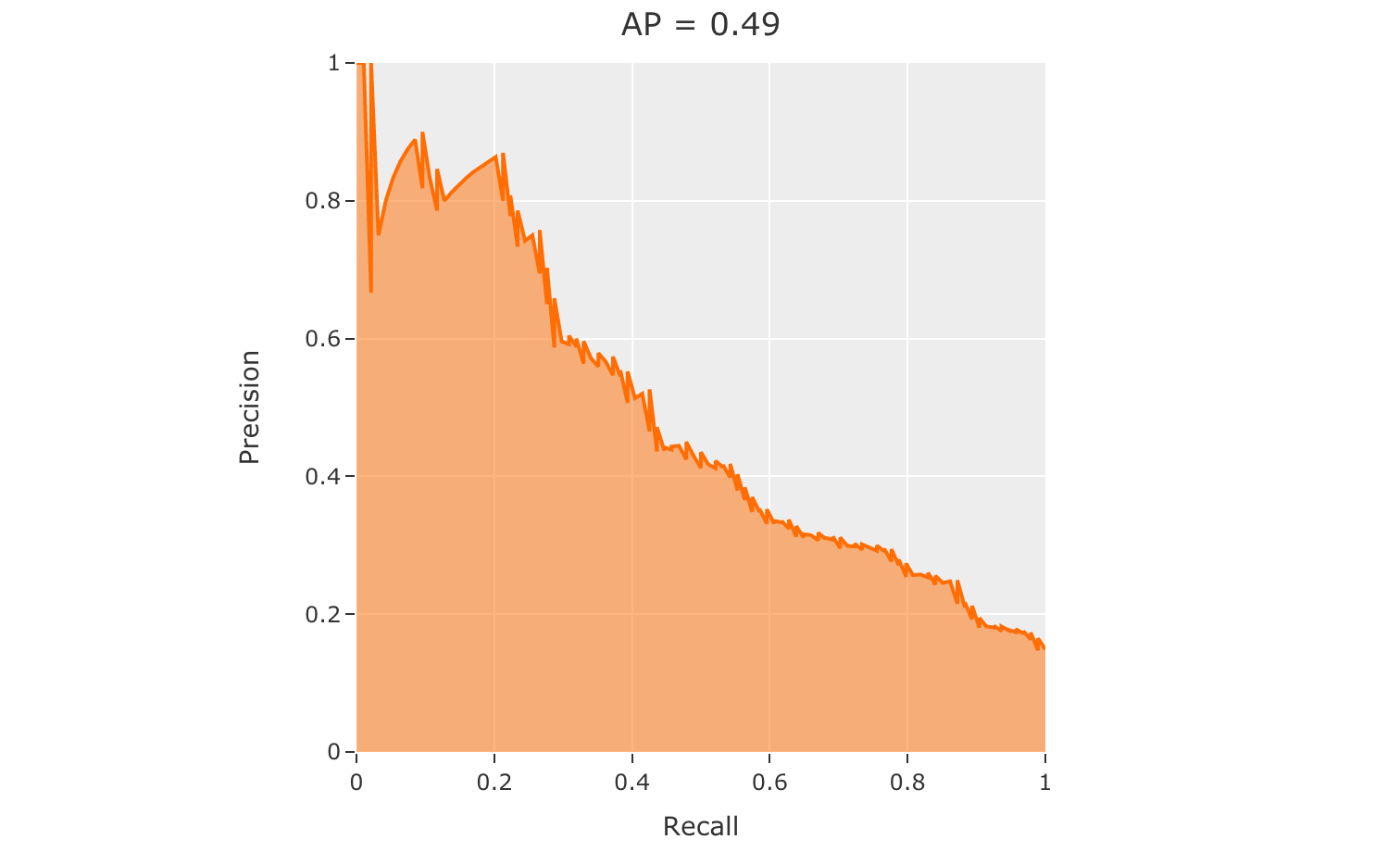
25    return val
26
27predictions = [
28    fo.Classification(label=jitter(gt.label), confidence=random.random())
29    for gt in dataset.values("ground_truth")
30]
31
32dataset.set_values("predictions", predictions)
33
34print(dataset)
35
36# Evaluate the predictions in the `predictions` field with respect to the
37# labels in the `ground_truth` field
38results = dataset.evaluate_classifications(
39    "predictions",
40    gt_field="ground_truth",
41    eval_key="eval_simple",
42)
43
44# Print a classification report
45results.print_report()
46
47# Plot a confusion matrix
48plot = results.plot_confusion_matrix()
49plot.show()
50
51# Launch the App to explore
52session = fo.launch_app(dataset)
53
54# View only the incorrect predictions in the App
55session.view = dataset.match(F("eval_simple") == False)
              precision    recall  f1-score   support

    airplane       0.91      0.90      0.91       118
  automobile       0.93      0.90      0.91       101
        bird       0.93      0.87      0.90       103
         cat       0.92      0.91      0.92        94
        deer       0.88      0.92      0.90       116
         dog       0.85      0.84      0.84        86
        frog       0.85      0.92      0.88        84
       horse       0.88      0.91      0.89        96
        ship       0.93      0.95      0.94        97
       truck       0.92      0.89      0.90       105

    accuracy                           0.90      1000
   macro avg       0.90      0.90      0.90      1000
weighted avg       0.90      0.90      0.90      1000
Note
The easiest way to analyze models in FiftyOne is via the Model Evaluation panel!
Top-k evaluation#
Set the method parameter of
evaluate_classifications()
to top-k in order to use top-k matching to evaluate your classifications.
Under this strategy, predictions are deemed to be correct if the corresponding
ground truth label is within the top k predictions.
When you specify an eval_key parameter, a boolean eval_key field will
be populated on each sample that records whether that sample’s prediction is
correct.
Note
In order to use top-k evaluation, you must populate the logits field
of your predictions, and you must provide the list of corresponding class
labels via the classes parameter of
evaluate_classifications().
Did you know? Many models from the Model Zoo provide support for storing logits for their predictions!
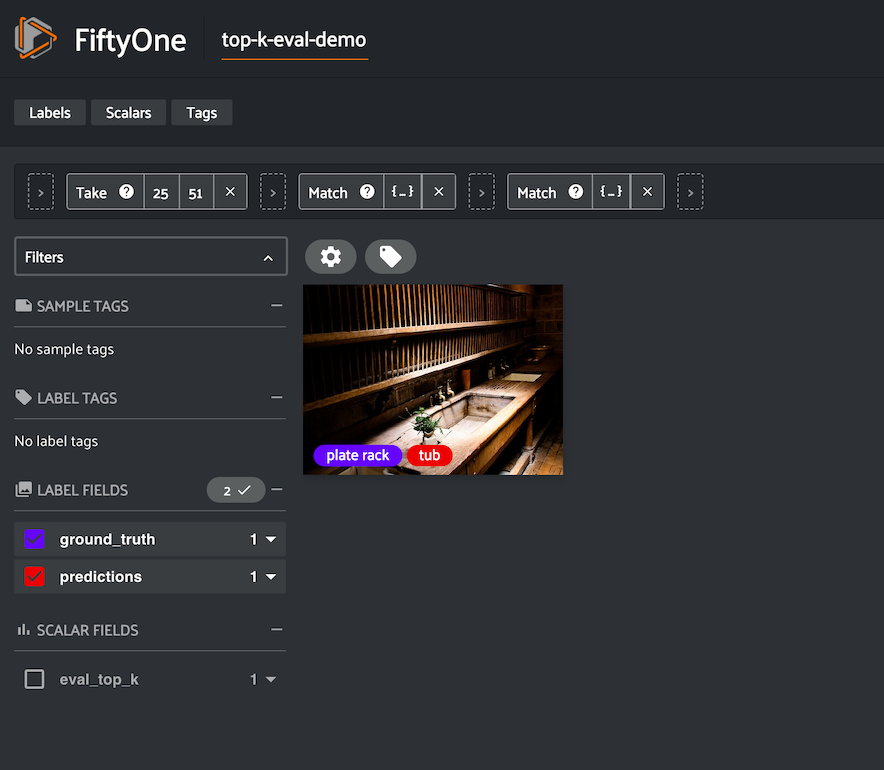
The example below demonstrates top-k evaluation on a small ImageNet sample with predictions from a pre-trained model from the Model Zoo:
 1import fiftyone as fo
 2import fiftyone.zoo as foz
 3from fiftyone import ViewField as F
 4
 5dataset = foz.load_zoo_dataset(
 6    "imagenet-sample", dataset_name="top-k-eval-demo"
 7)
 8
 9# We need the list of class labels corresponding to the logits
10logits_classes = dataset.default_classes
11
12# Add predictions (with logits) to 25 random samples
13predictions_view = dataset.take(25, seed=51)
14model = foz.load_zoo_model("resnet50-imagenet-torch")
15predictions_view.apply_model(model, "predictions", store_logits=True)
16
17print(predictions_view)
18
19# Evaluate the predictions in the `predictions` field with respect to the
20# labels in the `ground_truth` field using top-5 accuracy
21results = predictions_view.evaluate_classifications(
22    "predictions",
23    gt_field="ground_truth",
24    eval_key="eval_top_k",
25    method="top-k",
26    classes=logits_classes,
27    k=5,
28)
29
30# Get the 10 most common classes in the view
31counts = predictions_view.count_values("ground_truth.label")
32classes = sorted(counts, key=counts.get, reverse=True)[:10]
33
34# Print a classification report for the top-10 classes
35results.print_report(classes=classes)
36
37# Launch the App to explore
38session = fo.launch_app(dataset)
39
40# View only the incorrect predictions for the 10 most common classes
41session.view = (
42    predictions_view
43    .match(F("ground_truth.label").is_in(classes))
44    .match(F("eval_top_k") == False)
45)
Note
The easiest way to analyze models in FiftyOne is via the Model Evaluation panel!
Binary evaluation#
If your classifier is binary, set the method parameter of
evaluate_classifications()
to "binary" in order to access binary-specific evaluation information such
as precision-recall curves for your model.
When you specify an eval_key parameter, a string eval_key field will
be populated on each sample that records whether the sample is a true positive,
false positive, true negative, or false negative.
Note
In order to use binary evaluation, you must provide the
(neg_label, pos_label) for your model via the classes parameter of
evaluate_classifications().
The example below demonstrates binary evaluation on the CIFAR-10 dataset with some fake binary predictions added to it to demonstrate the workflow:
 1import random
 2
 3import fiftyone as fo
 4import fiftyone.zoo as foz
 5
 6# Load a small sample from the ImageNet dataset
 7dataset = foz.load_zoo_dataset(
 8    "cifar10",
 9    split="test",
10    max_samples=1000,
11    shuffle=True,
12)
13
14#
15# Binarize the ground truth labels to `cat` and `other`, and add
16# predictions that are correct proportionally to their confidence
17#
18
19classes = ["other", "cat"]
20
21for sample in dataset:
22    gt_label = "cat" if sample.ground_truth.label == "cat" else "other"
23
24    confidence = random.random()
25    if random.random() > confidence:
26        pred_label = "cat" if gt_label == "other" else "other"
27    else:
28        pred_label = gt_label
29
30    sample.ground_truth.label = gt_label
31    sample["predictions"] = fo.Classification(
32        label=pred_label, confidence=confidence
33    )
34
35    sample.save()
36
37print(dataset)
38
39# Evaluate the predictions in the `predictions` field with respect to the
40# labels in the `ground_truth` field
41results = dataset.evaluate_classifications(
42    "predictions",
43    gt_field="ground_truth",
44    eval_key="eval_binary",
45    method="binary",
46    classes=classes,
47)
48
49# Print a classification report
50results.print_report()
51
52# Plot a PR curve
53plot = results.plot_pr_curve()
54plot.show()
              precision    recall  f1-score   support

       other       0.90      0.48      0.63       906
         cat       0.09      0.50      0.15        94

    accuracy                           0.48      1000
   macro avg       0.50      0.49      0.39      1000
weighted avg       0.83      0.48      0.59      1000
Note
The easiest way to analyze models in FiftyOne is via the Model Evaluation panel!