
Note
This is a community plugin, an external project maintained by its respective author. Community plugins are not part of FiftyOne core and may change independently. Please review each plugin’s documentation and license before use.

GLM-OCR FiftyOne Implementation#

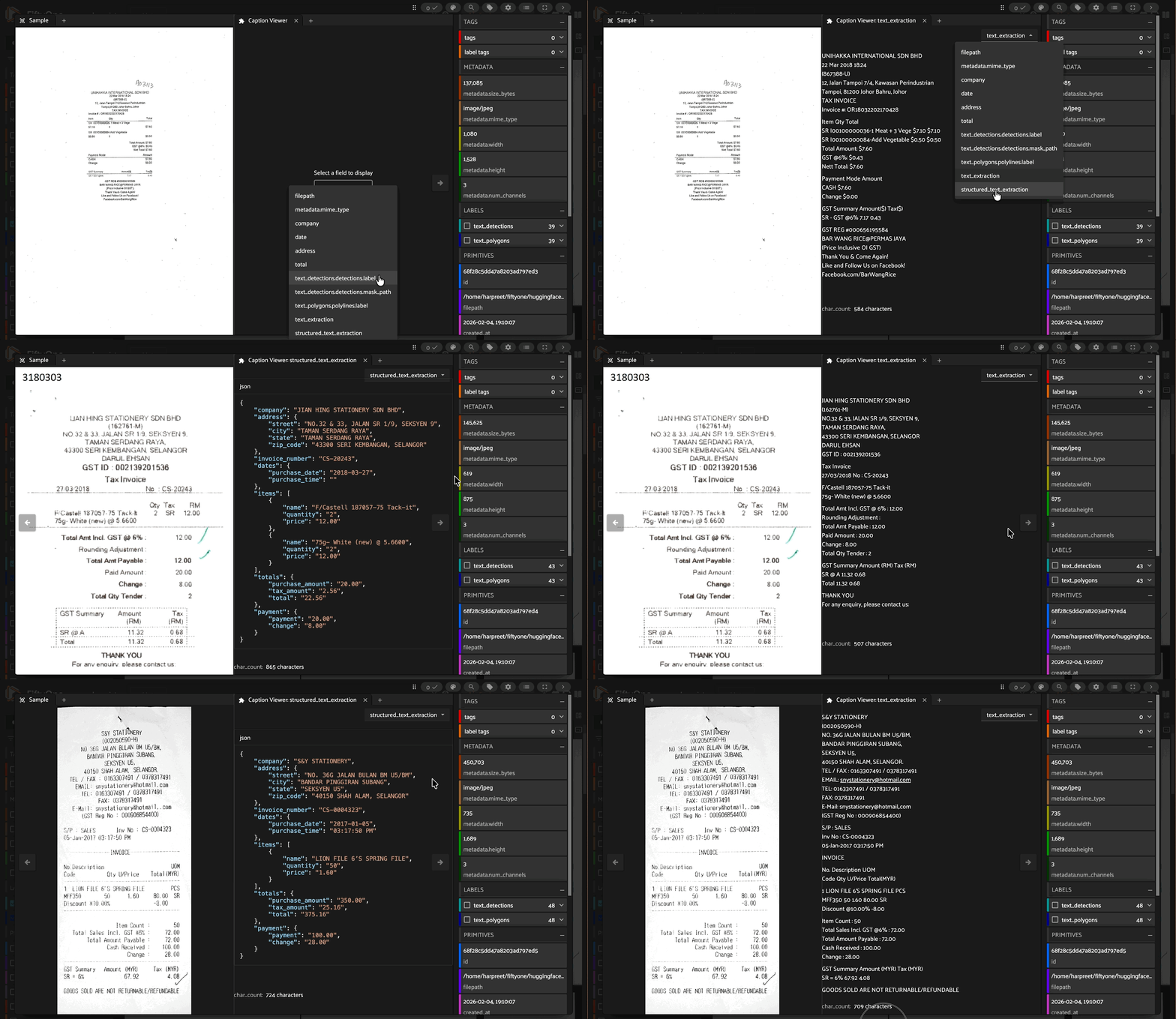
A FiftyOne integration for GLM-OCR, a state-of-the-art multimodal OCR model for complex document understanding. This implementation provides efficient batched inference with support for text recognition, formula extraction, table parsing, and custom structured data extraction.
Overview#
GLM-OCR is a lightweight (0.9B parameters) yet powerful vision-language model that achieves 94.62 on OmniDocBench V1.5, ranking #1 overall. Despite its small size, it delivers state-of-the-art performance across major document understanding benchmarks including formula recognition, table recognition, and information extraction.
Key Features#
State-of-the-Art Performance: Top-ranked on OmniDocBench V1.5 and other document understanding benchmarks
Lightweight & Fast: Only 0.9B parameters enabling efficient local deployment
Versatile: Supports text, formulas (LaTeX), tables (HTML/Markdown), and custom structured extraction (JSON)
Production-Ready: Optimized for real-world scenarios including complex tables, code blocks, seals, and multi-language documents
Efficient Batching: Native FiftyOne integration with batched inference support
Installation#
Requirements#
Since GLM-OCR is a new model, you need to install transformers from source:
pip install git+https://github.com/huggingface/transformers.git
You’ll also need the latest version of timm:
pip install -U timm
Install FiftyOne:
pip install fiftyone
Optional: Caption Viewer Plugin#
For the best text viewing experience in the FiftyOne App, install the Caption Viewer plugin:
fiftyone plugins download https://github.com/harpreetsahota204/caption_viewer
This plugin provides intelligent formatting for OCR outputs with proper line breaks, table rendering, and JSON pretty-printing.
Quick Start#
Load a Dataset#
We’ll use the scanned_receipts dataset from Hugging Face Hub:
import fiftyone as fo
from fiftyone.utils.huggingface import load_from_hub

dataset = load_from_hub(
    "Voxel51/scanned_receipts",
    overwrite=True,
    persistent=True,
    name="scanned_receipts",
    max_samples=50
)
Register and Load GLM-OCR#
import fiftyone.zoo as foz

# Register the model source
foz.register_zoo_model_source(
    "https://github.com/harpreetsahota204/glm_ocr",
    overwrite=True
)

# Load the model
model = foz.load_zoo_model("zai-org/GLM-OCR")
Extract Text from Documents#
# Configure for text recognition
model.operation = "text"

# Apply to dataset with batching
dataset.apply_model(
    model,
    label_field="text_extraction",
    batch_size=8,
    num_workers=2,
    skip_failures=False
)
Supported Operations#
GLM-OCR supports four operation modes:
1. Text Recognition#
Extract plain text from documents:
model.operation = "text"
dataset.apply_model(model, label_field="ocr_text", batch_size=8)
Output: Plain text with preserved formatting and layout
2. Formula Recognition#
Extract mathematical formulas in LaTeX format:
model.operation = "formula"
dataset.apply_model(model, label_field="formulas", batch_size=8)
Output: LaTeX-formatted mathematical expressions
3. Table Recognition#
Parse table structures into HTML or Markdown:
model.operation = "table"
dataset.apply_model(model, label_field="tables", batch_size=8)
Output: HTML or Markdown-formatted tables with proper structure
4. Custom Structured Extraction#
Extract structured information using JSON schema prompts:
model.operation = "custom"
model.custom_prompt = """JSON:
{
    "company": "",
    "address": {
        "street": "",
        "city": "",
        "state": "",
        "zip_code": ""
    },
    "invoice_number": "",
    "dates": {
        "purchase_date": "",
        "purchase_time": ""
    },
    "items": [
        {"name": "", "quantity": "", "price": ""}
    ],
    "totals": {
        "purchase_amount": "",
        "tax_amount": "",
        "total": ""
    },
    "payment": {
        "payment": "",
        "change": ""
    }
}
"""

dataset.apply_model(
    model,
    label_field="structured_extraction",
    batch_size=8,
    num_workers=2
)
Output: JSON-formatted structured data matching the schema
Example Output#
Text Recognition#
Sarang Hae Yo
TRENDYMAX (M) SDN. BHD.
Company Reg. No.: (583246-A).
P6, Block C, GM Klang Wholesale City,
Jalan Kasuarina 1,
41200 Klang, Selangor D.E.
...
Structured Extraction (JSON)#
{
    "company": "Sarang Hae Yo",
    "address": {
        "street": "P6, Block C, GM Klang Wholesale City, Jalan Kasuarina 1,",
        "city": "Klang",
        "state": "Selangor D.E.",
        "zip_code": "41200"
    },
    "invoice_number": "GM3-46792",
    "dates": {
        "purchase_date": "2018-01-15",
        "purchase_time": "13:48:36"
    },
    "items": [
        {
            "name": "MS LOYALTY PACKAGE",
            "quantity": "1",
            "price": "15.00"
        },
        {
            "name": "IB-RDM IRON BASKET ROUND 27 * 25",
            "quantity": "10",
            "price": "28.90"
        }
    ],
    "totals": {
        "purchase_amount": "329.10",
        "tax_amount": "18.63",
        "total": "329.10"
    }
}
Visualizing Results in FiftyOne#
Launch the FiftyOne App to explore your results:
session = fo.launch_app(dataset)
Using Caption Viewer Plugin#
For the best viewing experience of extracted text:
Click on any sample to open the modal view
Click the
+button to add a panelSelect “Caption Viewer” from the panel list
In the panel menu (), select the field you want to view:
text_extractionfor plain OCR textstructured_extractionfor JSON outputsAny other text field
Navigate through samples to see beautifully formatted text
The Caption Viewer automatically:
Renders line breaks properly
Converts HTML tables to markdown
Pretty-prints JSON content
Shows character counts
Performance#
GLM-OCR delivers exceptional performance despite its small size:
Throughput: 1.86 pages/second for PDFs, 0.67 images/second
Accuracy: 94.62 on OmniDocBench V1.5 (#1 ranking)
Efficiency: Runs on CPU, GPU, or Apple Silicon (MPS)
Batch Size Recommendations#
CPU:
batch_size=2-4GPU (8GB):
batch_size=8-16GPU (16GB+):
batch_size=16-32
Advanced Usage#
Inspect Individual Results#
# Get a sample
sample = dataset.first()

# View extracted text
print(sample.text_extraction)

# View structured data
print(sample.structured_extraction)
Runtime Configuration#
Change operation mode without reloading the model:
# Start with text recognition
model.operation = "text"
dataset.apply_model(model, label_field="text")

# Switch to table recognition
model.operation = "table"
dataset.apply_model(model, label_field="tables")

# Use custom prompt
model.operation = "custom"
model.custom_prompt = "Extract invoice data as JSON..."
dataset.apply_model(model, label_field="invoice_data")
Adjust Generation Parameters#
# Increase max tokens for longer outputs
model.max_new_tokens = 16384

# Adjust batch size for memory constraints
model.batch_size = 4
Model Architecture#
GLM-OCR is built on the GLM-V encoder-decoder architecture with:
Visual Encoder: CogViT pre-trained on large-scale image-text data
Cross-Modal Connector: Lightweight token downsampling for efficiency
Language Decoder: GLM-0.5B with multi-token prediction (MTP) loss
Training: Stable full-task reinforcement learning for improved accuracy
The model uses a two-stage pipeline:
Layout Analysis: PP-DocLayout-V3 for document structure understanding
Parallel Recognition: Efficient batched text extraction
Real-World Applications#
GLM-OCR excels at:
Complex Tables: Merged cells, nested structures, mixed content
Technical Documents: Code blocks, formulas, diagrams
Multilingual Content: Mixed language documents
Forms & Receipts: Structured data extraction
Academic Papers: LaTeX formulas, tables, references
Legal Documents: Seals, signatures, structured extraction
License#
This implementation is released under the MIT License.
GLM-OCR model is licensed under MIT License. The integrated PP-DocLayoutV3 component is licensed under Apache License 2.0. Users should comply with both licenses.
Resources#
Citation#
If you use GLM-OCR in your research, please cite:
@misc{glm-ocr-2026,
  title={GLM-OCR: State-of-the-Art Multimodal OCR for Document Understanding},
  author={Z.ai},
  year={2026},
  url={https://huggingface.co/zai-org/GLM-OCR}
}
Acknowledgements#
This project builds upon excellent work from:
GLM-OCR by Z.ai
PP-DocLayout-V3 by PaddlePaddle
FiftyOne by Voxel51
Questions or Issues? Open an issue on GitHub