
Advanced Evaluation Usage#
Evaluating views into your dataset#
All evaluation methods are exposed on DatasetView objects, which means that
you can define arbitrarily complex views into your datasets and run evaluation
on those.
For example, the snippet below evaluates only the medium-sized objects in a dataset:
 1import fiftyone as fo
 2import fiftyone.zoo as foz
 3from fiftyone import ViewField as F
 4
 5dataset = foz.load_zoo_dataset("quickstart", dataset_name="eval-demo")
 6dataset.compute_metadata()
 7
 8# Create an expression that will match objects whose bounding boxes have
 9# areas between 32^2 and 96^2 pixels
10bbox_area = (
11    F("$metadata.width") * F("bounding_box")[2] *
12    F("$metadata.height") * F("bounding_box")[3]
13)
14medium_boxes = (32 ** 2 < bbox_area) & (bbox_area < 96 ** 2)
15
16# Create a view that contains only medium-sized objects
17medium_view = (
18    dataset
19    .filter_labels("ground_truth", medium_boxes)
20    .filter_labels("predictions", medium_boxes)
21)
22
23print(medium_view)
24
25# Evaluate the medium-sized objects
26results = medium_view.evaluate_detections(
27    "predictions",
28    gt_field="ground_truth",
29    eval_key="eval_medium",
30)
31
32# Print some aggregate metrics
33print(results.metrics())
34
35# View results in the App
36session = fo.launch_app(view=medium_view)
Note
If you run evaluation on a complex view, don’t worry, you can always load the view later!
Loading a previous evaluation result#
You can view a list of evaluation keys for evaluations that you have previously
run on a dataset via
list_evaluations().
Evaluation keys are stored at the dataset-level, but if a particular evaluation
was run on a view into your dataset, you can use
load_evaluation_view()
to retrieve the exact view on which you evaluated:
 1import fiftyone as fo
 2
 3dataset = fo.load_dataset(...)
 4
 5# List available evaluations
 6dataset.list_evaluations()
 7# ["my_eval1", "my_eval2", ...]
 8
 9# Load the view into the dataset on which `my_eval1` was run
10eval1_view = dataset.load_evaluation_view("my_eval1")
Note
If you have run multiple evaluations on a dataset, you can use the
select_fields parameter of the
load_evaluation_view()
method to hide any fields that were populated by other evaluation runs,
allowing you to, for example, focus on a specific set of evaluation results
in the App:
import fiftyone as fo

dataset = fo.load_dataset(...)

# Load a view that contains the results of evaluation `my_eval1` and
# hides all other evaluation data
eval1_view = dataset.load_evaluation_view("my_eval1", select_fields=True)

session = fo.launch_app(view=eval1_view)
Evaluating videos#
All evaluation methods can be applied to frame-level labels in addition to sample-level labels.
You can evaluate frame-level labels of a video dataset by adding the frames
prefix to the relevant prediction and ground truth frame fields.
Note
When evaluating frame-level labels, helpful statistics are tabulated at both the sample- and frame-levels of your dataset. Refer to the documentation of the relevant evaluation method for more details.
The example below demonstrates evaluating (mocked) frame-level detections on the quickstart-video dataset from the Dataset Zoo:
 1import random
 2
 3import fiftyone as fo
 4import fiftyone.zoo as foz
 5
 6dataset = foz.load_zoo_dataset(
 7    "quickstart-video", dataset_name="video-eval-demo"
 8)
 9
10#
11# Create some test predictions by copying the ground truth objects into a
12# new `predictions` field of the frames with 10% of the labels perturbed at
13# random
14#
15
16classes = dataset.distinct("frames.detections.detections.label")
17
18def jitter(val):
19    if random.random() < 0.10:
20        return random.choice(classes)
21
22    return val
23
24predictions = []
25for sample_gts in dataset.values("frames.detections"):
26    sample_predictions = []
27    for frame_gts in sample_gts:
28        sample_predictions.append(
29            fo.Detections(
30                detections=[
31                    fo.Detection(
32                        label=jitter(gt.label),
33                        bounding_box=gt.bounding_box,
34                        confidence=random.random(),
35                    )
36                    for gt in frame_gts.detections
37                ]
38            )
39        )
40
41    predictions.append(sample_predictions)
42
43dataset.set_values("frames.predictions", predictions)
44
45print(dataset)
46
47# Evaluate the frame-level `predictions` against the frame-level
48# `detections` objects
49results = dataset.evaluate_detections(
50    "frames.predictions",
51    gt_field="frames.detections",
52    eval_key="eval",
53)
54
55# Print a classification report
56results.print_report()
              precision    recall  f1-score   support

      person       0.76      0.93      0.84      1108
   road sign       0.90      0.94      0.92      2726
     vehicle       0.98      0.94      0.96      7511

   micro avg       0.94      0.94      0.94     11345
   macro avg       0.88      0.94      0.91     11345
weighted avg       0.94      0.94      0.94     11345
You can also view frame-level evaluation results as evaluation patches by first converting to frames and then to patches!
1# Convert to frame evaluation patches
2frames = dataset.to_frames(sample_frames=True)
3frame_eval_patches = frames.to_evaluation_patches("eval")
4print(frame_eval_patches)
5
6print(frame_eval_patches.count_values("type"))
7# {'tp': 10578, 'fn': 767, 'fp': 767}
8
9session = fo.launch_app(view=frame_eval_patches)
Dataset:     video-eval-demo
Media type:  image
Num patches: 12112
Patch fields:
    id:               fiftyone.core.fields.ObjectIdField
    sample_id:        fiftyone.core.fields.ObjectIdField
    frame_id:         fiftyone.core.fields.ObjectIdField
    filepath:         fiftyone.core.fields.StringField
    frame_number:     fiftyone.core.fields.FrameNumberField
    tags:             fiftyone.core.fields.ListField(fiftyone.core.fields.StringField)
    metadata:         fiftyone.core.fields.EmbeddedDocumentField(fiftyone.core.metadata.ImageMetadata)
    created_at:       fiftyone.core.fields.DateTimeField
    last_modified_at: fiftyone.core.fields.DateTimeField
    predictions:      fiftyone.core.fields.EmbeddedDocumentField(fiftyone.core.labels.Detections)
    detections:       fiftyone.core.fields.EmbeddedDocumentField(fiftyone.core.labels.Detections)
    type:             fiftyone.core.fields.StringField
    iou:              fiftyone.core.fields.FloatField
    crowd:            fiftyone.core.fields.BooleanField
View stages:
    1. ToFrames(config=None)
    2. ToEvaluationPatches(eval_key='eval', config=None)
Custom evaluation metrics#
You can add custom metrics to your evaluation runs in FiftyOne.
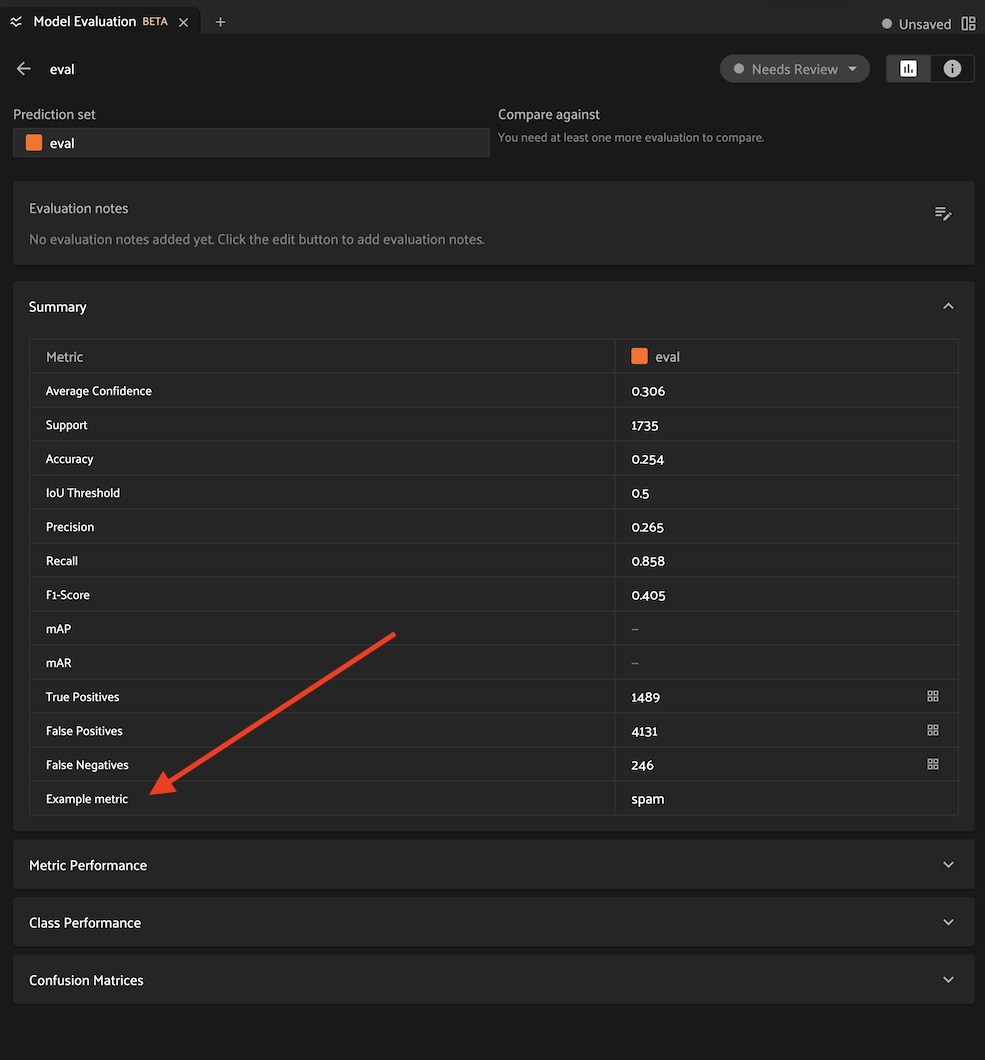
Custom metrics are supported by all FiftyOne evaluation methods, and you can compute them via the SDK, or directly from the App if you’re running Voxel51.
Using custom metrics#
The example below shows how to compute a custom metric from the metric-examples plugin when evaluating object detections:
# Install the example metrics plugin
fiftyone plugins download \
    https://github.com/voxel51/fiftyone-plugins \
    --plugin-names @voxel51/metric-examples
 1import fiftyone as fo
 2import fiftyone.zoo as foz
 3
 4dataset = foz.load_zoo_dataset("quickstart")
 5
 6# Custom metrics are specified via their operator URI
 7metric_uri = "@voxel51/metric-examples/example_metric"
 8
 9# Custom metrics can optionally accept kwargs that configure their behavior
10metric_kwargs = dict(value="spam")
11
12results = dataset.evaluate_detections(
13    "predictions",
14    gt_field="ground_truth",
15    eval_key="eval",
16    custom_metrics={metric_uri: metric_kwargs},
17)
18
19# Custom metrics may populate new fields on each sample
20dataset.count_values("eval_example_metric")
21# {'spam': 200}
22
23# Custom metrics may also compute an aggregate value, which is included in
24# the run's metrics report
25results.print_metrics()
26"""
27accuracy   0.25
28precision  0.26
29recall     0.86
30fscore     0.40
31support    1735
32example    spam  # the custom metric
33"""
34
35#
36# Launch the app
37#
38# Open the Model Evaluation panel and you'll see the "Example metric" in
39# the Summary table
40#
41session = fo.launch_app(dataset)
42
43# Deleting an evaluation automatically deletes any custom metrics
44# associated with it
45dataset.delete_evaluation("eval")
46assert not dataset.has_field("eval_example_metric")
When using metric operators without custom parameters, you can also pass a list
of operator URI’s to the custom_metrics parameter:
 1# Apply two custom metrics to a regression evaluation
 2results = dataset.evaluate_regressions(
 3    "predictions",
 4    gt_field="ground_truth",
 5    eval_key="eval",
 6    custom_metrics=[
 7        "@voxel51/metric-examples/absolute_error",
 8        "@voxel51/metric-examples/squared_error",
 9    ],
10)
You can also add custom metrics to an existing evaluation at any time via
add_custom_metrics():
 1# Load an existing evaluation run
 2results = dataset.load_evaluation_results("eval")
 3
 4# Add some custom metrics
 5results.add_custom_metrics(
 6    [
 7        "@voxel51/metric-examples/absolute_error",
 8        "@voxel51/metric-examples/squared_error",
 9    ]
10)
Developing custom metrics#
Each custom metric is implemented as an operator
that implements the
EvaluationMetric
interface.
Let’s look at an example evaluation metric operator:
 1import fiftyone.operators as foo
 2from fiftyone.operators import types
 3
 4class ExampleMetric(foo.EvaluationMetric):
 5    @property
 6    def config(self):
 7        return foo.EvaluationMetricConfig(
 8            # The metric's URI: f"{plugin_name}/{name}"
 9            name="example_metric",  # required
10
11            # The display name of the metric in the Summary table of the
12            # Model Evaluation panel
13            label="Example metric",  # required
14
15            # A description for the operator
16            description="An example evaluation metric",  # optional
17
18            # List of evaluation types that the metrics supports
19            # EG: ["regression", "classification", "detection", ...]
20            # If omitted, the metric may be applied to any evaluation
21            eval_types=None,  # optional
22
23            # An optional custom key under which the metric's aggregate
24            # value is stored and returned in methods like `metrics()`
25            # If omitted, the metric's `name` is used
26            aggregate_key="example",  # optional
27
28            # Metrics are generally not designed to be directly invoked
29            # via the Operator browser, so they should be unlisted
30            unlisted=True,  # required
31        )
32
33    def resolve_input(self, ctx, inputs):
34        """You can optionally implement this method to collect user input
35        for the metric's parameters in the App.
36
37        Returns:
38            a :class:`fiftyone.operators.types.Property`, or None
39        """
40        inputs = types.Object()
41        inputs.str(
42            "value",
43            label="Example value",
44            description="The example value to store/return",
45            default="foo",
46            required=True,
47        )
48        return types.Property(inputs)
49
50    def compute(self, samples, results, value="foo"):
51        """All metric operators must implement this method. It defines the
52        computation done by the metric and which per-frame and/or
53        per-sample fields store the computed value.
54
55        This method can return None or the aggregate metric value. The
56        aggregrate metric value is included in the result's `metrics()`
57        and displayed in the Summary table of the Model Evaluation panel.
58        """
59        dataset = samples._dataset
60        eval_key = results.key
61        metric_field = f"{eval_key}_{self.config.name}"
62        dataset.add_sample_field(metric_field, fo.StringField)
63        samples.set_field(metric_field, value).save()
64
65        return value
66
67    def get_fields(self, samples, config, eval_key):
68        """Lists the fields that were populated by the evaluation metric
69        with the given key, if any.
70        """
71        return [f"{eval_key}_{self.config.name}"]
Note
By convention, evaluation metrics should include f"{eval_key}" in any
sample fields that they populate. If your metric populates fields whose
names do not contain the evaluation key, then you must also implement
rename()
and
cleanup()
so that they are properly handled when renaming/deleting evaluation runs.
Custom evaluation backends#
If you would like to use an evaluation protocol that is not natively supported by FiftyOne, you can follow the instructions below to implement an interface for your protocol and then configure your environment so that FiftyOne’s evaluation methods will use it.
You can define custom regression evaluation backends that can be used by
passing the method parameter to
evaluate_regressions():
1view.evaluate_regressions(..., method="<backend>", ...)
Regression evaluation backends are defined by writing subclasses of the following two classes:
RegressionEvaluation: this class implements the evaluation protocol itself. Specifically you should implementevaluate_samples(), which accepts a sample collection to evaluate as input and returns aRegressionResultsinstance that contains the results of the evaluationRegressionEvaluationConfig: this class defines the available parameters that users can pass as keyword arguments toevaluate_regressions()to customize the behavior of the evaluation run
If desired, you can also implement and return a custom
RegressionResults
subclass. This is useful if you want to expose custom methods that users
can call to view and/or interact with the evaluation results
programmatically.
The recommended way to expose a custom regression evaluation method is to
add it to your evaluation config at
~/.fiftyone/evaluation_config.json as follows:
{
    "default_regression_backend": "<backend>",
    "regression_backends": {
        "<backend>": {
            "config_cls": "your.custom.RegressionEvaluationConfig"
        }
    },
    ...
}
In the above, <backend> defines the name of your custom backend, which
you can henceforward pass as the method parameter to
evaluate_regressions(),
and the config_cls parameter specifies the fully-qualified name of the
RegressionEvaluationConfig
subclass for your evaluation backend.
With the optional default_regression_backend parameter set to your custom
backend as shown above, calling
evaluate_regressions()
will automatically use your backend.
You can define custom classification evaluation backends that can be used
by passing the method parameter to
evaluate_classifications():
1view.evaluate_classifications(..., method="<backend>", ...)
Classification evaluation backends are defined by writing subclasses of the following two classes:
ClassificationEvaluation: this class implements the evaluation protocol itself. Specifically you should implementevaluate_samples(), which accepts a sample collection to evaluate as input and returns aClassificationResultsinstance that contains the results of the evaluationClassificationEvaluationConfig: this class defines the available parameters that users can pass as keyword arguments toevaluate_classifications()to customize the behavior of the evaluation run
If desired, you can also implement and return a custom
ClassificationResults
subclass. This is useful if you want to expose custom methods that users
can call to view and/or interact with the evaluation results
programmatically.
The recommended way to expose a custom classification evaluation method is
to add it to your evaluation config at
~/.fiftyone/evaluation_config.json as follows:
{
    "default_classification_backend": "<backend>",
    "classification_backends": {
        "<backend>": {
            "config_cls": "your.custom.ClassificationEvaluationConfig"
        }
    },
    ...
}
In the above, <backend> defines the name of your custom backend, which
you can henceforward pass as the method parameter to
evaluate_classifications(),
and the config_cls parameter specifies the fully-qualified name of the
ClassificationEvaluationConfig
subclass for your evaluation backend.
With the optional default_classification_backend parameter set to your
custom backend as shown above, calling
evaluate_classifications()
will automatically use your backend.
You can define custom detection evaluation backends that can be used by
passing the method parameter to
evaluate_detections():
1view.evaluate_detections(..., method="<backend>", ...)
Detection evaluation backends are defined by writing subclasses of the following two classes:
DetectionEvaluation: this class implements the evaluation protocol itself. Specifically you should implementevaluate(), which accepts a sample to evaluate as input and returns a list of matched ground truth/predicted object pairs, and you can optionally implementgenerate_results(), to compute aggregate evaluation results (e.g., mAP or PR curves) for the sample collection and return them in aDetectionResultsinstanceDetectionEvaluationConfig: this class defines the available parameters that users can pass as keyword arguments toevaluate_detections()to customize the behavior of the evaluation run
If desired, you can also implement and return a custom
DetectionResults
subclass. This is useful if you want to expose custom methods that users
can call to view and/or interact with the evaluation results
programmatically.
The recommended way to expose a custom detection evaluation method is to
add it to your evaluation config at
~/.fiftyone/evaluation_config.json as follows:
{
    "default_detection_backend": "<backend>",
    "detection_backends": {
        "<backend>": {
            "config_cls": "your.custom.DetectionEvaluationConfig"
        }
    },
    ...
}
In the above, <backend> defines the name of your custom backend, which
you can henceforward pass as the method parameter to
evaluate_detections(),
and the config_cls parameter specifies the fully-qualified name of the
DetectionEvaluationConfig
subclass for your evaluation backend.
With the optional default_detection_backend parameter set to your
custom backend as shown above, calling
evaluate_detections()
will automatically use your backend.
You can define custom segmentation evaluation backends that can be used by
passing the method parameter to
evaluate_segmentations():
1view.evaluate_segmentations(..., method="<backend>", ...)
Segmentation evaluation backends are defined by writing subclasses of the following two classes:
SegmentationEvaluation: this class implements the evaluation protocol itself. Specifically you should implementevaluate_samples(), which accepts a sample collection to evaluate as input and returns aSegmentationResultsinstance that contains the results of the evaluationSegmentationEvaluationConfig: this class defines the available parameters that users can pass as keyword arguments toevaluate_segmentations()to customize the behavior of the evaluation run
If desired, you can also implement and return a custom
SegmentationResults
subclass. This is useful if you want to expose custom methods that users
can call to view and/or interact with the evaluation results
programmatically.
The recommended way to expose a custom segmentation evaluation method is to
add it to your evaluation config at
~/.fiftyone/evaluation_config.json as follows:
{
    "default_segmentation_backend": "<backend>",
    "segmentation_backends": {
        "<backend>": {
            "config_cls": "your.custom.SegmentationEvaluationConfig"
        }
    },
    ...
}
In the above, <backend> defines the name of your custom backend, which
you can henceforward pass as the method parameter to
evaluate_segmentations(),
and the config_cls parameter specifies the fully-qualified name of the
SegmentationEvaluationConfig
subclass for your evaluation backend.
With the optional default_segmentation_backend parameter set to your
custom backend as shown above, calling
evaluate_segmentations()
will automatically use your backend.
Evaluation config#
FiftyOne provides an evaluation config that you can use to either temporarily or permanently configure the behavior of the evaluation API.
Viewing your config#
You can print your current evaluation config at any time via the Python library and the CLI:
import fiftyone as fo

# Print your current evaluation config
print(fo.evaluation_config)
{
    "default_regresion_backend": "simple",
    "default_classification_backend": "simple",
    "default_detection_backend": "coco",
    "default_segmentation_backend": "simple",
    "regression_backends": {
        "simple": {
            "config_cls": "fiftyone.utils.eval.regression.SimpleEvaluationConfig"
        }
    },
    "classification_backends": {
        "binary": {
            "config_cls": "fiftyone.utils.eval.classification.BinaryEvaluationConfig"
        },
        "simple": {
            "config_cls": "fiftyone.utils.eval.classification.SimpleEvaluationConfig"
        },
        "top-k": {
            "config_cls": "fiftyone.utils.eval.classification.TopKEvaluationConfig"
        }
    },
    "detection_backends": {
        "activitynet": {
            "config_cls": "fiftyone.utils.eval.activitynet.ActivityNetEvaluationConfig"
        },
        "coco": {
            "config_cls": "fiftyone.utils.eval.coco.COCOEvaluationConfig"
        },
        "open-images": {
            "config_cls": "fiftyone.utils.eval.openimages.OpenImagesEvaluationConfig"
        }
    },
    "segmentation_backends": {
        "simple": {
            "config_cls": "fiftyone.utils.eval.segmentation.SimpleEvaluationConfig"
        }
    }
}
# Print your current evaluation config
fiftyone evaluation config
{
    "default_regresion_backend": "simple",
    "default_classification_backend": "simple",
    "default_detection_backend": "coco",
    "default_segmentation_backend": "simple",
    "regression_backends": {
        "simple": {
            "config_cls": "fiftyone.utils.eval.regression.SimpleEvaluationConfig"
        }
    },
    "classification_backends": {
        "binary": {
            "config_cls": "fiftyone.utils.eval.classification.BinaryEvaluationConfig"
        },
        "simple": {
            "config_cls": "fiftyone.utils.eval.classification.SimpleEvaluationConfig"
        },
        "top-k": {
            "config_cls": "fiftyone.utils.eval.classification.TopKEvaluationConfig"
        }
    },
    "detection_backends": {
        "activitynet": {
            "config_cls": "fiftyone.utils.eval.activitynet.ActivityNetEvaluationConfig"
        },
        "coco": {
            "config_cls": "fiftyone.utils.eval.coco.COCOEvaluationConfig"
        },
        "open-images": {
            "config_cls": "fiftyone.utils.eval.openimages.OpenImagesEvaluationConfig"
        }
    },
    "segmentation_backends": {
        "simple": {
            "config_cls": "fiftyone.utils.eval.segmentation.SimpleEvaluationConfig"
        }
    }
}
Note
If you have customized your evaluation config via any of the methods described below, printing your config is a convenient way to ensure that the changes you made have taken effect as you expected.
Modifying your config#
You can modify your evaluation config in a variety of ways. The following sections describe these options in detail.
Order of precedence#
The following order of precedence is used to assign values to your evaluation config settings as runtime:
Config settings applied at runtime by directly editing
fiftyone.evaluation_configFIFTYONE_XXXenvironment variablesSettings in your JSON config (
~/.fiftyone/evaluation_config.json)The default config values
Editing your JSON config#
You can permanently customize your evaluation config by creating a
~/.fiftyone/evaluation_config.json file on your machine. The JSON file may
contain any desired subset of config fields that you wish to customize.
For example, the following config JSON file declares a new custom detection
evaluation backend without changing any other default config settings:
{
    "default_detection_backend": "custom",
    "detection_backends": {
        "custom": {
            "config_cls": "path.to.your.CustomDetectionEvaluationConfig"
        }
    }
}
When fiftyone is imported, any options from your JSON config are merged into
the default config, as per the order of precedence described above.
Note
You can customize the location from which your JSON config is read by
setting the FIFTYONE_EVALUATION_CONFIG_PATH environment variable.
Setting environment variables#
Evaluation config settings may be customized on a per-session basis by setting
the FIFTYONE_<TYPE>_XXX environment variable(s) for the desired config
settings, where <TYPE> can be REGRESSION, CLASSIFICATION, DETECTION, or
SEGMENTATION.
The FIFTYONE_DEFAULT_<TYPE>_BACKEND environment variables allows you to
configure your default backend:
export FIFTYONE_DEFAULT_DETECTION_BACKEND=coco
You can declare parameters for specific evaluation backends by setting
environment variables of the form FIFTYONE_<TYPE>_<BACKEND>_<PARAMETER>. Any
settings that you declare in this way will be passed as keyword arguments to
methods like
evaluate_detections()
whenever the corresponding backend is in use:
export FIFTYONE_DETECTION_COCO_ISCROWD=is_crowd
The FIFTYONE_<TYPE>_BACKENDS environment variables can be set to a
list,of,backends that you want to expose in your session, which may exclude
native backends and/or declare additional custom backends whose parameters are
defined via additional config modifications of any kind:
export FIFTYONE_DETECTION_BACKENDS=custom,coco,open-images
When declaring new backends, you can include * to append new backend(s)
without omitting or explicitly enumerating the builtin backends. For example,
you can add a custom detection evaluation backend as follows:
export FIFTYONE_DETECTION_BACKENDS=*,custom
export FIFTYONE_DETECTION_CUSTOM_CONFIG_CLS=your.custom.DetectionEvaluationConfig
Modifying your config in code#
You can dynamically modify your evaluation config at runtime by directly
editing the fiftyone.evaluation_config object.
Any changes to your evaluation config applied via this manner will immediately
take effect in all subsequent calls to fiftyone.evaluation_config during your
current session.
1import fiftyone as fo
2
3fo.evaluation_config.default_detection_backend = "custom"