
Note
This is a community plugin, an external project maintained by its respective author. Community plugins are not part of FiftyOne core and may change independently. Please review each plugin’s documentation and license before use.

FiftyOne Remote Zoo Model: NVIDIA Locate Anything#
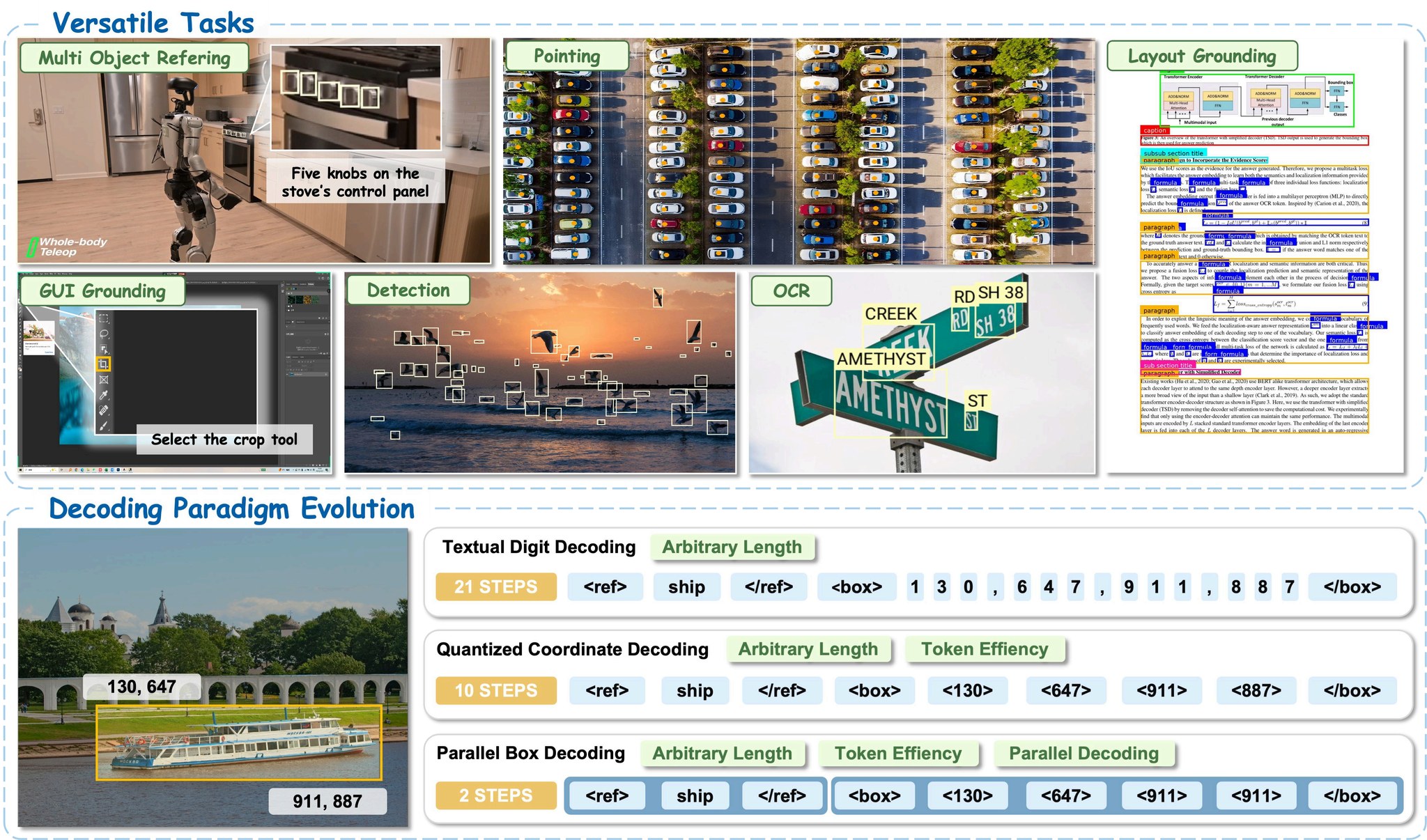
A FiftyOne remote Model Zoo integration for NVIDIA’s LocateAnything-3B, an open-vocabulary grounding VLM from the Eagle family. Learn more about the FiftyOne Model Zoo in the Voxel51 docs.
Image + video support, 7 operations, and an Eagle JSONL dataset importer for evaluating against Rex-Omni-EvalData benchmarks (DocLayNet, COCO, LVIS, ScreenSpot-Pro, etc.).
Table of Contents#
Loading Eagle / Rex-Omni eval bundles
Installation#
Install the runtime dependencies the model requires. lmdb, peft,
opencv-python-headless, and decord are not optional: the HF model’s
modeling_locateanything.py and processing_locateanything.py files
hard-import them at module-load time.
Easiest: via requirements.txt#
The repo ships a requirements.txt that uses PEP 508 environment markers to
pick the correct decord (or eva-decord on arm64 macOS) for your platform:
pip install -r requirements.txt
Linux / Windows
pip install fiftyone "transformers>=4.57.1,<4.58" "tokenizers>=0.22.0" \
            torch torchvision huggingface-hub Pillow timm numpy \
            lmdb peft "opencv-python-headless>=4.10" decord
macOS (Apple Silicon / arm64)
decord has no arm64 macOS wheel; use the maintained eva-decord fork instead
(it registers as the decord module so the rest of the code is unchanged):
pip install fiftyone "transformers>=4.57.1,<4.58" "tokenizers>=0.22.0" \
            torch torchvision huggingface-hub Pillow timm numpy \
            lmdb peft "opencv-python-headless>=4.10" eva-decord
Via uv#
uv add fiftyone "transformers>=4.57.1,<4.58" "tokenizers>=0.22.0" \
       torch torchvision huggingface-hub Pillow timm numpy \
       lmdb peft "opencv-python-headless>=4.10"
# Then add the right decord on your platform:
uv add decord                            # Linux / Windows
uv add eva-decord                        # macOS
Auto-install via FiftyOne (alternative)#
FiftyOne can install the manifest’s required packages for you. After
register_zoo_model_source, you have two options:
# Install any missing packages
foz.install_zoo_model_requirements("nvidia/LocateAnything-3B")

# OR: check first, install only if anything is missing
foz.ensure_zoo_model_requirements("nvidia/LocateAnything-3B")
ensure_zoo_model_requirements is the safer default for repeat runs because
it skips the install step entirely when everything is already present.
decord is not included in the manifest’s auto-install list because the
correct distribution name is platform-dependent (decord on Linux/Win,
eva-decord on arm64 macOS), and FiftyOne’s package checker doesn’t honor
PEP 508 environment markers. Install one of those two manually before running
inference (requirements.txt and the per-platform sections above handle this
correctly).
Quick Start#
import fiftyone as fo
import fiftyone.zoo as foz

# 1. Register the model source (one time per environment)
foz.register_zoo_model_source(
    "https://github.com/Burhan-Q/fiftyone-locate-anything",
    overwrite=True,
)

# 2. Download the model weights (~4 GB, one time)
foz.download_zoo_model(
    "https://github.com/Burhan-Q/fiftyone-locate-anything",
    model_name="nvidia/LocateAnything-3B",
)

# 3. Load and run inference
dataset = foz.load_zoo_dataset("quickstart")

model = foz.load_zoo_model(
    "nvidia/LocateAnything-3B",
    operation="detect",
    classes=["person", "car", "dog"],
)
dataset.apply_model(model, label_field="detections")

session = fo.launch_app(dataset)
After step 1 and 2 are done once, each subsequent script only needs
foz.load_zoo_model(...). The registration and weights persist across
sessions.
Operations#
Operation |
Required arg |
Output |
|---|---|---|
|
|
|
|
|
|
|
|
|
|
(none) |
|
|
optional |
|
|
|
|
|
|
|
Examples#
Each example below assumes you’ve already run the registration + download steps from Quick Start.
Detect specific classes#
model = foz.load_zoo_model(
    "nvidia/LocateAnything-3B",
    operation="detect",
    classes=["car", "person", "traffic light"],
)
dataset.apply_model(model, label_field="detections")
Phrase grounding with per-sample prompts#
model = foz.load_zoo_model(
    "nvidia/LocateAnything-3B",
    operation="grounding",
)
dataset.apply_model(model, label_field="grounded", prompt_field="caption")
Document layout#
model = foz.load_zoo_model(
    "nvidia/LocateAnything-3B",
    operation="layout",
)
dataset.apply_model(model, label_field="layout")
# Default classes: title, paragraph, figure, table
Pointing (e.g., GUI element)#
model = foz.load_zoo_model(
    "nvidia/LocateAnything-3B",
    operation="point",
    prompt="the submit button",
)
dataset.apply_model(model, label_field="ui_point")
GUI region grounding (vs point)#
model = foz.load_zoo_model(
    "nvidia/LocateAnything-3B",
    operation="gui_box",
    prompt="the file menu",
)
dataset.apply_model(model, label_field="ui_box")
Scene text / OCR localization#
model = foz.load_zoo_model(
    "nvidia/LocateAnything-3B",
    operation="scene_text",
)
dataset.apply_model(model, label_field="text")
Text grounding (find a specific phrase in the image)#
model = foz.load_zoo_model(
    "nvidia/LocateAnything-3B",
    operation="text_grounding",
    prompt="invoice number",
)
dataset.apply_model(model, label_field="text_location")
Reusing a loaded model across calls#
The model class exposes property setters for every user-tunable attribute, so
you can mutate a single loaded instance between apply_model calls instead of
calling load_zoo_model again (which would reload ~4 GB of weights).
model = foz.load_zoo_model(
    "nvidia/LocateAnything-3B",
    operation="detect",
    classes=["car", "person"],
)
dataset.apply_model(model, label_field="detect_results")

# Switch operation, prompt, or any generation param in place:
model.operation = "grounding"
model.prompt = "the red car"
dataset.apply_model(model, label_field="grounded_results")

model.operation = "scene_text"
dataset.apply_model(model, label_field="text_results")
Settable attributes:
Attribute |
Validation |
|---|---|
|
One of the 7 supported operations |
|
None |
|
|
|
None |
|
None |
model_path and media_type are NOT settable — changing them requires a new
load_zoo_model call.
Using the FiftyOne App#
You can drive the model interactively from the App via the Apply Model
operator, with no notebook code required for each run. The resolve_input
form in __init__.py is what FiftyOne renders for the operator’s parameters.
End-to-end flow:
import fiftyone as fo
import fiftyone.zoo as foz

# One-time setup (skip if already done)
foz.register_zoo_model_source(
    "https://github.com/Burhan-Q/fiftyone-locate-anything",
    overwrite=True,
)
foz.download_zoo_model(
    "https://github.com/Burhan-Q/fiftyone-locate-anything",
    model_name="nvidia/LocateAnything-3B",
)

dataset = foz.load_zoo_dataset("quickstart")
session = fo.launch_app(dataset)
Then in the App:
Open the operators palette (press the backtick
`key, or click the lightning-bolt icon in the toolbar).Search for “Apply Model” and select it.
Pick
nvidia/LocateAnything-3Bfrom the model list. The form below appears.Fill in the form (see fields table below).
Choose a label field name (e.g.
predictions) and whether to run delegated (background) or immediate.Click Execute. Predictions stream into the chosen field on each sample.
Form fields#
Field |
Default |
Notes |
|---|---|---|
Media Type |
|
|
Operation |
|
One of the 7 operations |
Classes (comma-separated) |
(empty) |
For |
Prompt |
(empty) |
For |
Single Instance |
|
Grounding only; switches to the “single instance” template |
Generation Mode |
|
|
Max New Tokens |
|
|
Use Sampling |
|
|
Temperature |
|
Only used when sampling |
Top-p |
|
Only used when sampling |
Repetition Penalty |
|
|
Video: # Sampled Frames |
(empty) |
Empty = every frame (recommended). Set N to pick N evenly-spaced frames. |
Video: Target FPS |
(empty) |
Sample at this rate; overrides frame count |
Video: Every Nth Frame |
(empty) |
Decimation factor; overrides frames and fps |
Per-sample prompts from the App#
The form takes a single static prompt. If you want a different prompt per
sample (e.g., the value of a caption field), the App route doesn’t expose
that directly. Use the notebook pattern with prompt_field=... from
Examples instead.
Video inference#
The model is image-only at the core; the video model decodes frames and runs
the image inference path per frame, returning {frame_num: label} so FiftyOne
merges results into sample.frames[N].field.
video_model = foz.load_zoo_model(
    "nvidia/LocateAnything-3B",
    media_type="video",
    operation="detect",
    classes=["person", "car"],
    # No sampling args: process every frame at native rate (recommended).
    # frames=8,        # or pick N evenly-spaced frames
    # fps=2.0,         # or sample at a target FPS
    # every_nth=15,    # or take every Kth frame
)
video_dataset.apply_model(video_model, label_field="dets")
# Per-frame results land in sample.frames[N].dets
Default is every-frame at native rate. When no sampling argument is set,
inference runs on every frame so the App plays back with continuous overlays.
Set frames, fps, or every_nth to subsample (e.g., for long videos or
quick previews).
Frame extraction backend probe order: decord → cv2 → torchvision.io.
Loading Eagle / Rex-Omni eval bundles#
Eagle ships eval data as JSONL in ShareGPT format with
<ref>label</ref><box>...</box> ground-truth tokens. The importer is in
dataset.py inside the registered zoo source.
import importlib.util
from pathlib import Path
import fiftyone as fo

# Resolve the source's on-disk path. FiftyOne's `register_zoo_model_source`
# stores it at `<model_zoo_dir>/<manifest-name-as-path>/`, where the manifest
# name `@Burhan-Q/fiftyone-locate-anything` becomes the subpath `@Burhan-Q/fiftyone-locate-anything`.
_SOURCE = Path(fo.config.model_zoo_dir) / "@Burhan-Q" / "fiftyone-locate-anything"

_spec = importlib.util.spec_from_file_location(
    "fiftyone_locate_anything_dataset", _SOURCE / "dataset.py",
)
_dataset_mod = importlib.util.module_from_spec(_spec)
_spec.loader.exec_module(_dataset_mod)
load_eagle_jsonl = _dataset_mod.load_eagle_jsonl

ds = load_eagle_jsonl(
    jsonl_path="~/data/rex_omni/DocLayNet/annotations.jsonl",
    image_root="~/data/rex_omni/DocLayNet/images",
    name="doclaynet-eval",
)
# ds[i].ground_truth is fo.Detections; ds[i].prompt is the human turn
Why the dynamic import? The directory
@Burhan-Q/fiftyone-locate-anythingcontains@and-characters; neither is valid in a Python identifier, sofrom @Burhan-Q.fiftyone-locate-anything import ...won’t parse. Theimportlib.util.spec_from_file_locationpattern above bypasses Python’s normal package machinery and works regardless of the on-disk name.
Compatible eval bundles:
Mountchicken/Rex-Omni-EvalData(COCO, LVIS, Dense200, VisDrone, DocLayNet, M6Doc, TotalText, HierText, RefCOCOg, HumanRef)
Configuration reference#
All foz.load_zoo_model(...) kwargs:
Kwarg |
Default |
Notes |
|---|---|---|
|
|
|
|
|
One of 7 ops above |
|
|
Required for |
|
|
Required for prompt-based ops |
|
|
Grounding only |
|
|
|
|
|
|
|
|
|
|
|
|
|
|
|
|
|
|
|
|
Video: # evenly-spaced frames. |
|
|
Video: target sampling FPS (overrides |
|
|
Video: sample every Kth frame (overrides others) |
For per-sample prompts (instead of a single static prompt=), pass
prompt_field="field_name" to dataset.apply_model(...).
Limitations#
No confidence scores: the model emits no per-detection scores;
fo.Detection.confidenceisNone. Affects mAP tie-breaking.Single-image inference at the model level; no native batching.
bf16 on CUDA; fp16 on MPS; fp32 on CPU. Apple Silicon works but is slower.
Video is frame-by-frame: no temporal modeling, no cross-frame tracking.
Layout taxonomy is 4 classes (
title,paragraph,figure,table); for other layouts usedetectwith your own class list.
Known-working dependency pins#
The Eagle pyproject pins specific versions. If you hit issues with the looser ranges in our manifest, try:
transformers==4.57.1
tokenizers==0.22.0
License notice#
LocateAnything-3B weights are released under the NVIDIA License (non-commercial research only). This wrapper is MIT, but the model it loads is not free for commercial use.