
Note
This is a community plugin, an external project maintained by its respective author. Community plugins are not part of FiftyOne core and may change independently. Please review each plugin’s documentation and license before use.

Isaac-0.2 FiftyOne Model Zoo Integration#
A FiftyOne Model Zoo integration for Isaac-0.2 by Perceptron AI - hybrid-reasoning vision-language models designed for real-world visual understanding tasks.
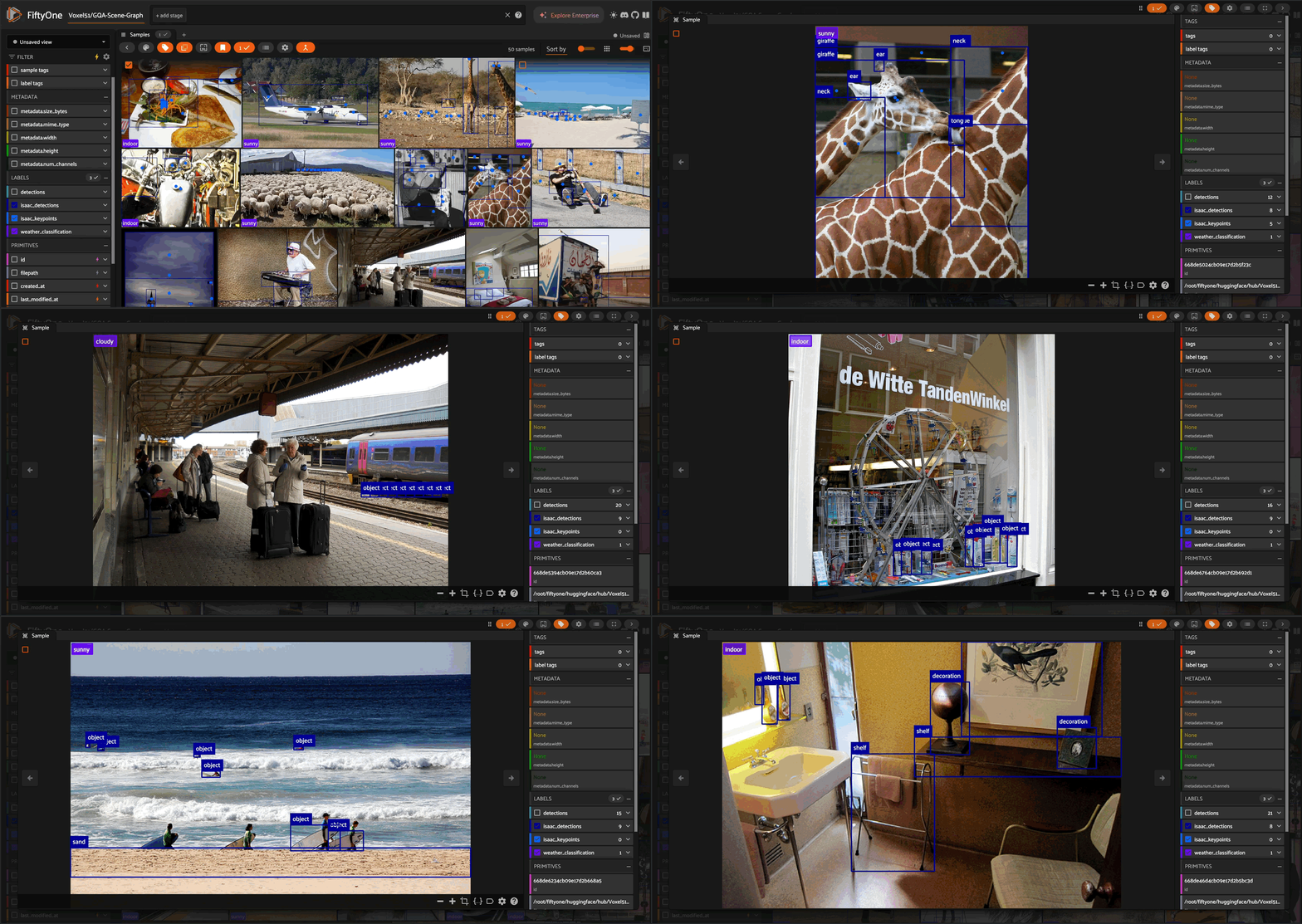
Overview#
Isaac-0.2 extends the efficient frontier of perception — small models that outperform systems 10× larger on visual reasoning and perception tasks, all running on commodity GPUs or edge devices. From robotics to media search to industrial inspection, Isaac 0.2 delivers high-accuracy perception without the heavy compute footprint.
Read the full announcement.
Available Models:
Isaac-0.2-2B-Preview - 2B parameter hybrid-reasoning model for maximum accuracy
Isaac-0.2-1B - 1B parameter model for faster inference and edge deployment
What’s New in Isaac 0.2#
Reasoning via Thinking Traces: Short, structured reasoning traces improve multi-step decisions, small-object understanding, and ambiguous spatial tasks
Tool Calling + Focus (Zoom & Crop): Isaac 0.2 can trigger tool calls to focus (zoom + crop) and re-query on smaller regions — improving fine-grained perception
Structured Outputs: More reliable structured output generation for consistent JSON and predictable downstream integration
Complex OCR: Improved text recognition across cluttered, low-resolution, or distorted regions — enabling accurate extraction from documents, diagrams, labels, screens, and dense real-world scenes
Desktop Use: Better performance on everyday desktop and mobile workflows such as UI understanding and navigation, making Isaac faster and more capable for agentic use cases
Features#
Object Detection: Detect and localize objects with bounding boxes
Keypoint Detection: Identify key points in images with spatial awareness
Complex OCR: Extract and detect text from documents, diagrams, labels, screens, and cluttered scenes
Classification: Classify images into categories with reliable JSON output
Visual Question Answering: Answer questions about image content
Segmentation: Generate polygon masks for instance segmentation
Desktop/UI Understanding: Navigate and understand desktop and mobile interfaces
Installation#
Prerequisites#
pip install fiftyone
pip install perceptron
pip install transformers
pip install accelerate
pip install torch torchvision
pip install huggingface-hub
Register the Model Zoo#
import fiftyone.zoo as foz

# Register this model zoo source
foz.register_zoo_model_source(
    "https://github.com/perceptron-ai-inc/fiftyone-isaac-0_2",
    overwrite=True
)
Usage#
Loading the Model#
import fiftyone.zoo as foz

# Load the Isaac-0.2 2B model
model = foz.load_zoo_model("PerceptronAI/Isaac-0.2-2B-Preview")

# Or load the 1B model for faster inference
model = foz.load_zoo_model("PerceptronAI/Isaac-0.2-1B")
Object Detection#
import fiftyone as fo
import fiftyone.zoo as foz

# Load a dataset
dataset = foz.load_zoo_dataset("quickstart", max_samples=10)

# Load model and set operation
model = foz.load_zoo_model("PerceptronAI/Isaac-0.2-2B-Preview")
model.operation = "detect"

# Set detection prompt
model.prompt = "Animals, Humans, Vehicles, Objects"

# Apply model to dataset
dataset.apply_model(model, label_field="detections")
Visual Question Answering (VQA)#
model.operation = "vqa"
model.prompt = "Describe the spatial relationships between objects in this scene"

dataset.apply_model(model, label_field="vqa_response")
OCR Text Detection#
model.operation = "ocr_detection"
model.prompt = "Detect all text in this image"

dataset.apply_model(model, label_field="text_detections")
OCR Text Extraction#
model.operation = "ocr"
model.prompt = "Extract all text from this image"

dataset.apply_model(model, label_field="extracted_text")
Keypoint Detection#
model.operation = "point"
model.prompt = "Identify key features: eyes, nose, corners"

dataset.apply_model(model, label_field="keypoints")
Classification#
model.operation = "classify"
model.prompt = "Classify the weather: sunny, rainy, snowy, cloudy, indoor"

dataset.apply_model(model, label_field="weather")
Segmentation (Polygons)#
model.operation = "segment"
model.prompt = "Draw polygons around the following objects: person, car, animal"

dataset.apply_model(model, label_field="polygons")
Advanced Usage#
Thinking Mode#
Enable structured reasoning traces for improved accuracy on complex scenes. Thinking traces improve multi-step decisions, small-object understanding, and ambiguous spatial tasks:
model.operation = "detect"
model.enable_thinking = True

dataset.apply_model(model, label_field="detections_with_reasoning")

# Disable when done
model.enable_thinking = False
Focus Tool Call#
Enable the Focus system (zoom + crop) for fine-grained perception. Isaac 0.2 can trigger tool calls to focus on smaller regions and re-query — improving detection of small objects and dense scenes. Only works with BOX operations (detect, ocr_detection):
model.operation = "detect"
model.enable_focus_tool_call = True

dataset.apply_model(model, label_field="focused_detections")

# Disable when done
model.enable_focus_tool_call = False
Combining Advanced Options#
You can combine both options for maximum precision:
model.operation = "detect"
model.enable_thinking = True
model.enable_focus_tool_call = True

dataset.apply_model(model, label_field="enhanced_detections")
Using Sample-Level Prompts#
You can use different prompts for each sample in your dataset:
# Apply model using the prompt field
model.operation = "detect"
dataset.apply_model(
    model,
    label_field="custom_detections",
    prompt_field="sample_prompt"
)
Custom System Prompts#
You can customize the system prompt for specific use cases:
model.system_prompt = """
You are a specialized assistant for medical image analysis.
Focus on identifying anatomical structures and abnormalities.
"""
Model Operations#
Operation |
Description |
Output Type |
Example Prompt |
|---|---|---|---|
|
Object detection with bounding boxes |
|
“Cars, pedestrians, traffic signs” |
|
Keypoint detection |
|
“Eyes, nose, mouth corners” |
|
Image classification |
|
“Indoor or outdoor scene” |
|
Text extraction |
String |
“Extract all text from the image” |
|
Text detection with boxes |
|
“Detect text regions” |
|
Text detection with polygons |
|
“Detect text regions” |
|
Instance segmentation |
|
“Segment all objects” |
|
Visual question answering |
String |
“What is the main subject?” |
Example Notebook#

See isaac_0_2_demo.ipynb for a complete interactive notebook demonstrating all operations. You can run it directly in Google Colab or download it for local execution.
Model Details#
Parameters: 2B (Preview) / 1B
Architecture: Based on Qwen with custom vision encoder
Vision Resolution: Dynamic, up to 60 megapixels
Context Length: 16,384 tokens
Training: Perceptive-language pretraining on multimodal data
License#
Code: Apache 2.0 License
Model Weights: Creative Commons Attribution-NonCommercial 4.0 International License
Resources#
Citation#
If you use Isaac-0.2 in your research or applications, please cite:
@software{isaac2025fiftyone,
  title = {Isaac-0.2 FiftyOne Model Zoo Integration},
  author = {Perceptron AI},
  year = {2025},
  url = {https://github.com/perceptron-ai-inc/fiftyone-isaac-0_2},
  note = {FiftyOne integration for Isaac-0.2 perceptive-language model}
}

@misc{perceptronai2025isaac,
  title = {Isaac-0.2: A Perceptive-Language Model},
  author = {{Perceptron AI}},
  year = {2025},
  publisher = {Hugging Face},
  url = {https://huggingface.co/PerceptronAI/Isaac-0.2-2B-Preview},
  note = {Open-source multimodal model for real-world visual understanding}
}
Contact#
Technical inquiries: support@perceptron.inc
Commercial inquiries: sales@perceptron.inc
Join the team: join-us@perceptron.inc
Acknowledgments#
Perceptron AI for developing Isaac-0.2
FiftyOne by Voxel51 for the model zoo framework