
Note
This is a community plugin, an external project maintained by its respective author. Community plugins are not part of FiftyOne core and may change independently. Please review each plugin’s documentation and license before use.

Image Edit Panel#
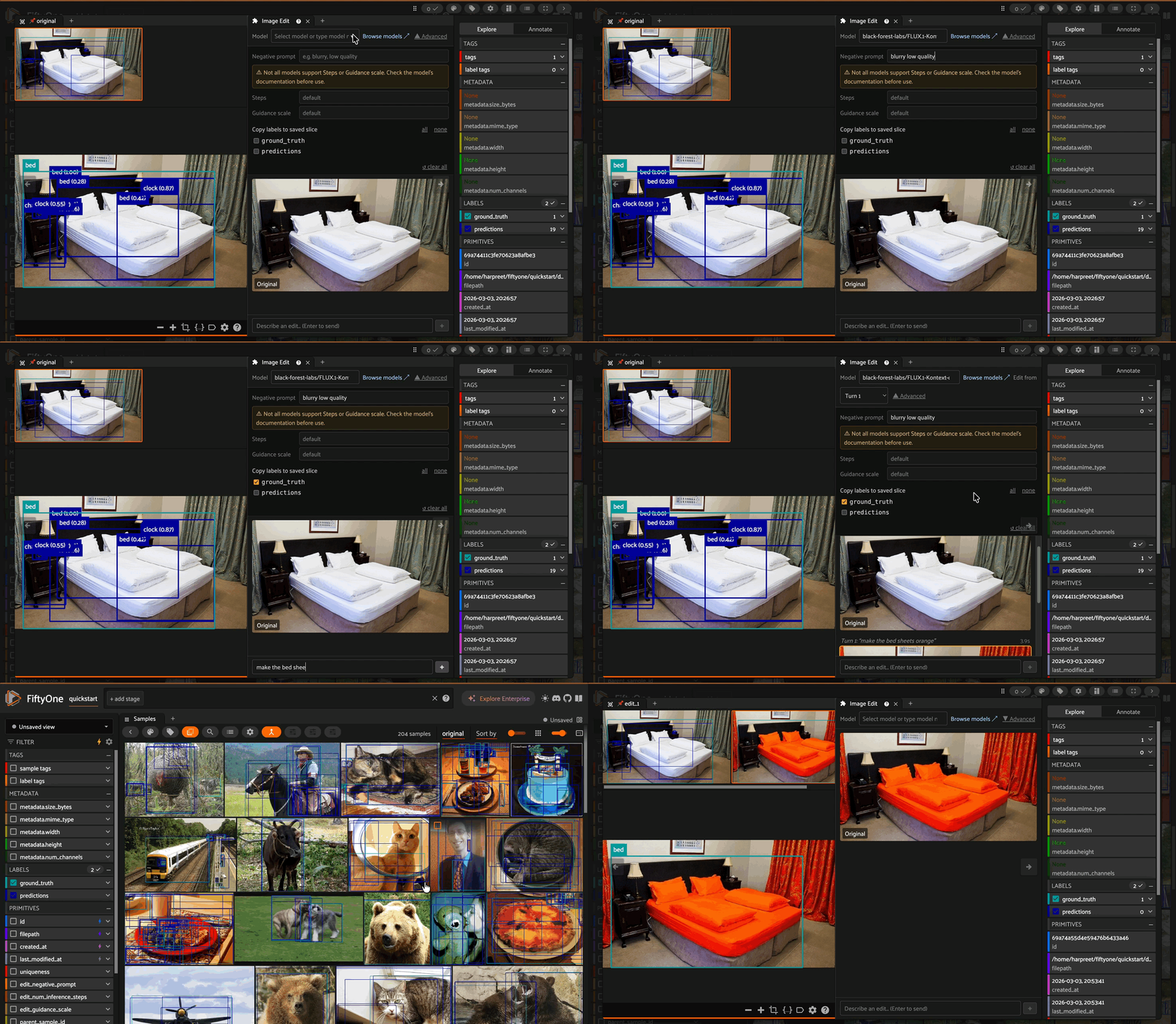
A FiftyOne plugin that brings chat-based image editing directly into the sample modal. Write a prompt, see the result inline, iterate, and save your favourite edits back to your dataset — all without leaving the app.
Installation#
fiftyone plugins download https://github.com/harpreetsahota204/image_editing_panel --overwrite
Then set your HuggingFace token before launching the app:
import os
os.environ["HF_TOKEN"] = "hf_..."

import fiftyone as fo
fo.launch_app(dataset)
Or via the shell:
export HF_TOKEN="hf_..."
fiftyone app launch
The plugin reads
HF_TOKENfrom the environment at startup. If it is missing the panel will display a setup prompt with these same instructions.
Requirements#
Requirement |
Detail |
|---|---|
FiftyOne |
Required |
HuggingFace Hub |
Required |
Pillow |
Required |
HuggingFace API token |
A |
What it does#
Open any sample in the FiftyOne modal and the Image Edit panel appears alongside it. From there you can:
Prompt-driven edits — describe the change you want in plain text and the panel calls a HuggingFace image-to-image model to apply it.
Iterative refinement — each edit becomes a new turn in the panel’s history. You can branch off any previous turn to explore different directions from the same starting point.
Advanced controls — optionally supply a negative prompt, override inference steps, and set a guidance scale for models that support them.
Save to dataset — click the save icon on any edited turn to persist it as a new group slice (
edit_1,edit_2, …) on your dataset. If the dataset is flat it is automatically converted to a grouped dataset on first save.Label copying — when saving, optionally copy any label fields (detections, classifications, segmentations, etc.) from the source sample to the new edited slice.
Session memory — your edit history for each sample is preserved in the browser session, so switching between samples and coming back doesn’t lose your work.
Supported models#
The panel ships with a curated list of warm HuggingFace image-to-image models and a Browse models ↗ link to discover more. You can type any HuggingFace model repo ID directly into the model field.
Getting Started#
If you want to quickly test the plugin, you can use the FiftyOne quickstart dataset:
import fiftyone as fo
import fiftyone.zoo as foz

dataset = foz.load_zoo_dataset("quickstart")
session = fo.launch_app(dataset)
Alternatively, if you have your own dataset and want to test the plugin with your data, see the FiftyOne documentation on importing datasets to learn how to load your data into FiftyOne.
Usage#
Open a dataset in the FiftyOne app and click into any sample.
Open the Image Edit panel from the modal panel selector.
Select a model (or type a HuggingFace repo ID).
Type a prompt describing your edit and press Enter or click ****.
When you’re happy with a result, click the Save button on that turn to write it to your dataset as a new group slice.