
Note
This is a community plugin, an external project maintained by its respective author. Community plugins are not part of FiftyOne core and may change independently. Please review each plugin’s documentation and license before use.

Qwen3-VL-Embedding for FiftyOne#
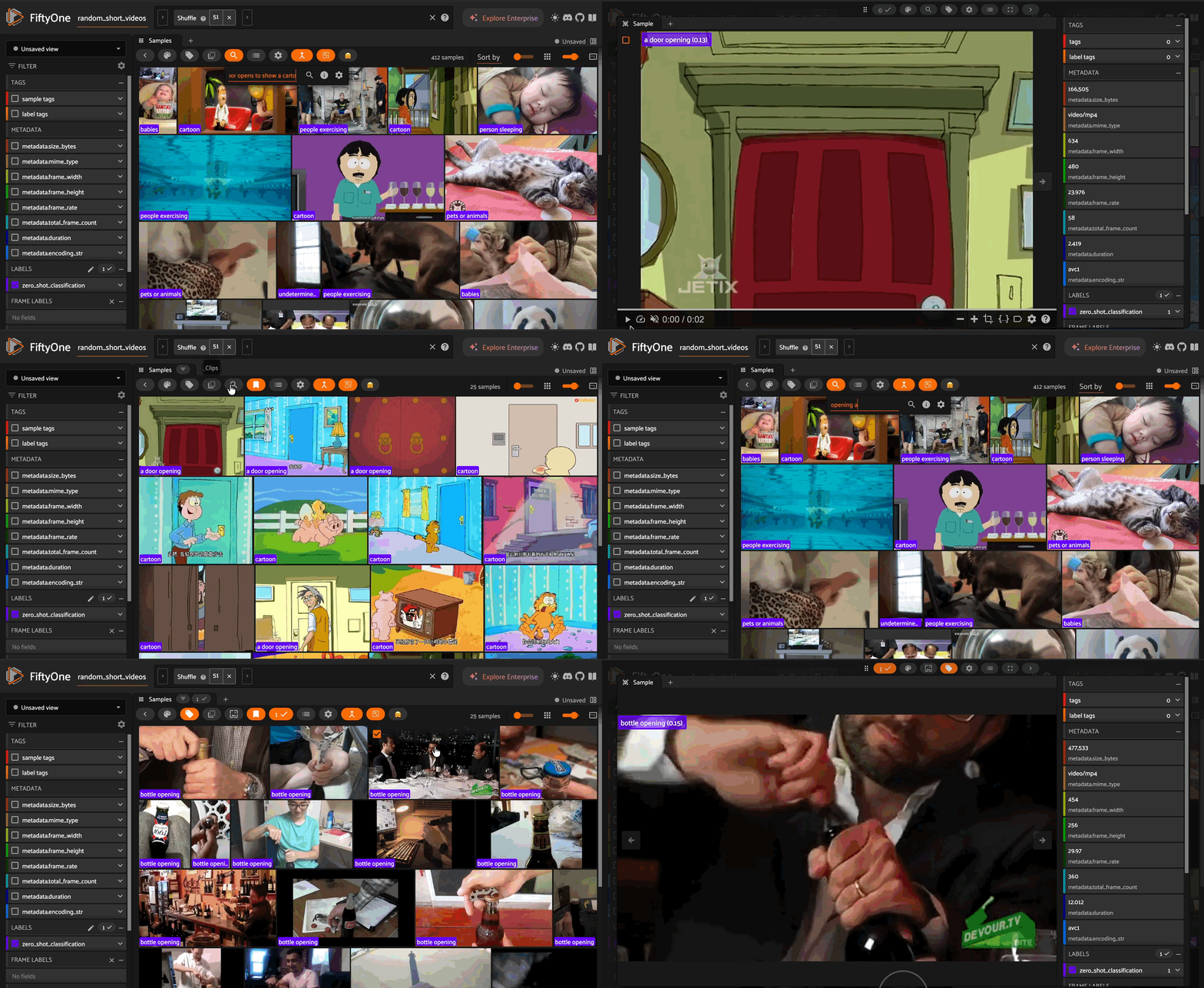
A FiftyOne zoo model integration for Qwen3-VL-Embedding, enabling state-of-the-art multimodal embeddings for video and image datasets.
Qwen3-VL-Embedding maps text, images, and video into a unified representation space, enabling powerful cross-modal retrieval and understanding. Built on the Qwen3-VL foundation model, it achieves state-of-the-art results on multimodal embedding benchmarks including MMEB-V2.
Features#
Multimodal Embeddings: Generate embeddings for videos, images, and text in a shared vector space
Text-to-Video/Image Search: Find media similar to natural language queries
Zero-Shot Classification: Classify media using text prompts without training
Batched Inference: Efficient processing with configurable batch sizes
Flexible Video Sampling: Configurable FPS and frame limits for different video lengths
Installation#
pip install fiftyone qwen-vl-utils transformers torch torchvision
Quick Start#
Register the Model Source#
import fiftyone.zoo as foz

foz.register_zoo_model_source(
    "https://github.com/harpreetsahota204/qwen3vl_embeddings",
    overwrite=True
)
Load a Model#
# Load the 2B model (faster, less memory)
model = foz.load_zoo_model("Qwen/Qwen3-VL-Embedding-2B")

# Or load the 8B model (higher quality embeddings)
model = foz.load_zoo_model("Qwen/Qwen3-VL-Embedding-8B")
Usage#
Compute Embeddings#
Generate embeddings for your video or image dataset:
import fiftyone as fo
from fiftyone.utils.huggingface import load_from_hub

# Load a video dataset
dataset = load_from_hub(
    "harpreetsahota/random_short_videos",
    name="random_short_videos",
    max_samples=20,
)

# Load model and compute embeddings
model = foz.load_zoo_model("Qwen/Qwen3-VL-Embedding-2B")

dataset.compute_embeddings(
    model,
    embeddings_field="qwen_embeddings",
    batch_size=4,
    num_workers=2,
)
Text-to-Video/Image Similarity Search#
Search your dataset using natural language queries:
import fiftyone.brain as fob

# Build a similarity index
fob.compute_similarity(
    dataset,
    model="Qwen/Qwen3-VL-Embedding-2B",
    brain_key="qwen_sim",
    embeddings="qwen_embeddings"
)

# Search by text
results = dataset.sort_by_similarity(
    "a person cooking in a kitchen",
    brain_key="qwen_sim",
    k=10
)

# Launch the App to view results
session = fo.launch_app(results)
Zero-Shot Classification#
Classify media using text prompts without any training:
# Configure model for classification
model.classes = ["children playing", "people exercising", "cooking"]
model.text_prompt = "A video of"

# Apply zero-shot classification
dataset.apply_model(model, label_field="predictions")
Embedding Visualization#
Visualize your embeddings with UMAP:
import fiftyone.brain as fob

fob.compute_visualization(
    dataset,
    method="umap",
    brain_key="qwen_viz",
    embeddings="qwen_embeddings",
    num_dims=2
)

session = fo.launch_app(dataset)
Configuration#
Available Models#
Model |
Parameters |
HuggingFace ID |
|---|---|---|
Qwen3-VL-Embedding-2B |
2B |
|
Qwen3-VL-Embedding-8B |
8B |
|
Model Parameters#
Parameter |
Default |
Description |
|---|---|---|
|
|
Type of media: |
|
|
Frame sampling rate for videos |
|
|
Maximum frames to sample from video |
|
|
Target number of frames to extract |
|
|
Minimum pixels for processing |
|
|
Maximum pixels for processing |
|
|
Total pixel budget for video frames |
|
|
Prefix for class labels in zero-shot classification |
|
|
List of class labels for zero-shot classification |
All parameters can be modified at runtime via properties (e.g., model.fps = 0.5).
Using with Image Datasets#
For image datasets, set media_type="image":
model = foz.load_zoo_model(
    "Qwen/Qwen3-VL-Embedding-2B",
    media_type="image"
)

image_dataset.compute_embeddings(model, embeddings_field="embeddings")
Runtime Configuration#
All model parameters can be changed at runtime without reloading the model:
# Load model once
model = foz.load_zoo_model("Qwen/Qwen3-VL-Embedding-2B")

# Process video dataset
video_dataset.compute_embeddings(model, embeddings_field="embeddings")

# Adjust video sampling for longer videos
model.media_type = "video"
model.fps = 0.5
model.max_frames = 128
long_video_dataset.compute_embeddings(model, embeddings_field="embeddings")


# Switch to image mode without reloading
model.media_type = "image"
image_dataset.compute_embeddings(model, embeddings_field="embeddings")
Video Length Constraints#
Qwen3-VL-Embedding is optimized for short-to-medium video clips. The model samples frames at a configurable FPS with a maximum frame limit.
Default settings:
Sample at 1 FPS with a maximum of 64 frames
Total token budget: ~4,500 tokens (~9.2M pixels)
At the default 1 FPS with 64 max frames, you’re effectively limited to ~64 seconds of video. You can trade off temporal resolution for duration:
FPS |
Max Duration |
Temporal Detail |
|---|---|---|
2.0 |
~32 sec |
Higher |
1.0 |
~64 sec |
Medium |
0.5 |
~128 sec |
Lower |
0.25 |
~256 sec |
Minimal |
For longer videos, consider:
Reducing FPS to capture more duration
Segmenting videos and embedding chunks separately
Using the model on key segments or clips
# Example: Lower FPS for longer videos
model = foz.load_zoo_model(
    "Qwen/Qwen3-VL-Embedding-2B",
    fps=0.5,      # Sample every 2 seconds
    max_frames=64
)
Dependencies#
fiftyone
huggingface-hub
transformers
torch
torchvision
qwen-vl-utils
License#
This FiftyOne integration is released under the Apache 2.0 license.
The Qwen3-VL-Embedding model weights are released under the Apache 2.0 license.
Citation#
If you use Qwen3-VL-Embedding in your research, please cite:
@article{qwen3vlembedding,
  title={Qwen3-VL-Embedding and Qwen3-VL-Reranker: A Unified Framework for State-of-the-Art Multimodal Retrieval and Ranking},
  author={Li, Mingxin and Zhang, Yanzhao and Long, Dingkun and Chen, Keqin and Song, Sibo and Bai, Shuai and Yang, Zhibo and Xie, Pengjun and Yang, An and Liu, Dayiheng and Zhou, Jingren and Lin, Junyang},
  journal={arXiv},
  year={2026}
}