
Note
This is a community plugin, an external project maintained by its respective author. Community plugins are not part of FiftyOne core and may change independently. Please review each plugin’s documentation and license before use.

torchvision-classifier-finetuner#
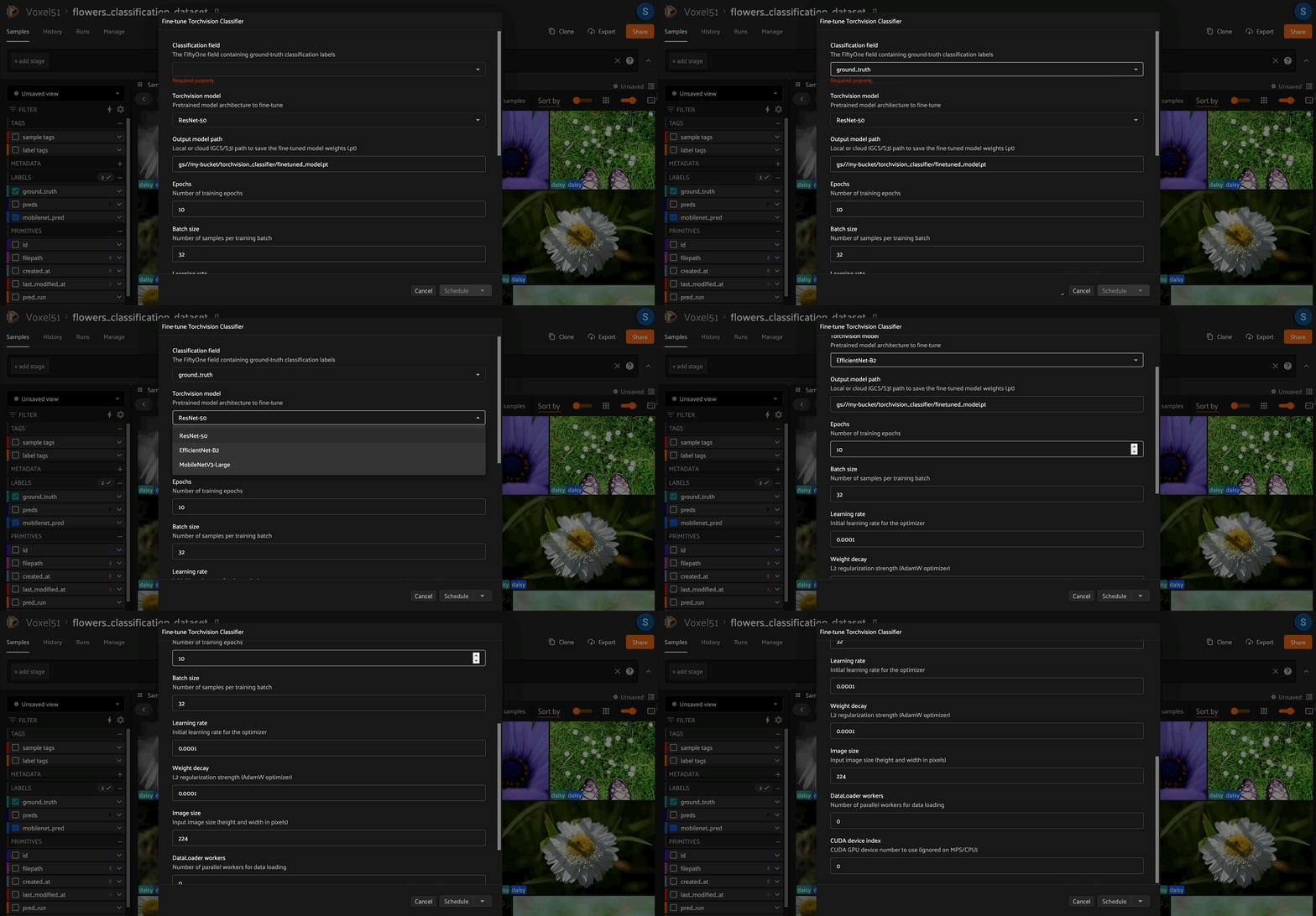
A FiftyOne plugin with two operators: one to fine-tune a pretrained torchvision image classification model on any labeled FiftyOne dataset, and one to run inference with the saved checkpoint — all directly from the UI or Python API, no training boilerplate required.
Overview#
The plugin performs transfer learning on top of a pretrained image classification backbone. Given a FiftyOne dataset with a Classification label field, it will:
Discover all unique classes in the label field.
Auto-create an 80/20 train/val split (by tagging samples) if one doesn’t already exist.
Load a pretrained torchvision model and replace the final classification head with one sized for your classes.
Train with AdamW + CosineAnnealingLR for the specified number of epochs, saving the best checkpoint by validation accuracy.
Export the checkpoint to a local path, GCS (
gs://…), or S3 (s3://…).
The checkpoint is a .pt file containing the weights plus metadata (architecture name, class labels, image size) so it can be reloaded for inference without re-specifying those details.
The companion inference operator loads the checkpoint and writes fo.Classification predictions directly onto your dataset. Because predictions are stored as native FiftyOne labels, they immediately unlock FiftyOne’s model evaluation suite — letting you compute per-class metrics, visualize confusion matrices, and sort/filter by confidence or correctness from the app.
Supported architectures
|
Architecture |
|---|---|
|
ResNet-50 |
|
EfficientNet-B2 |
|
MobileNetV3-Large |
Auto train/val split, configurable hyperparameters, and best-checkpoint saving
Export to local, GCS, or S3 paths; inference loads from the same locations
Pre-downloads cloud media before DataLoader construction so worker processes always hit local files
Modular file layout: model building (
models.py), data augmentation (transforms.py), and the training loop (trainer.py) are each in their own focused module
Dataset requirements#
The specified
label_fieldmust containfo.Classificationlabels.If your dataset already has
"train"and"val"tags on samples, those splits will be used. Otherwise the plugin automatically tags 80% as"train"and 20% as"val".
Fine Tuning Operator#
From the FiftyOne UI#
Open a dataset with a
Classificationlabel field.Click the Fine-tune Classifier button in the Samples Grid secondary actions bar.
Fill in the input form and click Schedule to run the fine-tuning job as a delegated operator.
From Python#
import fiftyone as fo
import fiftyone.operators as foo

dataset = fo.load_dataset("my_dataset")

op = foo.get_operator("@smehta73/torchvision-classifier-finetuner")
op.execute(
    fo.OperatorExecutionContext(
        dataset=dataset,
        params={
            "label_field": "ground_truth",
            "model_name": "resnet50",
            "export_uri": "/tmp/my_model.pt",
            "epochs": 15,
            "batch_size": 32,
            "learning_rate": 1e-4,
        },
    )
)
Fine-tuner parameters#
Parameter |
Type |
Default |
Description |
|---|---|---|---|
|
string |
— |
The |
|
choice |
|
Backbone architecture (see supported models below) |
|
string |
— |
Output path for the |
|
int |
10 |
Number of training epochs |
|
int |
32 |
Mini-batch size |
|
float |
1e-4 |
Initial learning rate for AdamW |
|
float |
1e-4 |
L2 regularization coefficient |
|
int |
224 |
Input image size (square, in pixels) |
|
int |
0 |
DataLoader worker processes |
|
int |
0 |
CUDA GPU index (ignored if no GPU is present) |
Inference operator#
Once you have a fine-tuned checkpoint, use the Run Torchvision Classifier Inference operator to write predictions back to any FiftyOne view — without leaving the app.
From the FiftyOne UI#
Open the dataset (or any view/slice) you want to run inference on.
Click the Run Torchvision Classifier Inference button in the Samples Grid secondary actions bar.
Point the file picker at your
.ptcheckpoint (local or cloud path), set an output field name, and click Execute.
From Python#
import fiftyone as fo
import fiftyone.operators as foo

dataset = fo.load_dataset("my_dataset")

op = foo.get_operator("@smehta73/torchvision-classifier-inference")
op.execute(
    fo.OperatorExecutionContext(
        dataset=dataset,
        params={
            "model_uri": {"absolute_path": "gs://my-bucket/torchvision_classifier/best.pt"},
            "label_field": "predicted_label",
            "batch_size": 64,
            "num_workers": 4,
        },
    )
)
Inference parameters#
Parameter |
Type |
Default |
Description |
|---|---|---|---|
|
file |
— |
Path to the |
|
string |
|
Field name to write |
|
int |
64 |
Images per inference batch |
|
int |
4 |
DataLoader worker processes |
|
int |
0 |
CUDA GPU index (ignored on MPS/CPU) |
The checkpoint is self-contained — it stores the architecture name, class labels, and image size, so you never need to re-specify them at inference time.
Customizing for your use case#
The plugin is split into focused modules — each covering one concern. Edit only the file relevant to what you want to change:
Goal |
File to edit |
|---|---|
Add a new backbone (ViT, ConvNeXt, etc.) |
|
Change data augmentation |
|
Swap loss function (label smoothing, focal loss) |
|
Swap optimizer or LR scheduler |
|
Change train/val split ratio or strategy |
|
Change how samples are filtered or loaded |
|
File responsibilities#
models.py—build_model()+SUPPORTED_MODELSdict. The UI dropdown auto-populates fromSUPPORTED_MODELS, so adding a key here is all it takes to expose a new architecture.transforms.py—get_transforms(). Augmentation changes stay fully isolated from training logic.trainer.py—train()function. Accepts model, loaders, criterion, optimizer, scheduler, epochs, device, and ctx. Returnsbest_val_accandbest_state.dataset.py—FiftyOneClassificationDataset. Handles label filtering and mapping between FiftyOne sample IDs and integer class indices.__init__.py— Thin operator shell.execute()wires together the modules: discovers classes, handles the train/val split, builds dataloaders, constructs criterion/optimizer/scheduler, callstrainer.train(), and saves the checkpoint.
Add a new model backbone#
Edit models.py:
# models.py
SUPPORTED_MODELS = {
    "resnet50": "ResNet-50",
    "efficientnet_b2": "EfficientNet-B2",
    "mobilenet_v3_large": "MobileNetV3-Large",
    "vit_b_16": "ViT-B/16",   # <-- add entry here
}

def build_model(model_name, num_classes, pretrained=True):
    ...
    if model_name == "vit_b_16":
        weights = models.ViT_B_16_Weights.DEFAULT if pretrained else None
        model = models.vit_b_16(weights=weights)
        in_features = model.heads.head.in_features
        model.heads.head = nn.Linear(in_features, num_classes)
        return model
    # ... existing branches below
Change data augmentation#
Edit transforms.py:
def get_transforms(img_size, is_train):
    if is_train:
        return transforms.Compose([
            transforms.RandomResizedCrop(img_size),
            transforms.RandomHorizontalFlip(),
            transforms.RandAugment(),               # swap in RandAugment
            transforms.ToTensor(),
            transforms.Normalize(mean=[0.485, 0.456, 0.406],
                                 std=[0.229, 0.224, 0.225]),
        ])
Change the loss function#
In execute() in __init__.py:
# e.g. label smoothing
criterion = nn.CrossEntropyLoss(label_smoothing=0.1)
Change the optimizer or learning rate schedule#
In execute() in __init__.py:
# Example: switch to SGD with StepLR
optimizer = torch.optim.SGD(model.parameters(), lr=lr, momentum=0.9, weight_decay=wd)
scheduler = torch.optim.lr_scheduler.StepLR(optimizer, step_size=5, gamma=0.1)
Freeze the backbone (linear-probe style)#
In execute() in __init__.py, after build_model():
model = build_model(model_name, num_classes)
for name, param in model.named_parameters():
    if "fc" not in name and "classifier" not in name and "heads" not in name:
        param.requires_grad = False
Change the train/val split ratio#
In execute() in __init__.py:
train_ratio = 0.8 # <-- adjust this
Customize how samples are loaded#
Edit the constructor loop in dataset.py:
for sample in view.iter_samples():
    label_obj = sample.get_field(label_field)
    if label_obj is None or label_obj.label is None:
        continue
    # Example: skip samples with confidence below a threshold
    if label_obj.confidence is not None and label_obj.confidence < 0.9:
        continue
    label_str = label_obj.label
    if label_str in class_to_idx:
        self._label_map[sample.id] = class_to_idx[label_str]
License#
MIT