
Note
This is a community plugin, an external project maintained by its respective author. Community plugins are not part of FiftyOne core and may change independently. Please review each plugin’s documentation and license before use.

Text Evaluation Metrics for FiftyOne#
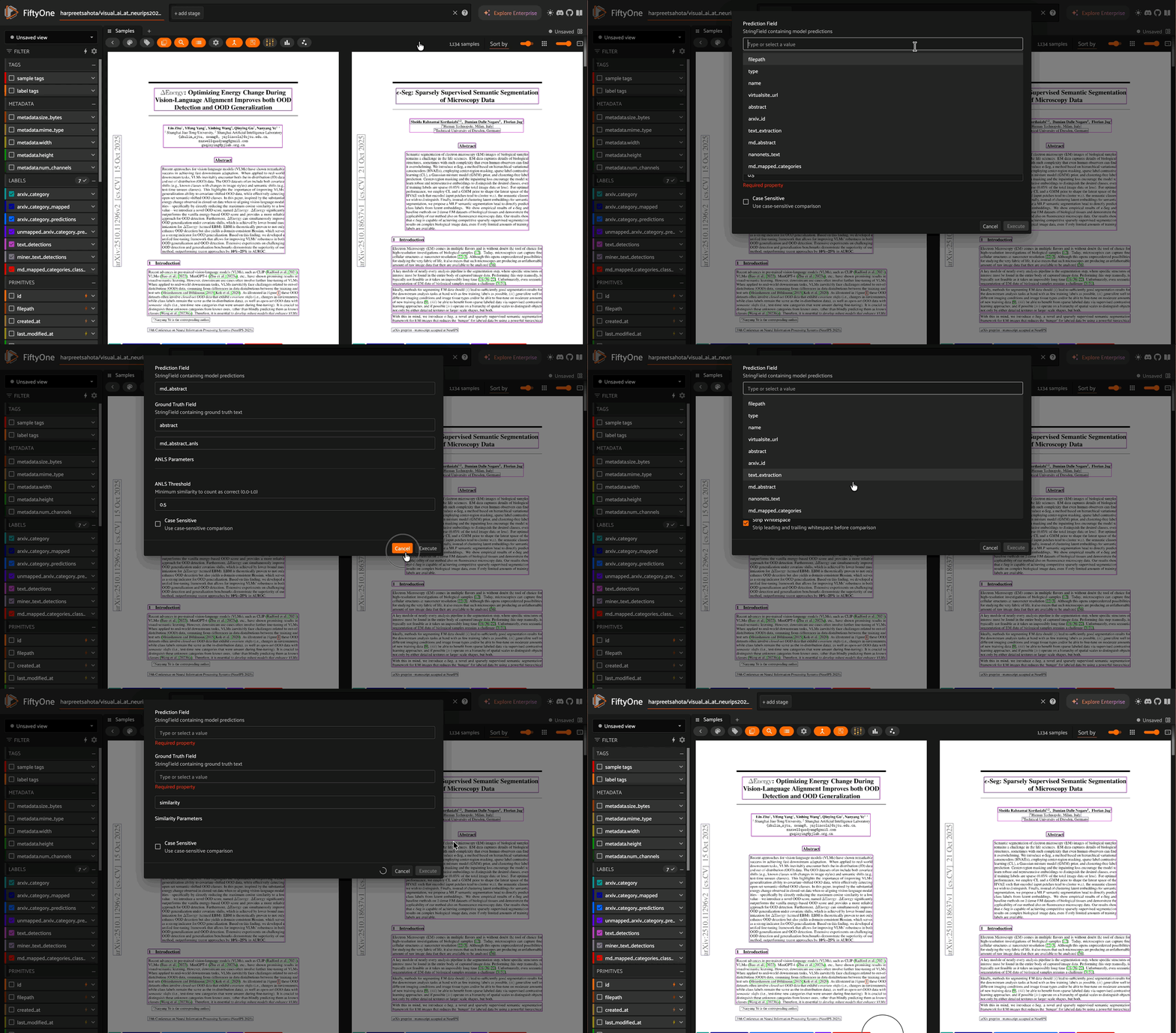
Operator plugin for evaluating text fields (StringFields) in FiftyOne datasets with standard VLM OCR metrics — including surface-form metrics, structural metrics for JSON/HTML/Markdown output, and semantic similarity.
Installation#
pip install python-Levenshtein apted beautifulsoup4 mistletoe sentence-transformers
Install the plugin:
fiftyone plugins download https://github.com/harpreetsahota204/text_evaluation_metrics
Overview#
This plugin provides seven text evaluation metrics for comparing predictions against ground truth:
Metric |
Description |
Use Case |
Range |
|---|---|---|---|
ANLS |
Average Normalized Levenshtein Similarity with threshold |
Primary OCR metric for VLMs, robust to minor errors |
0.0–1.0 |
Exact Match |
Binary perfect match |
Strict evaluation (form fields, IDs) |
0.0 or 1.0 |
Normalized Similarity |
Continuous Levenshtein similarity without threshold |
Fine-grained analysis and ranking |
0.0–1.0 |
CER |
Character Error Rate |
Character-level error analysis |
0.0+ (lower is better) |
WER |
Word Error Rate |
Word-level error analysis |
0.0+ (lower is better) |
TED Similarity |
Tree Edit Distance similarity for structured text |
Evaluating JSON, HTML, or Markdown output from VLMs |
0.0–1.0 |
Semantic Similarity |
Cosine similarity of sentence-transformer embeddings |
Meaning-level evaluation, paraphrase-tolerant scoring |
0.0–1.0 |
Choosing the right metric#
Plain OCR text (receipts, documents, IDs): use ANLS as the primary metric and CER/WER for error breakdown.
Strict fields (account numbers, dates, codes): use Exact Match.
Structured output (model asked to return JSON, HTML, or Markdown): use TED Similarity. Surface-form metrics will penalise valid paraphrases of the same structure.
Open-ended answers or captions: use Semantic Similarity. A prediction that means the same thing as the ground truth should score well even if the wording differs.
Multi-metric analysis: run several metrics and correlate results to understand where and how a model is failing.
Available Operators#
1. ComputeANLS (compute_anls)#
Average Normalized Levenshtein Similarity - Standard metric for OCR evaluation, normalizes edit distance by string length and applies a configurable threshold (default: 0.5)
operator = foo.get_operator("@harpreetsahota/text-evaluation-metrics/compute_anls")
result = operator(
    dataset,
    pred_field="prediction",
    gt_field="ground_truth",
    output_field="anls_score",  # optional, defaults to "{pred_field}_anls"
    threshold=0.5,  # ANLS threshold (0.0-1.0)
    case_sensitive=False,
    delegate=False
)
2. ComputeExactMatch (compute_exact_match)#
Binary exact match accuracy - Returns 1.0 only for perfect matches, ideal for strict evaluation where partial credit isn’t appropriate
operator = foo.get_operator("@harpreetsahota/text-evaluation-metrics/compute_exact_match")
result = operator(
    dataset,
    pred_field="prediction",
    gt_field="ground_truth",
    output_field="exact_match",  # optional, defaults to "{pred_field}_exact_match"
    case_sensitive=False,
    strip_whitespace=True,
    delegate=False
)
3. ComputeNormalizedSimilarity (compute_normalized_similarity)#
Continuous similarity score - Full range (0.0-1.0) without threshold, useful for fine-grained analysis and ranking samples by similarity
operator = foo.get_operator("@harpreetsahota/text-evaluation-metrics/compute_normalized_similarity")
result = operator(
    dataset,
    pred_field="prediction",
    gt_field="ground_truth",
    output_field="similarity",  # optional, defaults to "{pred_field}_similarity"
    case_sensitive=False,
    delegate=False
)
4. ComputeCER (compute_cer)#
Character Error Rate - Ratio of character-level edits needed to transform prediction into ground truth (lower is better), language-agnostic
operator = foo.get_operator("@harpreetsahota/text-evaluation-metrics/compute_cer")
result = operator(
    dataset,
    pred_field="prediction",
    gt_field="ground_truth",
    output_field="cer",  # optional, defaults to "{pred_field}_cer"
    case_sensitive=True,
    delegate=False
)
5. ComputeWER (compute_wer)#
Word Error Rate - Ratio of word-level edits needed to transform prediction into ground truth (lower is better), commonly used in speech recognition
operator = foo.get_operator("@harpreetsahota/text-evaluation-metrics/compute_wer")
result = operator(
    dataset,
    pred_field="prediction",
    gt_field="ground_truth",
    output_field="wer",  # optional, defaults to "{pred_field}_wer"
    case_sensitive=True,
    delegate=False
)
6. ComputeTED (compute_ted)#
Tree Edit Distance Similarity - Measures structural similarity between two hierarchical documents (JSON, HTML, or Markdown) by computing the minimum number of node-level edit operations (insert, delete, relabel) needed to transform one tree into the other, normalized to [0, 1].
This is the appropriate metric when a VLM is expected to return structured output. Unlike character-level metrics, TED captures whether the structure is correct — a prediction with the right text but wrong nesting scores lower than a prediction with a minor typo in an otherwise correct structure.
When a string cannot be parsed into a valid tree (e.g. malformed JSON), the sample receives a score of 0.0. This is intentional: failure to produce valid structured output is itself a meaningful evaluation signal.
operator = foo.get_operator("@harpreetsahota/text-evaluation-metrics/compute_ted")
result = operator(
    dataset,
    pred_field="predicted_json",
    gt_field="ground_truth_json",
    output_field="ted_score",      # optional, defaults to "{pred_field}_ted"
    format="json",                 # "json", "html", or "markdown"
    delegate=False
)
print(f"Mean TED similarity: {result['mean_ted_similarity']:.3f}")
Format notes:
"json"— objects are sorted by key before comparison (JSON is semantically unordered). Markdown code fences (```json ```) are stripped automatically."html"— tag names are used as node labels; text content becomes leaf nodes; whitespace-only nodes are ignored."markdown"— the AST node type (e.g.Heading,Paragraph,List) is used as the label; leaf text content is the leaf label.
7. ComputeSemanticSimilarity (compute_semantic_similarity)#
Semantic Similarity - Embeds both strings using a pre-trained sentence encoder and computes their cosine similarity. Captures meaning rather than surface form, so paraphrases and synonymous expressions score near 1.0 even without lexical overlap.
All strings in the view are encoded in two batched calls (one for ground truth, one for predictions) before scores are computed. This maximises throughput and GPU utilisation. For large datasets, delegate=True is recommended since model loading and inference can be slow.
operator = foo.get_operator("@harpreetsahota/text-evaluation-metrics/compute_semantic_similarity")
result = operator(
    dataset,
    pred_field="prediction",
    gt_field="ground_truth",
    output_field="semantic_score",    # optional, defaults to "{pred_field}_semantic_similarity"
    model_name="all-MiniLM-L6-v2",   # see model options below
    delegate=False
)
print(f"Mean semantic similarity: {result['mean_semantic_similarity']:.3f}")
Available models:
Model |
Speed |
Quality |
Notes |
|---|---|---|---|
|
Default — best speed/quality balance |
||
|
+ |
Marginally better than L6 |
|
|
Highest quality for English |
||
|
50+ languages |
Models are downloaded from HuggingFace automatically on first use and cached locally.
Usage#
Via FiftyOne App#
Open your dataset in the FiftyOne App
Press
`key or click the operator icon to open the Operator BrowserSearch for the metric you want to compute (e.g., “Compute ANLS”)
Select your prediction and ground truth StringFields
Configure parameters (threshold, case sensitivity, etc.)
Click “Execute”
The computed scores will be saved as a new field in your dataset.
Via Python SDK#
All operators support the __call__ method for clean, Pythonic usage:
import fiftyone as fo
import fiftyone.operators as foo

# Load dataset with StringFields
dataset = fo.load_dataset("your_dataset")

# Get the operator
anls_op = foo.get_operator("@harpreetsahota/text-evaluation-metrics/compute_anls")

# Call operator directly - clean and simple!
result = anls_op(
    dataset,
    pred_field="prediction",
    gt_field="ground_truth",
    output_field="prediction_anls",
    threshold=0.5,
    case_sensitive=False,
)

print(f"Mean ANLS: {result['mean_anls']:.3f}")
print(f"Evaluated {result['samples_evaluated']} samples")

# View per-sample scores
print(dataset.values("prediction_anls")[:5])
Smart Defaults: The output_field parameter is optional and defaults to {pred_field}_{metric}:
# These are equivalent:
result = anls_op(dataset, pred_field="prediction", gt_field="ground_truth")
# Creates field: "prediction_anls"

result = anls_op(dataset, pred_field="prediction", gt_field="ground_truth",
                 output_field="prediction_anls")
Delegated Execution#
For large datasets, set delegate=True to run operations on a delegated service (requires delegated execution service to be running).
Best Practices#
Start with ANLS for plain OCR tasks: It’s the standard metric for VLM OCR and is robust to minor transcription errors.
Use TED for structured output tasks: If the model is prompted to return JSON, HTML, or Markdown, TED captures structural correctness that character-level metrics miss entirely.
Use Semantic Similarity for open-ended generation: When the ground truth can be validly expressed in multiple ways (captions, summaries, answers), semantic similarity avoids penalising correct paraphrases.
Use Exact Match as a strict baseline: Provides a zero-tolerance accuracy figure useful for fields like IDs, codes, or dates where partial credit is not appropriate.
Enable delegation for large datasets: Set
delegate=Truefor any operator on large datasets. This is especially important forcompute_semantic_similaritywhere model loading and batch inference add significant wall-clock time.Organize output fields consistently: Use the default naming convention (
{pred_field}_{metric}) or your own consistent prefix so all metric fields are easy to identify and filter in the App.Evaluate on views: Use FiftyOne’s filtering to evaluate metric performance on specific subsets (e.g., only samples with a particular label, or samples where ANLS is below a threshold).
Advanced Usage#
Custom Thresholds for Different Tasks#
# Get operator
anls_op = foo.get_operator("@harpreetsahota/text-evaluation-metrics/compute_anls")

# Strict evaluation for critical fields
strict_result = anls_op(
    dataset,
    pred_field="account_number",
    gt_field="gt_account_number",
    output_field="account_anls",
    threshold=0.9,  # Higher threshold for critical data
)

# Lenient evaluation for noisy fields
lenient_result = anls_op(
    dataset,
    pred_field="description",
    gt_field="gt_description",
    output_field="description_anls",
    threshold=0.3,  # Lower threshold for descriptive text
)
Comparing Multiple Models#
# Get operator
anls_op = foo.get_operator("@harpreetsahota/text-evaluation-metrics/compute_anls")

# Evaluate two different models
models = ["model_a_prediction", "model_b_prediction"]

for model_field in models:
    result = anls_op(
        dataset,
        pred_field=model_field,
        gt_field="ground_truth",
        threshold=0.5,
    )
    print(f"{model_field}: {result['mean_anls']:.3f}")

# Compare in app
session = fo.launch_app(dataset)
Evaluating Structured JSON Output#
import fiftyone as fo
import fiftyone.operators as foo

dataset = fo.load_dataset("your_dataset")

# Fields: "predicted_json" and "ground_truth_json" both contain JSON strings
# (possibly wrapped in ```json ... ``` fences — these are stripped automatically)
ted_op = foo.get_operator("@harpreetsahota/text-evaluation-metrics/compute_ted")

result = ted_op(
    dataset,
    pred_field="predicted_json",
    gt_field="ground_truth_json",
    format="json",
)
print(f"Mean TED similarity: {result['mean_ted_similarity']:.3f}")
print(f"Samples evaluated:   {result['samples_evaluated']}")

# Inspect the worst-performing samples
low_ted_view = dataset.match(fo.ViewField("predicted_json_ted") < 0.5)
print(f"Samples with TED < 0.5: {len(low_ted_view)}")
Evaluating Markdown or HTML Output#
ted_op = foo.get_operator("@harpreetsahota/text-evaluation-metrics/compute_ted")

# Markdown fields
result = ted_op(
    dataset,
    pred_field="predicted_markdown",
    gt_field="ground_truth_markdown",
    format="markdown",
)
print(f"Mean TED (Markdown): {result['mean_ted_similarity']:.3f}")

# HTML fields
result = ted_op(
    dataset,
    pred_field="predicted_html",
    gt_field="ground_truth_html",
    format="html",
)
print(f"Mean TED (HTML): {result['mean_ted_similarity']:.3f}")
Semantic Similarity for Open-Ended Answers#
sem_op = foo.get_operator(
    "@harpreetsahota/text-evaluation-metrics/compute_semantic_similarity"
)

# Default model (all-MiniLM-L6-v2) — fast, great for most use cases
result = sem_op(
    dataset,
    pred_field="predicted_answer",
    gt_field="ground_truth_answer",
)
print(f"Mean semantic similarity: {result['mean_semantic_similarity']:.3f}")

# Higher quality model for more nuanced evaluation
result = sem_op(
    dataset,
    pred_field="predicted_answer",
    gt_field="ground_truth_answer",
    model_name="all-mpnet-base-v2",
    output_field="predicted_answer_semantic_mpnet",
)

# Multilingual datasets
result = sem_op(
    dataset,
    pred_field="predicted_answer",
    gt_field="ground_truth_answer",
    model_name="paraphrase-multilingual-MiniLM-L12-v2",
    output_field="predicted_answer_semantic_multilingual",
)
Running All Metrics Together#
import fiftyone as fo
import fiftyone.operators as foo

dataset = fo.load_dataset("your_dataset")

operators = {
    "anls":     ("compute_anls",                 {"threshold": 0.5}),
    "cer":      ("compute_cer",                  {}),
    "wer":      ("compute_wer",                  {}),
    "semantic": ("compute_semantic_similarity",  {}),
}

for metric, (op_name, kwargs) in operators.items():
    op = foo.get_operator(f"@harpreetsahota/text-evaluation-metrics/{op_name}")
    result = op(dataset, pred_field="prediction", gt_field="ground_truth", **kwargs)
    score_key = [k for k in result if k.startswith("mean")][0]
    print(f"{metric:10s}: {result[score_key]:.3f}")
License#
Apache 2.0