
Note
This is a community plugin, an external project maintained by its respective author. Community plugins are not part of FiftyOne core and may change independently. Please review each plugin’s documentation and license before use.

olmOCR-2 FiftyOne Integration#
A FiftyOne plugin for AllenAI’s olmOCR-2 model, enabling advanced document OCR capabilities within the FiftyOne platform.
Overview#
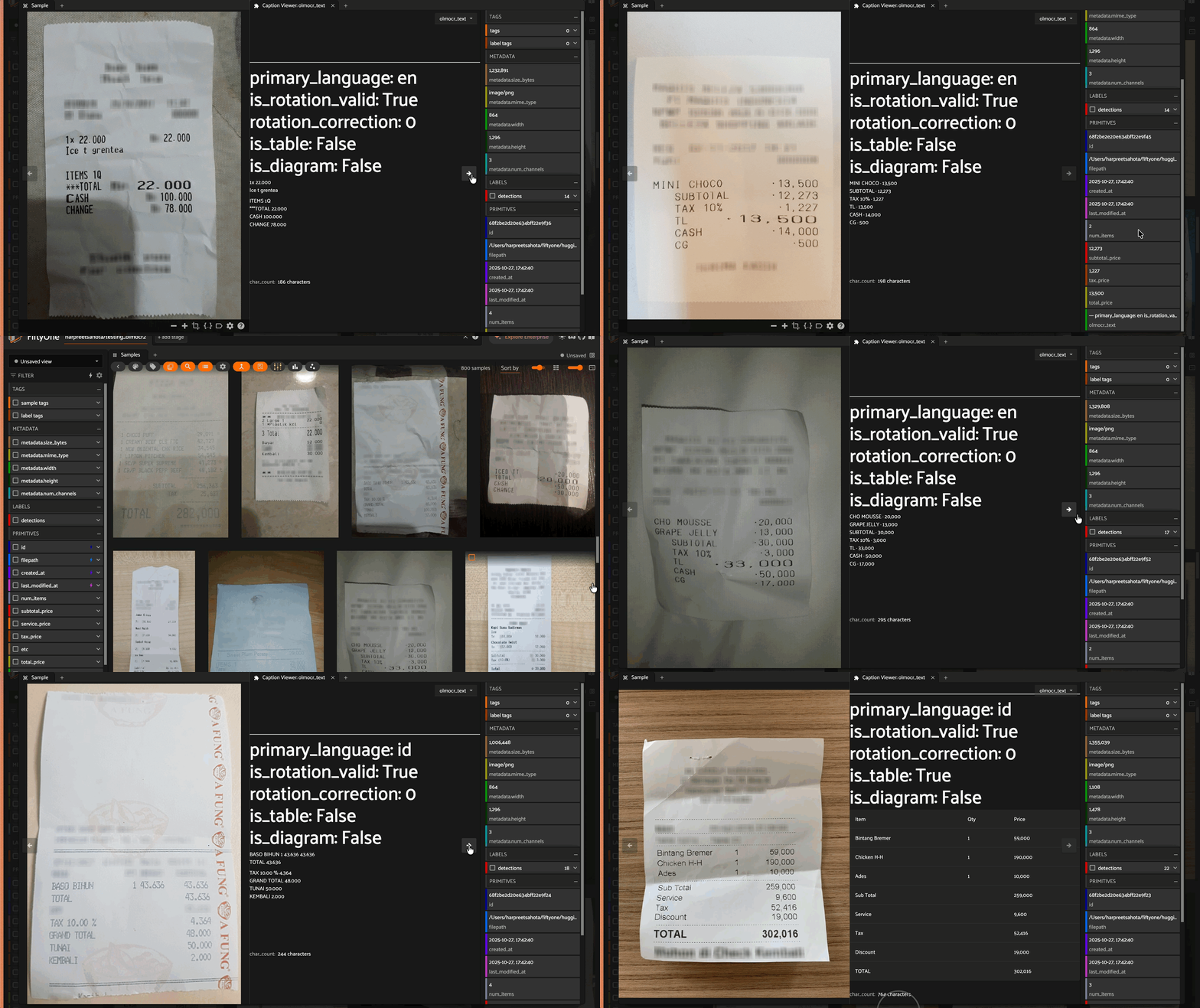
olmOCR-2 is a state-of-the-art OCR model built on Qwen2.5-VL architecture that extracts text from document images with high accuracy. The model outputs markdown-formatted text with YAML front matter containing document metadata.
Features#
Document Text Extraction: Naturally reads document text as a human would
LaTeX Equations: Converts mathematical equations to LaTeX format
HTML Tables: Exports tables in structured HTML format
Figure Detection: Labels figures and charts with markdown syntax
Metadata Output: Returns YAML front matter with document properties:
primary_language: Detected languageis_rotation_valid: Whether orientation is correctrotation_correction: Suggested rotation if neededis_table: Whether document contains tablesis_diagram: Whether document contains diagrams
Installation#
Requirements#
Install Dependencies#
pip install fiftyone torch transformers pillow numpy huggingface-hub
To better view the results in the FiftyOne app, install the Caption Viewer plugin:
fiftyone plugins download https://github.com/harpreetsahota204/caption_viewer
Register the Model Source#
The olmOCR-2 model is registered dynamically in your code using FiftyOne’s zoo model system:
import fiftyone.zoo as foz

foz.register_zoo_model_source(
    "https://github.com/harpreetsahota204/olmOCR-2",
    overwrite=True
)
This approach ensures you’re always using the latest model implementation without manual installation.
Usage#
Basic Usage#
import fiftyone as fo
import fiftyone.zoo as foz
from fiftyone.utils.huggingface import load_from_hub

# Load a dataset from HuggingFace (or use your own)
dataset = load_from_hub(
    "Voxel51/consolidated_receipt_dataset",
    max_samples=200
)

# Register the olmOCR-2 model source
foz.register_zoo_model_source(
    "https://github.com/harpreetsahota204/olmOCR-2",
    overwrite=True  # Ensures you're using the latest implementation
)

# Load the olmOCR-2 model
model = foz.load_zoo_model("allenai/olmOCR-2-7B-1025")

# Apply OCR to your dataset
dataset.apply_model(
    model,
    label_field="olmocr_text"
)

# View results in the FiftyOne App
session = fo.launch_app(dataset)
Advanced Configuration#
# Load model with custom parameters
model = foz.load_zoo_model(
    "allenai/olmOCR-2-7B-1025",
    max_new_tokens=4096,
    temperature=0.1,
    custom_prompt="Your custom prompt here"
)
Custom Prompt Example#
custom_prompt = """
Extract all text from this document.
Focus on preserving the original layout and formatting.
Convert any equations to LaTeX and tables to HTML format.
"""

model = foz.load_zoo_model(
    "allenai-olmOCR-2",
    custom_prompt=custom_prompt
)
Saving Results to HuggingFace Hub#
from fiftyone.utils.huggingface import push_to_hub

# After applying the model to your dataset
push_to_hub(
    dataset,
    "your-username/dataset-with-olmocr-results"
)
Citation#
If you use olmOCR-2 in your research, please cite:
@misc{olmocr2-2024,
  title={olmOCR-2: Advanced Document OCR with Vision-Language Models},
  author={AllenAI},
  year={2024},
  url={https://huggingface.co/allenai/olmOCR-2-7B-1025}
}
License#
This plugin is released under the Apache 2.0 License. The underlying olmOCR-2 model is also licensed under Apache 2.0.
Links#
Support#
For issues and questions:
GitHub Issues: Create an issue
FiftyOne Slack: Join the community