
Note
This is a community plugin, an external project maintained by its respective author. Community plugins are not part of FiftyOne core and may change independently. Please review each plugin’s documentation and license before use.

HuggingFace Fine-Tuning Plugin for FiftyOne#
Fine-tune HuggingFace vision models directly from the FiftyOne App or programmatically via the Python SDK.
Supported Tasks#
Task |
Operator |
Status |
|---|---|---|
Image Classification |
|
Stable |
Object Detection |
|
Stable |
Semantic Segmentation |
|
Experimental |
Features#
Fine-tune any compatible HuggingFace model (ie,
AutoModelForImageClassificationorAutoModelForObjectDetection) on your FiftyOne datasetTrain/val splitting via percentage or existing sample tags
Background (delegated) execution so the App stays responsive
Optional push to HuggingFace Hub (private repos by default)
Full SDK support for programmatic / notebook workflows
Requirements#
FiftyOne >= 1.0
Python 3.9+
A CUDA-capable GPU is recommended
Installation#
fiftyone plugins download https://github.com/harpreetsahota204/hf_fine_tuner_plugin

# Install any requirements for the plugin
fiftyone plugins requirements @harpreetsahota/hf_fine_tuner_plugin --install
Secrets#
If you want to push models to the HuggingFace Hub, set your token as an environment variable before launching FiftyOne:
export HF_TOKEN="hf_..."
Or authenticate via the HuggingFace CLI:
hf auth login
Usage — App#
Launch the FiftyOne App, open a dataset, and find the fine-tuning operators in the operator browser or the grid actions menu.
Usage — SDK#
Classification#
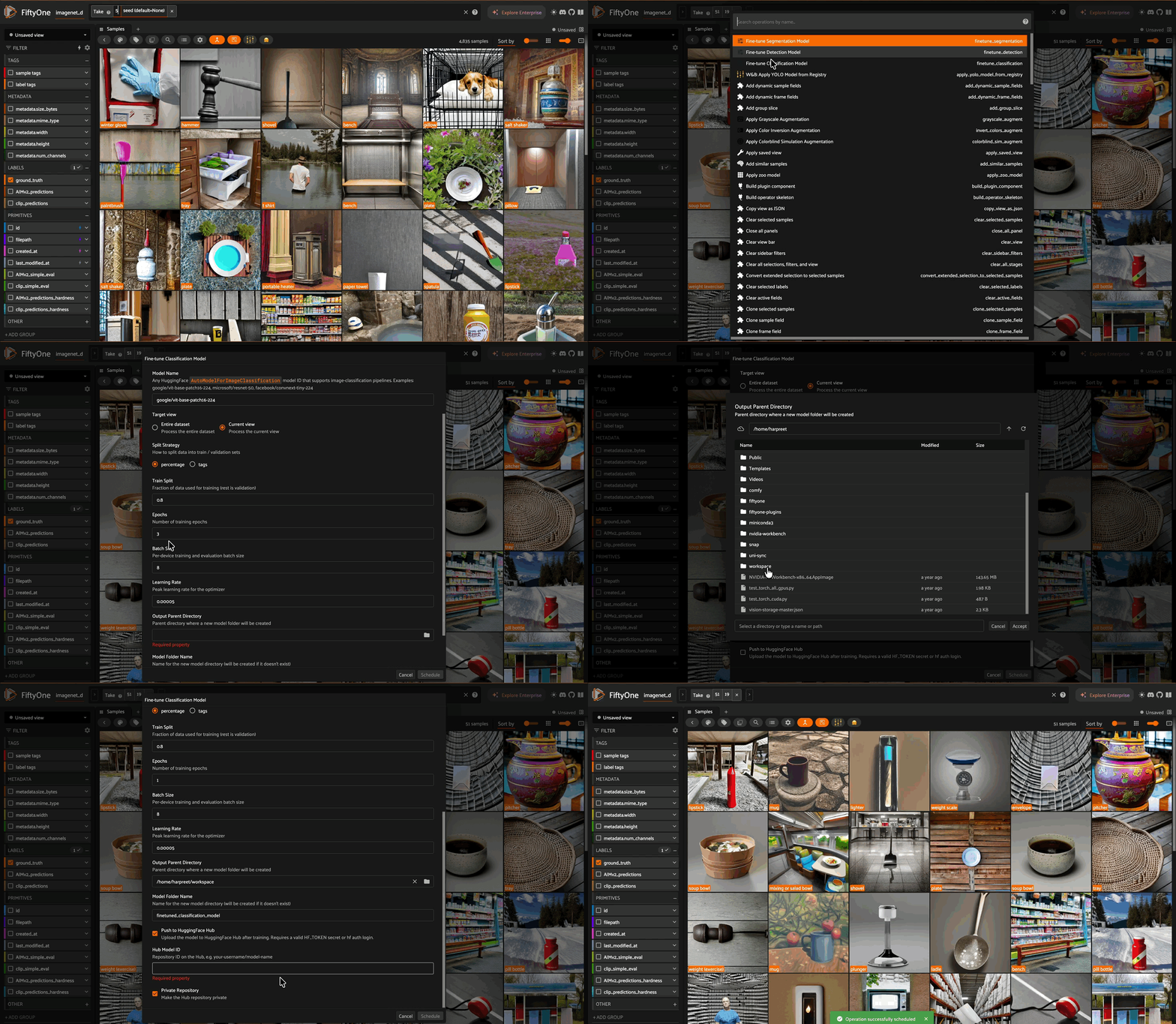
import fiftyone as fo
import fiftyone.operators as foo
import fiftyone.utils.huggingface as fouh

# Load a dataset
dataset = fouh.load_from_hub("Voxel51/cats-vs-dogs-sample", max_samples=100)

# Get the operator
classification_trainer = foo.get_operator(
    "@harpreetsahota/hf_fine_tuner_plugin/finetune_classification"
)

# Run fine-tuning
classification_trainer(
    dataset.view(),
    label_field="label",
    model_name="google/vit-base-patch16-224",
    num_epochs=1,
    batch_size=16,
    output_dir="./my_finetuned_vit",
)
Object Detection#
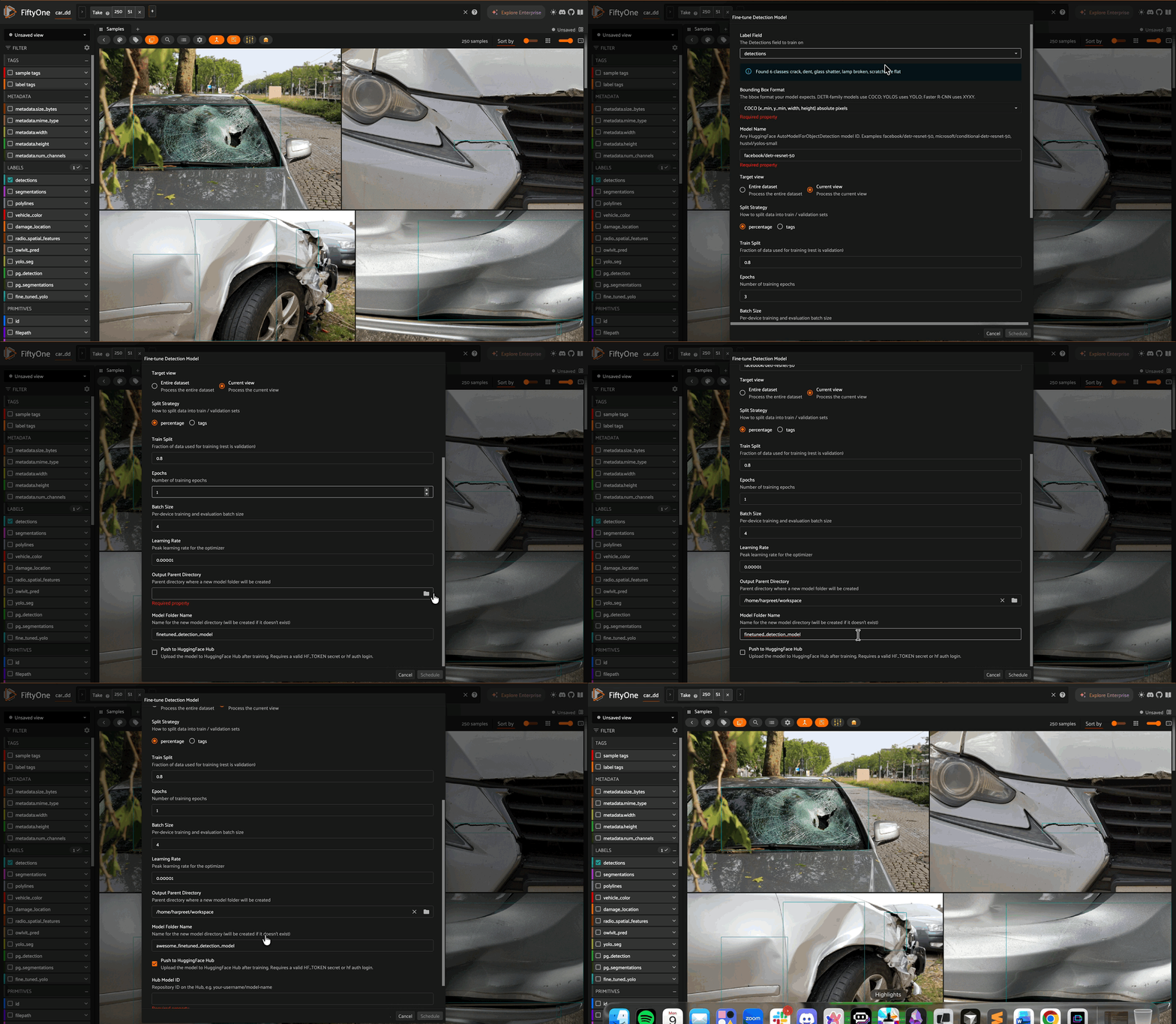
import fiftyone as fo
import fiftyone.operators as foo
import fiftyone.zoo as foz

# Load a dataset with detections
dataset = foz.load_zoo_dataset("quickstart")

# Get the operator
det_trainer = foo.get_operator(
    "@harpreetsahota/hf_fine_tuner_plugin/finetune_detection"
)

# Run fine-tuning
det_trainer(
    dataset,
    label_field="ground_truth",
    model_name="facebook/detr-resnet-50",
    bbox_format="coco",
    num_epochs=1,
    batch_size=16,
    output_dir="./my_finetuned_detr",
)
Operator Parameters#
All three operators share these common parameters:
Parameter |
Type |
Default |
Description |
|---|---|---|---|
|
str |
required |
The label field to train on |
|
str |
required |
HuggingFace model ID |
|
str |
|
|
|
float |
|
Fraction for training (percentage mode) |
|
str |
|
Sample tag for training data (tags mode) |
|
str |
|
Sample tag for validation data (tags mode) |
|
int |
varies |
Number of training epochs |
|
int |
varies |
Per-device batch size |
|
float |
varies |
Peak learning rate |
|
str |
varies |
Directory for saving the fine-tuned model |
|
bool |
|
Push model to HuggingFace Hub |
|
str |
|
Hub repo ID (required if pushing) |
|
bool |
|
Make Hub repo private |
|
bool |
|
Run in background via orchestrator |
The detection operator also accepts:
Parameter |
Type |
Default |
Description |
|---|---|---|---|
|
str |
|
|
Delegated Execution#
Training runs as a delegated operation in the App by default. To use
delegated execution from the SDK, pass delegate=True.
Before launching the delegated service, set the following environment variables in the same terminal:
# Required for the delegated orchestrator
export FIFTYONE_ALLOW_LEGACY_ORCHESTRATORS=true

# Optional: control which GPU(s) training runs on (defaults to "0")
export CUDA_VISIBLE_DEVICES=0

# Launch the delegated operation service
fiftyone delegated launch
Then kick off training from your Python process:
classification_trainer(
    dataset.view(),
    label_field="label",
    model_name="google/vit-base-patch16-224",
    output_dir="./my_finetuned_vit",
    delegate=True,
)
Multi-GPU Note#
By default, training runs on a single GPU to avoid issues with PyTorch’s
DataParallel (which breaks models like DETR). If you want to use a
different GPU, set CUDA_VISIBLE_DEVICES before launching the delegated
service (e.g. export CUDA_VISIBLE_DEVICES=1). For multi-GPU training,
use an accelerate-compatible setup.
License#
Apache 2.0