

Label Propagation Plugin#
Propagate annotations from sparsely labeled “exemplar frames” to all frames in a sequence using SAM-2.
This plugin exposes the following operators for use in the FiftyOne App and the Python SDK.
propagate_labels— uses SAM2 to use labels from an input field as prompts, to populate and output fieldtemporal_segmentation— populates temporal segment classificationsselect_exemplars— sets exemplar scores on segment classifications
Requirements#
FiftyOne installed and configured
SAM 2 installed:
pip install "git+https://github.com/facebookresearch/segment-anything-2.git"Network access for the first run:
The plugin will attempt to download SAM 2 weights (by defaultsam2.1_hiera_tiny.pt) into the installed SAM 2 package underweights/if they are not found.
Operator: propagate_labels#
Takes a view over your dataset as input
Looks for annotations in a given input field
Uses SAM-2 to propagate those annotations to all frames in the view
Writes the propagated annotations to a given output field
Parameters#
input_annotation_field(string, required)Sample-level field (for an image dataset) or Frame-level field (for a video dataset) containing the labels to propagate
Only frames where this field is non-empty are treated as exemplars
output_annotation_field(string, required)Sample-level field (for an image dataset) or Frame-level field (for a video dataset) where the propagated labels will be stored
Must be different from
input_annotation_fieldto prevent accidental overwriting of ground truth annotations
sort_field(string, optional)[For image/grouped datasets only] Field used to sort samples before propagation, intended as a temporal index
If the view has this field, frames are ordered by it; otherwise, the operator falls back to the default dataset order
Usage in the FiftyOne App#
Open your dataset in the FiftyOne App.
Create a view containing the frames you want to process (for example, a subset of sequences or frames).
Ensure that:
Exemplar frames (currently, must include the first frame of the sequence) have labels in your chosen
input_annotation_field.Labels corresponding to a single instance across different frames have the same
index.
Open the Operators dropdown and search for:
Name:
propagate_labelsLabel:
Propagate Labels From Input Field Operator
Configure the presented field name options
Run the operator
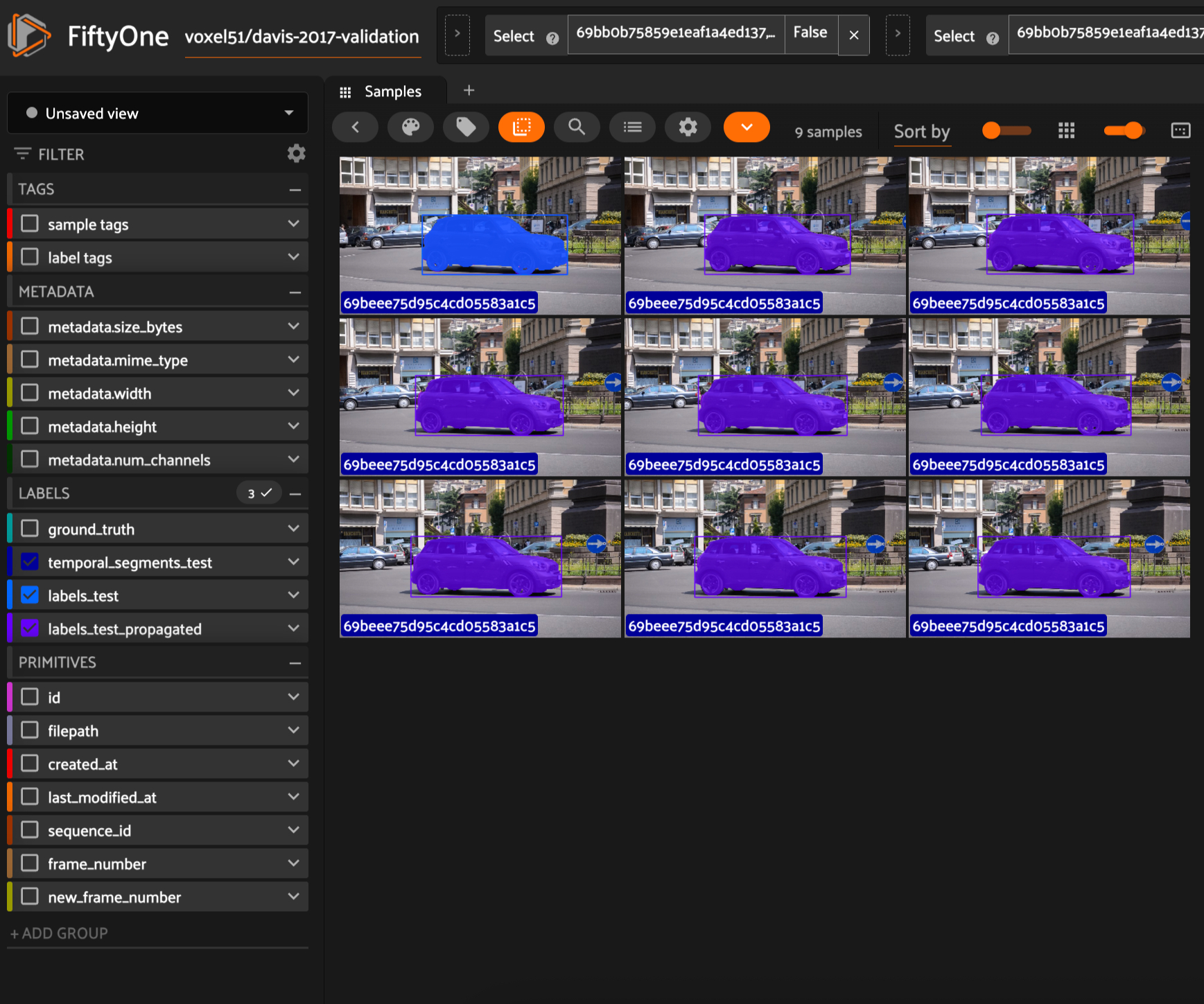
On success, you should see a message similar to:
Annotations propagated from <input_field> to <output_field>
Delegated Operation#
To run the Propagate Labels operator with delegated operation, see the instructions here. You can also enable delegated operation via the Label Propagation panel by checking the Use delegated operation checkbox next to the Run Propagation button.
Notes and limitations#
The operator is designed for image sequences / video frames where temporal consistency is meaningful.
Currently, fails on views with discontinuous scenes/labels.
Currently, fails if annotated frames do not contain all relevant labels.
Currently, only propagates forward in the sequence.
On first run, downloading SAM 2 weights can take time, and GPU acceleration is strongly recommended for practical runtimes.
Operator: temporal_segmentation#
For image/grouped datasets: Populates an fo.Classifications field with temporal segment labels. Each classification has a label (segment id) and an exemplar_score (float, initially 0).
For video datasets: Populates an fo.TemporalDetections field. Each classification has a label (segment id). Since this is a sample-level field (not frame-level), no exemplar_score is assigned. [To be restructured once frame-level annotation is enabled.]
Parameters#
temporal_segmentation_method(string, default:"heuristic")Presently, only supports a single method, based on sharp changes in RGB stats
temporal_segments_field— Field in which to store classificationssort_field(string, optional)[For image datasets only] Field used to sort samples before propagation, intended as a temporal index
If the view has this field, frames are ordered by it; otherwise, the operator falls back to the default dataset order
Field schema#
{temporal_segments_field} is fo.Classifications. Each Classification has:
label(str) — segment identifierexemplar_score(float) — effectiveness as an exemplar of the segment
Operator: select_exemplars#
[For image/grouped datasets only] Only valid with an existing fo.Classifications field with temporal segment labels. Assigns an exemplar_score to each label of sample, indicating how valuable it is for this sample to be an exemplar for said temporal segment.
Parameters#
temporal_segments_field(string, default: None)Field whose classification labels to modify
exemplar_scoring_method(string, default:"first_frame") — detects scene discontinuities using image correlationDepends on the Label Propagation method used.
Presently, only supports a single method, where the first frame of each segment gets score 1, others get 0. This is due to the lack of backward/bidirectional label propagation support.
sort_field(string, optional)[For image/grouped datasets only] Field used to sort samples before propagation, intended as a temporal index
If the view has this field, frames are ordered by it; otherwise, the operator falls back to the default dataset order
Interactive Panel: A Typical Workflow#
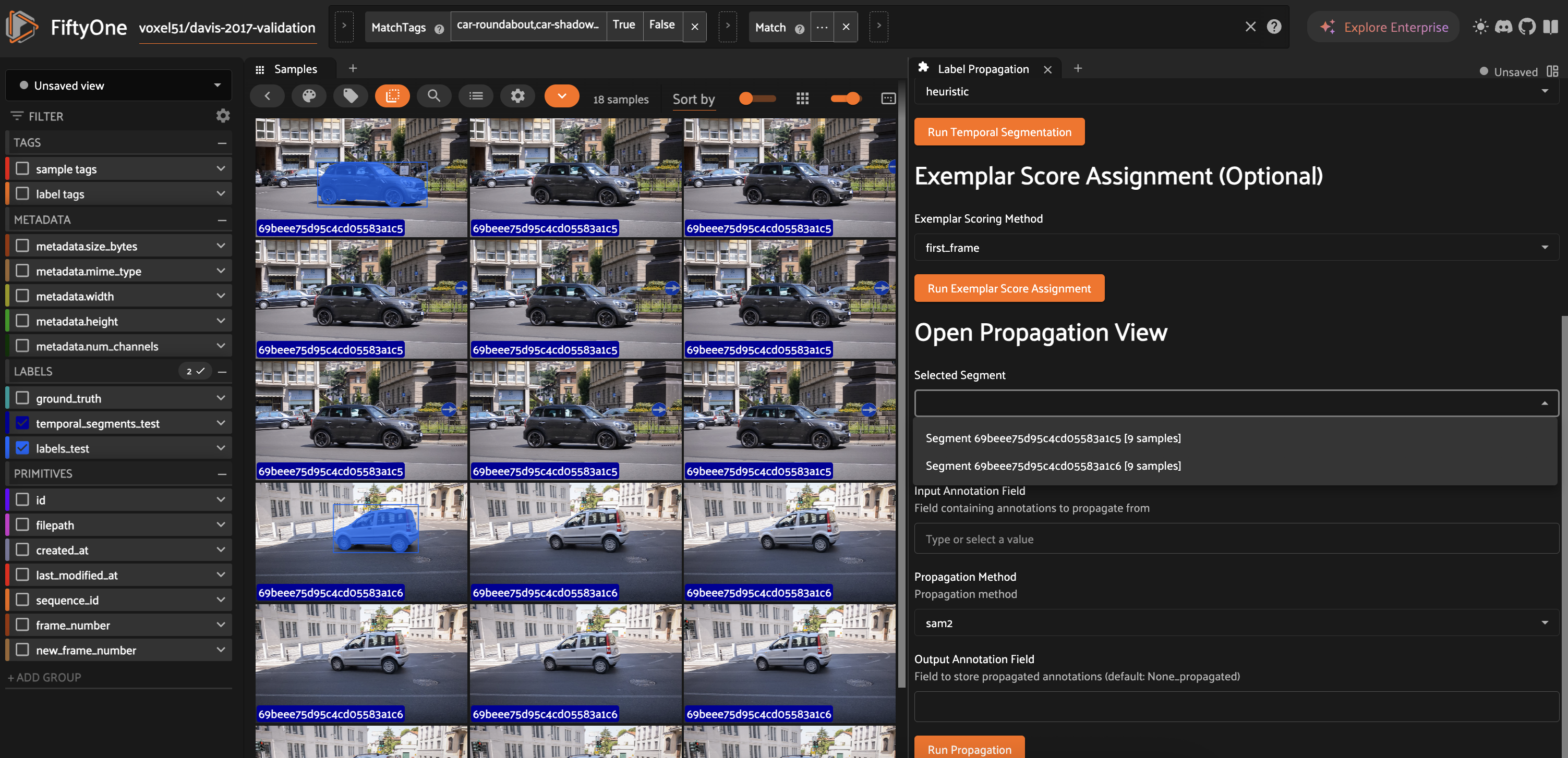
The Label Propagation panel provides an interactive UI for the complete workflow:
Open the panel from the FiftyOne App sidebar
[For image/grouped datasets] Configure the sort field for indicating the temporal sequence of images.
Configure the temporal segments field – this may already exist, or will be where temporal detections are stored.
If the entire dataset does not belong to a single video scene (i.e., has discontinuities), run Temporal Segmentation. You can now select a segment label to open its propagation view (samples belonging to that temporal detection label)
Optionally, run Exemplar Selection. This will populate the
exemplar_scorefield within the temporal segments classifications, to suggest how valuable of an exemplar each sample would be.Label frames as needed. If labeling multiple occurrences of the same object, ensure the
indexfield is populated and has a unique value for each object.Configure input and output annotation fields, then run
propagate_labelsInspect results and iterate
Try It Yourself#
Use the following script with upto 3 scenes and image/group/video formats:
python run_demo.py --num_scenes=2 --media-format=image
The annotations in labels_test exist only for the first frame within each temporal segment – you can play around with the panel and operators to propagate them to all.
ToDos#
For the next PR
[ ] Support backward propagation
[ ] Add evaluation to the pytests
[ ] Additional Temporal Segmentation methods
Product requirements
[x] Supports image datasets
[x] Supports video datasets
[x] Supports dynamically grouped datasets
[x] Propagated labels include
instance(for videos) orindexfields[ ] < 100ms per frame; faster for single-sample
Other features on the roadmap
[ ] Single-sample (or few-sample) execution for interactive instance-wise propagation
[ ] UX features that support HA (e.g. edit label field, “select” instances)
[ ] Golden workflow