
Note
This is a community plugin, an external project maintained by its respective author. Community plugins are not part of FiftyOne core and may change independently. Please review each plugin’s documentation and license before use.

VLM Run Plugin#
A plugin that provides operators for extracting structured data from visual sources using VLM Run’s vision-language models.
Installation#
fiftyone plugins download \
    https://github.com/vlm-run/vlmrun-voxel51-plugin
Install the required dependencies:
fiftyone plugins requirements @vlm-run/vlmrun-voxel51-plugin --install
Refer to the FiftyOne Plugins documentation for more information about managing downloaded plugins and developing plugins locally.
Configuration#
Set your VLM Run API key as an environment variable:
export VLMRUN_API_KEY="your-api-key-here"
You can obtain an API key from vlm.run.
Alternatively, you can provide the API key directly when running operators in the FiftyOne App.
Usage#
Launch the App:
import fiftyone as fo
import fiftyone.zoo as foz

dataset = foz.load_zoo_dataset("quickstart", max_samples=10)
session = fo.launch_app(dataset)
Press
`or click theBrowse operationsaction to open the Operators listSelect any of the operators listed below!
Operators#
vlmrun_chat_completions#
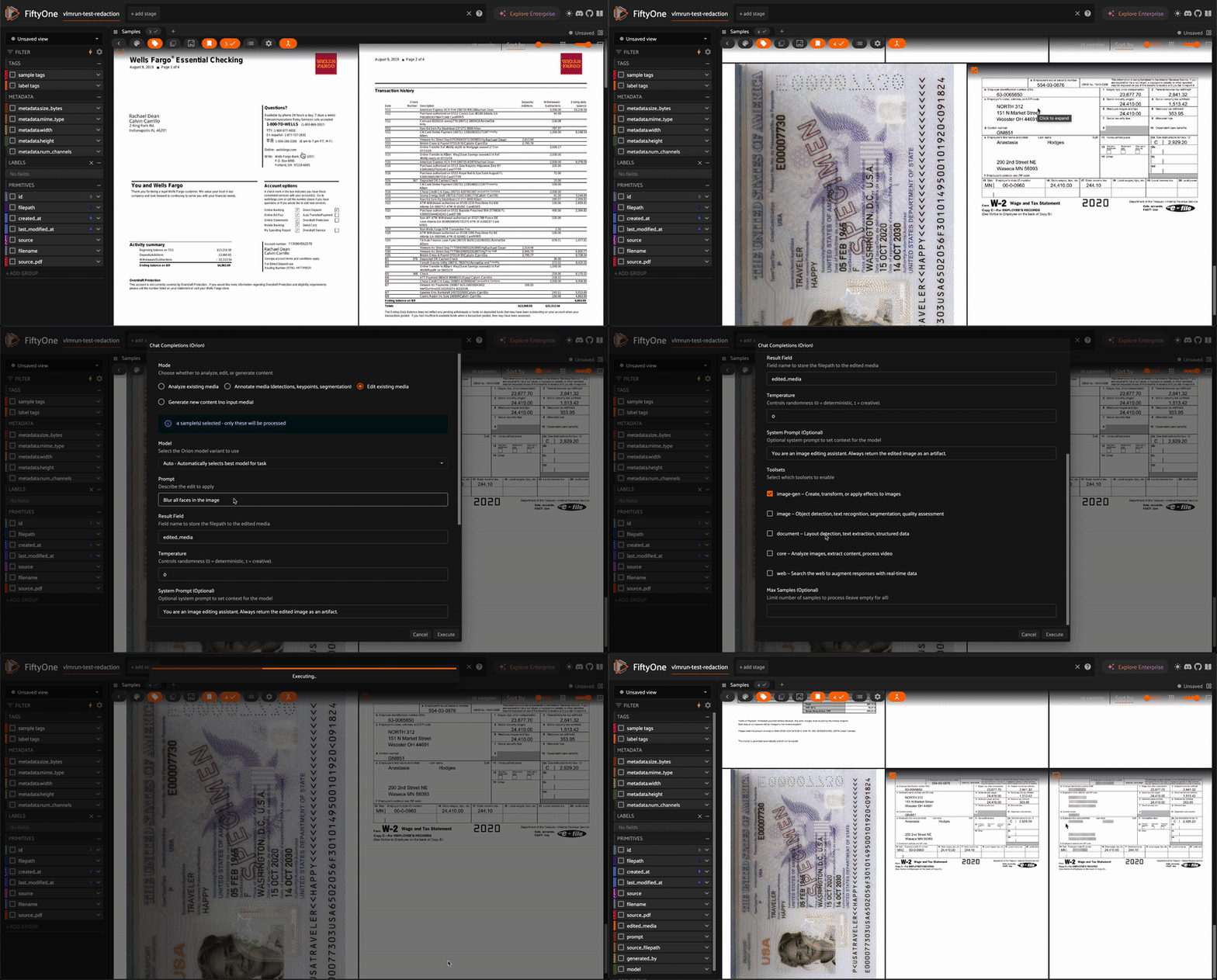
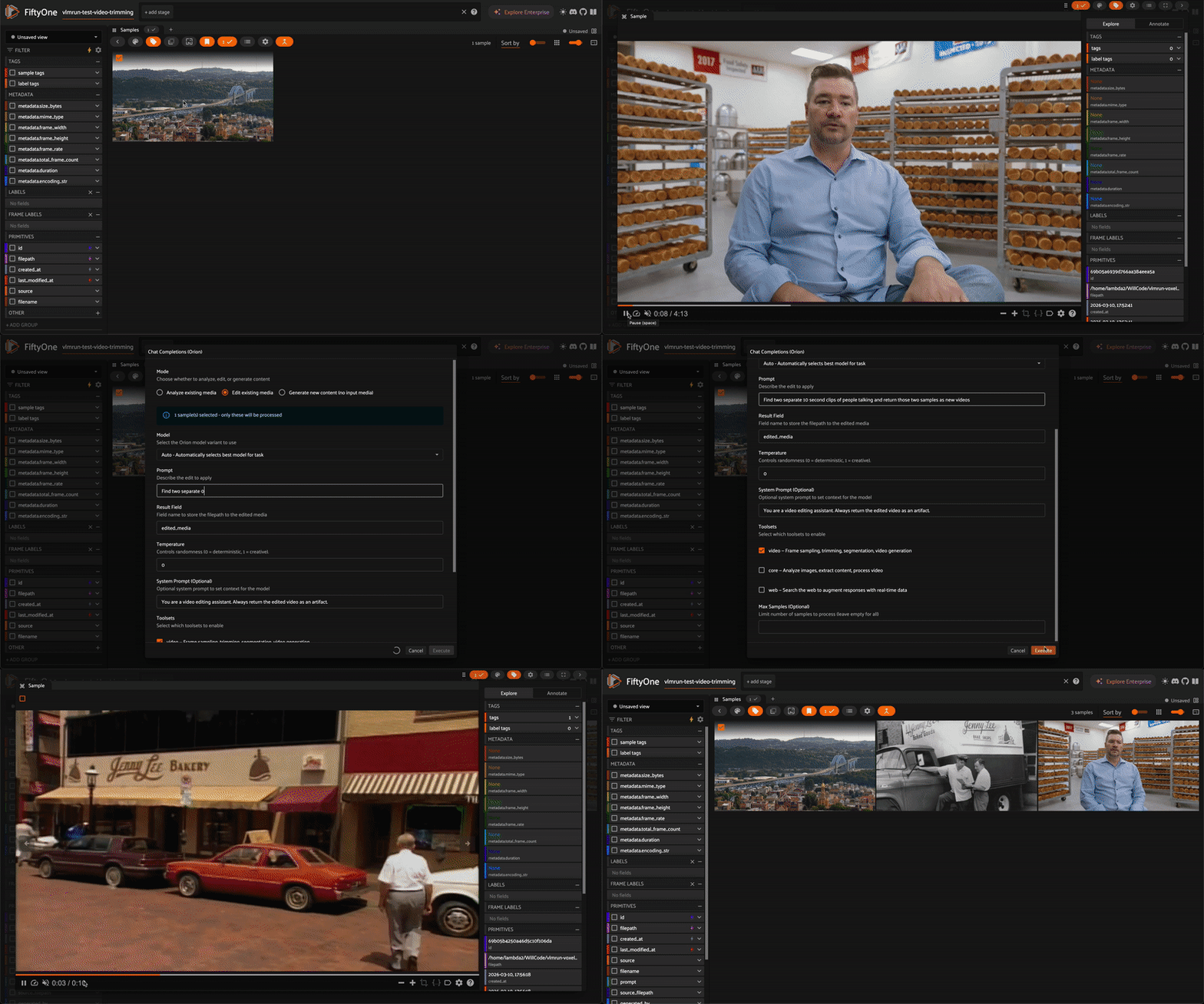
Flexible media analysis and content generation using VLM Run’s Orion chat completions API with natural language prompts. Defaults to the Orion 2 model family (code-execution agents); Orion 1 remains selectable.
How to use:
Press
`or clickBrowse operationsto open the operator listSearch for “Chat Completions” and select it
Choose a mode, enter your prompt, and click Execute
The operator automatically detects your dataset’s media type (image, video, or document) and filters the available modes and toolsets to only show compatible options.
Modes:
Analyze — Describe, caption, or extract information from your media using natural language prompts. Results are stored as text in a sample field, along with model and usage metadata fields. Works with images, videos, and PDFs.
Annotate — Produce spatial annotations: bounding boxes (Detections), keypoints, or segmentation masks. Results are stored as native FiftyOne label types. Available for image and document datasets (not video).
Edit — Modify existing media with natural language instructions (e.g., “Blur all faces”, “Trim to the first 5 seconds”). Edited files are saved and added to the dataset with the
vlmrun_editedtag.Generate — Create new images or videos from text prompts (no input media required). Supports generating multiple outputs at once. Generated files are saved and added to the dataset with the
vlmrun_generatedtag.
Options:
Option |
Description |
|---|---|
Model |
Orion 2 (default) or Orion 1 variant — |
Prompt |
Natural language instruction for the task |
Output Type |
Type of spatial annotation to produce: Detections, Keypoints, or Segmentation masks (Annotate mode only) |
Result Field |
Field name to store the output (default varies by mode) |
Temperature |
Controls randomness (0 = deterministic, 1 = creative) |
System Prompt |
Optional context-setting prompt |
Toolsets |
Select which tool categories to enable (filtered by media type) |
Number of Generations |
How many items to generate (Generate mode only) |
Max Samples |
Limit number of samples to process |
Media type filtering:
Dataset Type |
Available Modes |
Generate Toolset |
|---|---|---|
Image |
Analyze, Annotate, Edit, Generate |
Image Generation |
Video |
Analyze, Edit, Generate |
Video |
Document/PDF |
Analyze, Annotate, Edit, Generate |
Image Generation |
Additional features:
Select specific samples before opening the operator to process only those
Artifacts (images, videos, audio, documents) are automatically downloaded and added as new dataset samples
Additional Operators#
Detection Operators
object_detection#
Detect and localize common objects in images with bounding box coordinates.
This operator uses VLM Run’s object detection domain with visual grounding to extract precise bounding boxes in normalized xywh format:
# Detect objects with visual grounding
from vlmrun import VLMRun

client = VLMRun(api_key="your-api-key")
result = client.run(
    "image.object-detection",
    image_path,
    grounding=True
)
The operator adds detections to your dataset with:
Bounding boxes in normalized coordinates
Confidence scores for each detection
Object labels
person_detection#
Specialized person detection with enhanced accuracy for human-centric applications.
This operator uses VLM Run’s person detection domain optimized for detecting people in various scenarios:
# Detect people with high accuracy
client.run(
    "image.person-detection",
    image_path,
    grounding=True
)
Features:
High-accuracy person detection
Optimized for challenging scenarios (crowds, occlusions)
Precise bounding boxes with confidence scores
Document Operators
invoice_parsing#
Extract structured data from invoice documents with field-level visual grounding.
This operator uses VLM Run’s invoice parsing domain:
# Parse invoice and extract structured data
client.run(
    "document.invoice-parsing",
    invoice_path,
    grounding=True
)
Extracts:
Invoice totals and line items
Vendor and customer information
Dates, invoice numbers, and payment terms
Tax and discount information
Visual grounding for each extracted field (optional)
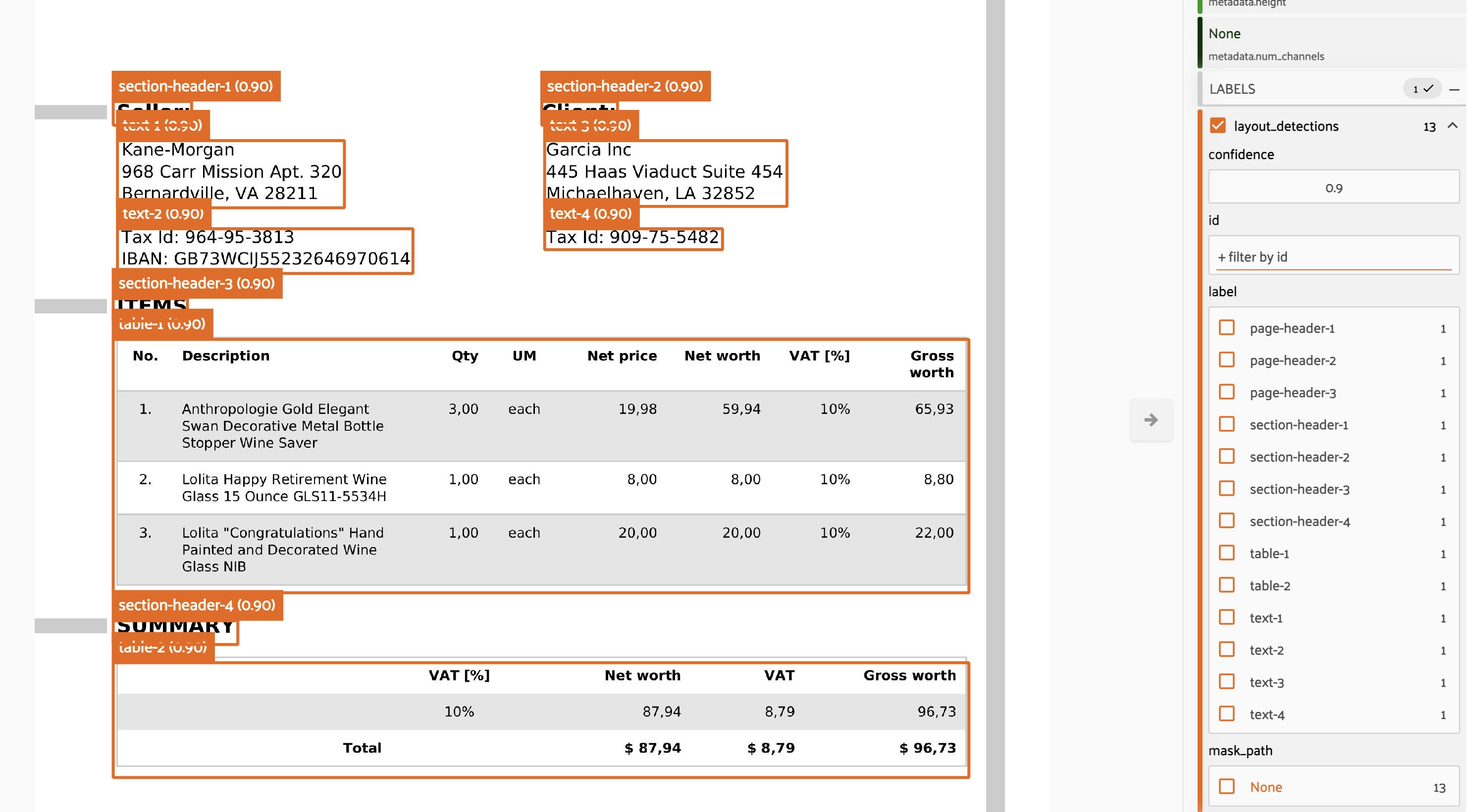
layout_detection#
Analyze document layout and identify structural elements with precise localization.
This operator uses VLM Run’s layout detection capabilities:
# Detect layout elements in documents
client.run(
    "document.layout-detection",
    document_path,
    grounding=True
)
Identifies:
Text regions and columns
Headers, footers, and body text
Tables, figures, and images
Captions and footnotes
Bounding boxes for each layout element
Video Operators
video_transcription#
Transcribe audio and analyze video content with multiple analysis modes.
This operator provides comprehensive video analysis using VLM Run’s video understanding capabilities:
# Transcribe video with various analysis modes
client.run(
    "video.transcription",  # or other modes
    video_path
)
Supported modes:
transcription: Audio-to-text transcription with timestamps
comprehensive: Full video analysis (audio + visual + activities)
objects: Object detection across video frames
scenes: Scene classification and changes
activities: Activity and action recognition
Each mode provides temporal information and can be combined for comprehensive video understanding.
Visual Grounding#
When enabled, visual grounding provides bounding box coordinates in normalized xywh format:
x: horizontal position of top-left corner (0-1)y: vertical position of top-left corner (0-1)w: width of the bounding box (0-1)h: height of the bounding box (0-1)
This allows for precise localization of detected objects, text regions, or document elements directly on your images.
Supported Formats#
Images: JPEG, PNG, BMP, TIFF, and other common formats
Documents: PDF files and document images
Videos: MP4, AVI, MOV, MKV, WEBM, FLV, WMV, M4V
Execution Modes#
All operators run in immediate execution mode, processing directly in the FiftyOne App.