
Note
This is a community plugin, an external project maintained by its respective author. Community plugins are not part of FiftyOne core and may change independently. Please review each plugin’s documentation and license before use.

FiftyOne + Weights & Biases Plugin#
Track your computer vision experiments with complete data-model lineage.
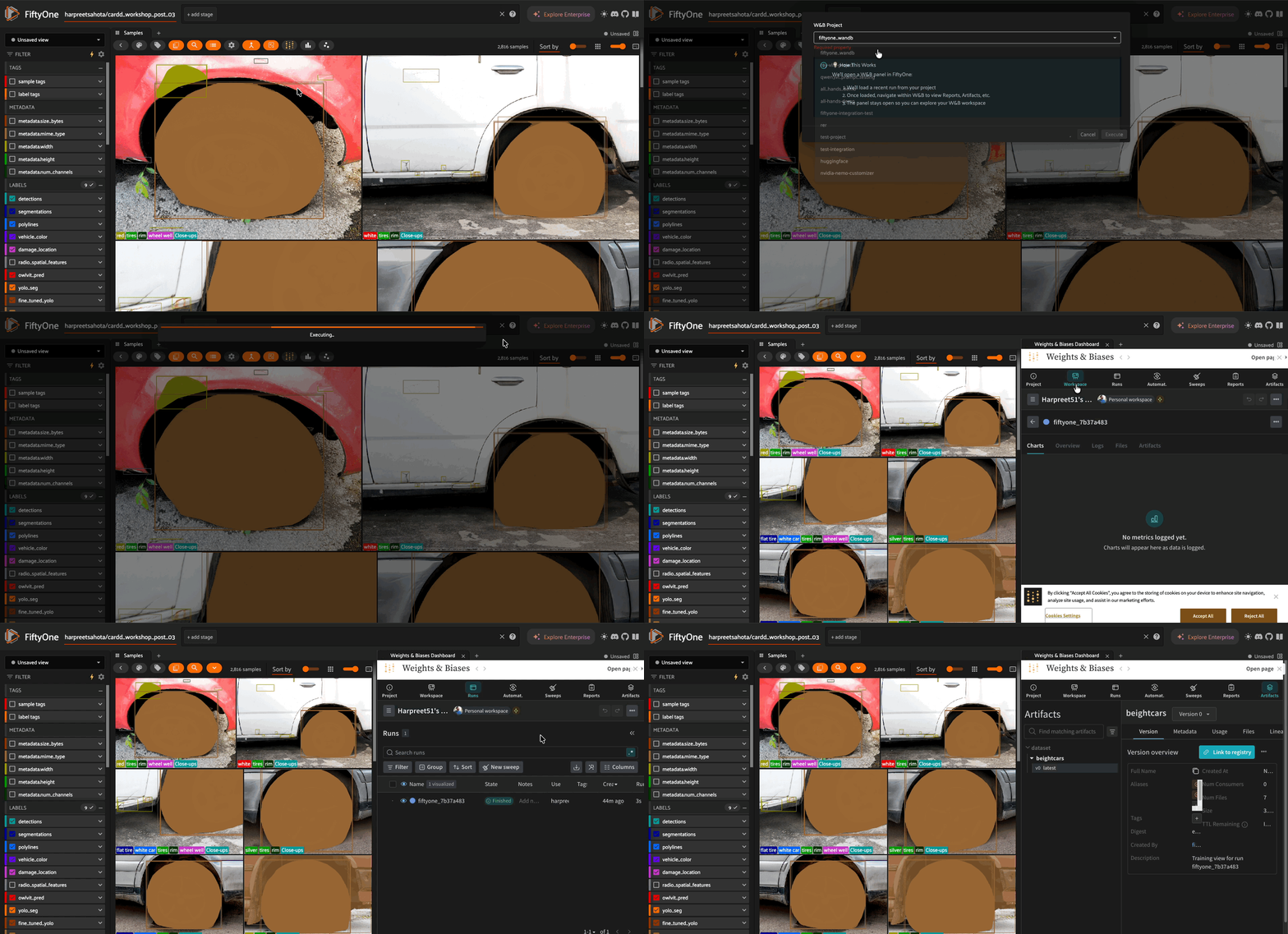
This plugin connects FiftyOne datasets with Weights & Biases to enable reproducible, data-centric ML workflows.
What You Can Do#
Track training data - Log curated FiftyOne views as W&B dataset artifacts
Track model predictions - Log inference results with detection-level granularity
Track VLM outputs - Special support for vision-language model workflows
Reproduce experiments - Recreate exact training views from W&B artifacts
Compare strategies - A/B test data curation, model versions, and prompting approaches
Installation#
# Install dependencies
pip install -U fiftyone wandb

# Download and install plugin
fiftyone plugins download https://github.com/harpreetsahota204/fiftyone_wandb_plugin

# Verify installation
fiftyone plugins list
# Should show: @harpreetsahota/wandb
Configuration#
Set your W&B credentials as environment variables:
# Required
export FIFTYONE_WANDB_API_KEY="your-api-key-here"
export FIFTYONE_WANDB_ENTITY="your-entity-name"

# Optional (can also specify per-operation)
export FIFTYONE_WANDB_PROJECT="your-project"

# Optional: Custom W&B URL for hosted/managed deployments (defaults to https://wandb.ai)
export FIFTYONE_WANDB_URL="https://your-custom-url.com"
Get your API key at wandb.ai/authorize.
Alternative: Use wandb login to cache credentials locally.
Complete Example#
For a complete end-to-end workflow demonstrating data curation strategies as experiment variables, see the using_fo_wandb_plugin.ipynb notebook.

The notebook walks through:
Loading a dataset and computing data quality metrics
Creating multiple curation strategies (baseline, deduplicated, high-uniqueness, high-representativeness)
Logging each strategy to W&B before training
Training models on each strategy with full lineage tracking
Comparing results and recreating the winning strategy’s training data
Quick Start#
Log a Training View to W&B#
import fiftyone as fo
import fiftyone.operators as foo
import wandb

# Load and curate your data
dataset = fo.load_dataset("my_dataset")
train_view = dataset.match_tags("train")

# Start W&B run
wandb.init(project="my-project", name="experiment-1")

# Log the training view with all labels
log_view = foo.get_operator("@harpreetsahota/wandb/log_fiftyone_view_to_wandb")
log_view(
    train_view,
    project="my-project",
    run_id=wandb.run.id,
    include_labels=True  # Logs all label types to W&B Table
)

# Train your model...
wandb.finish()
What gets logged to W&B:
Sample IDs (for exact reproducibility)
All label fields (Detection, Classification, Segmentation, etc.)
Dataset statistics and metadata
Thumbnail images in interactive W&B Tables
Log Model Predictions#
import fiftyone.zoo as foz

# Load model and run inference
model = foz.load_zoo_model("yolov8n-coco-torch")
dataset.apply_model(model, label_field="predictions")

# Log predictions to W&B
log_preds = foo.get_operator("@harpreetsahota/wandb/log_model_predictions")
result = log_preds(
    dataset,
    model_name="yolov8n",
    model_version="v1.0",
    predictions_field="predictions",
    project="my-project"
)

print(f"Logged {result['total_predictions']} predictions")
print(f"View in W&B: {result['wandb_url']}")
What gets logged:
Per-sample prediction counts (e.g.,
"person(5), car(3), dog(2)")Average confidence scores
Class distribution across all predictions
Low-confidence label IDs for active learning
Recreate a Training View from W&B#
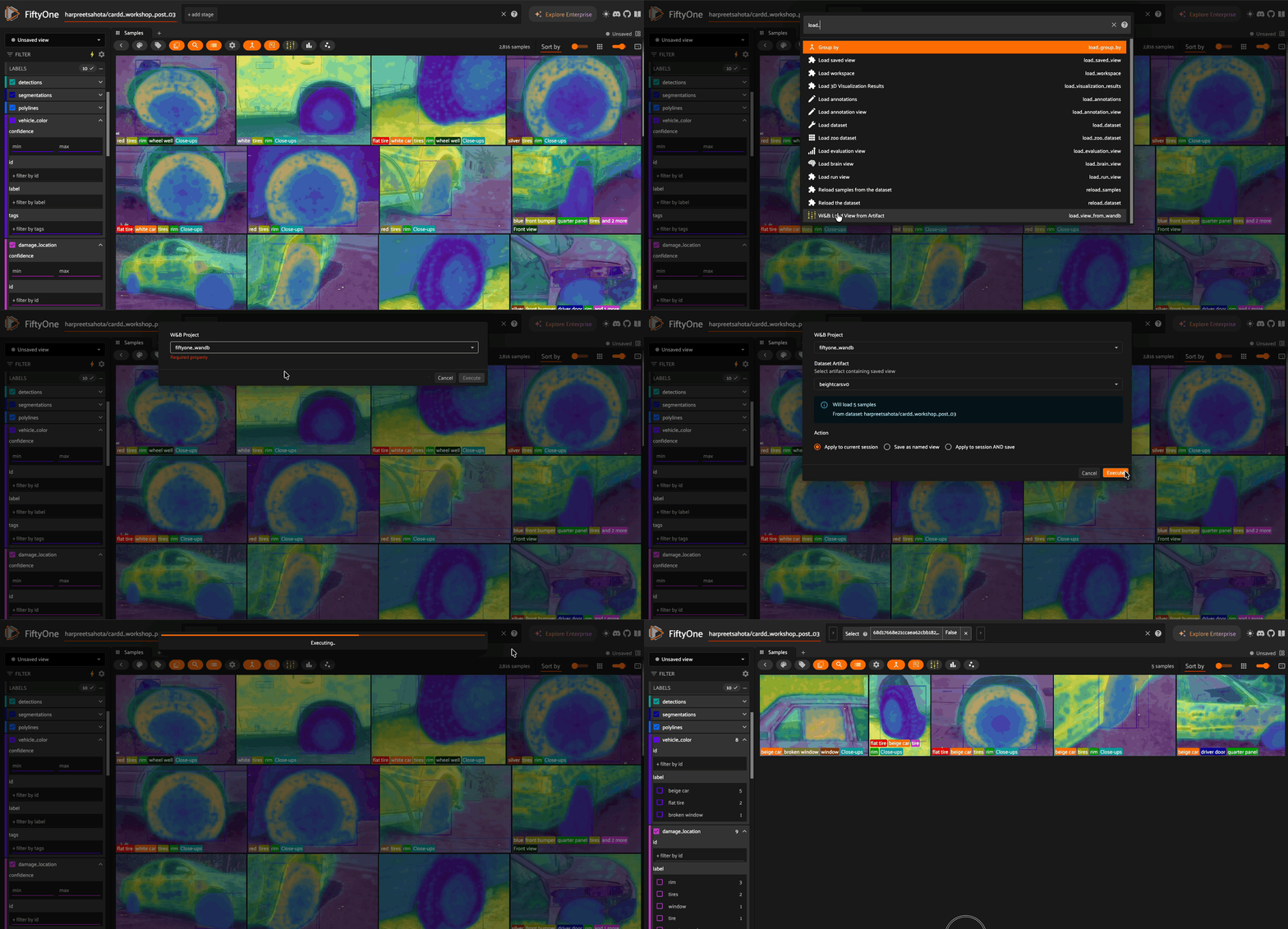
Every training view is stored with sample IDs in W&B metadata. Recreate views months later:
import fiftyone as fo
import wandb

# Download the artifact
api = wandb.Api()
artifact = api.artifact("entity/project/training_view:v2")

# Get exact sample IDs used for training
sample_ids = artifact.metadata["sample_ids"]

# Recreate the view instantly
dataset = fo.load_dataset("my_dataset")
train_view = dataset.select(sample_ids)

print(f"Recreated training view with {len(train_view)} samples")
Or use the plugin operator directly:
load_view = foo.get_operator("@harpreetsahota/wandb/load_view_from_wandb")
recreated_view = load_view(
    dataset,
    project="my-project",
    artifact="training_view:latest"
)
Using the FiftyOne App#
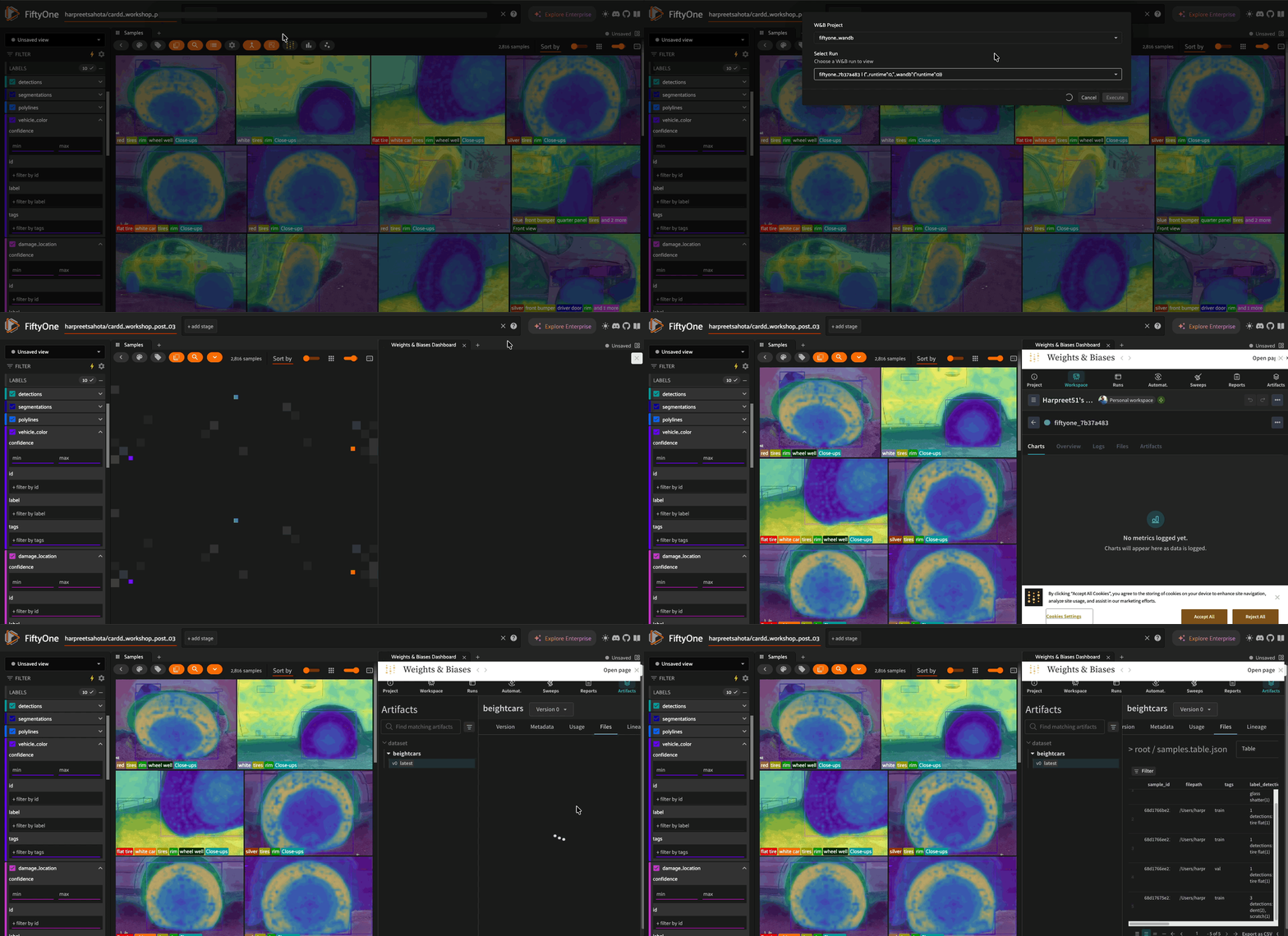
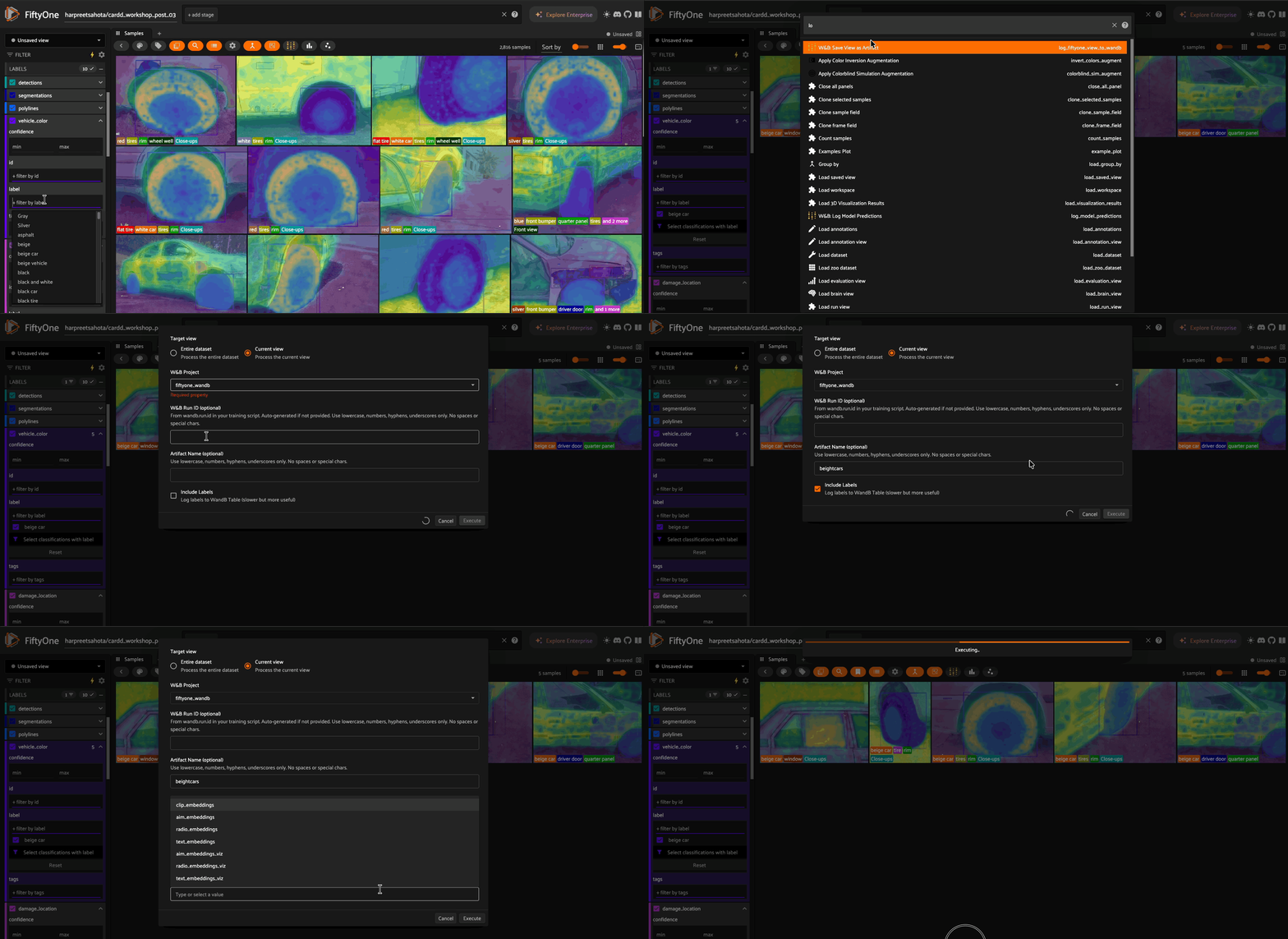
All operators have interactive UIs in the FiftyOne App:
Open your dataset:
fo.launch_app(dataset)Press backtick (`) to open the operators menu
Select a W&B operator:
“W&B: Save View as Artifact” - Log training data
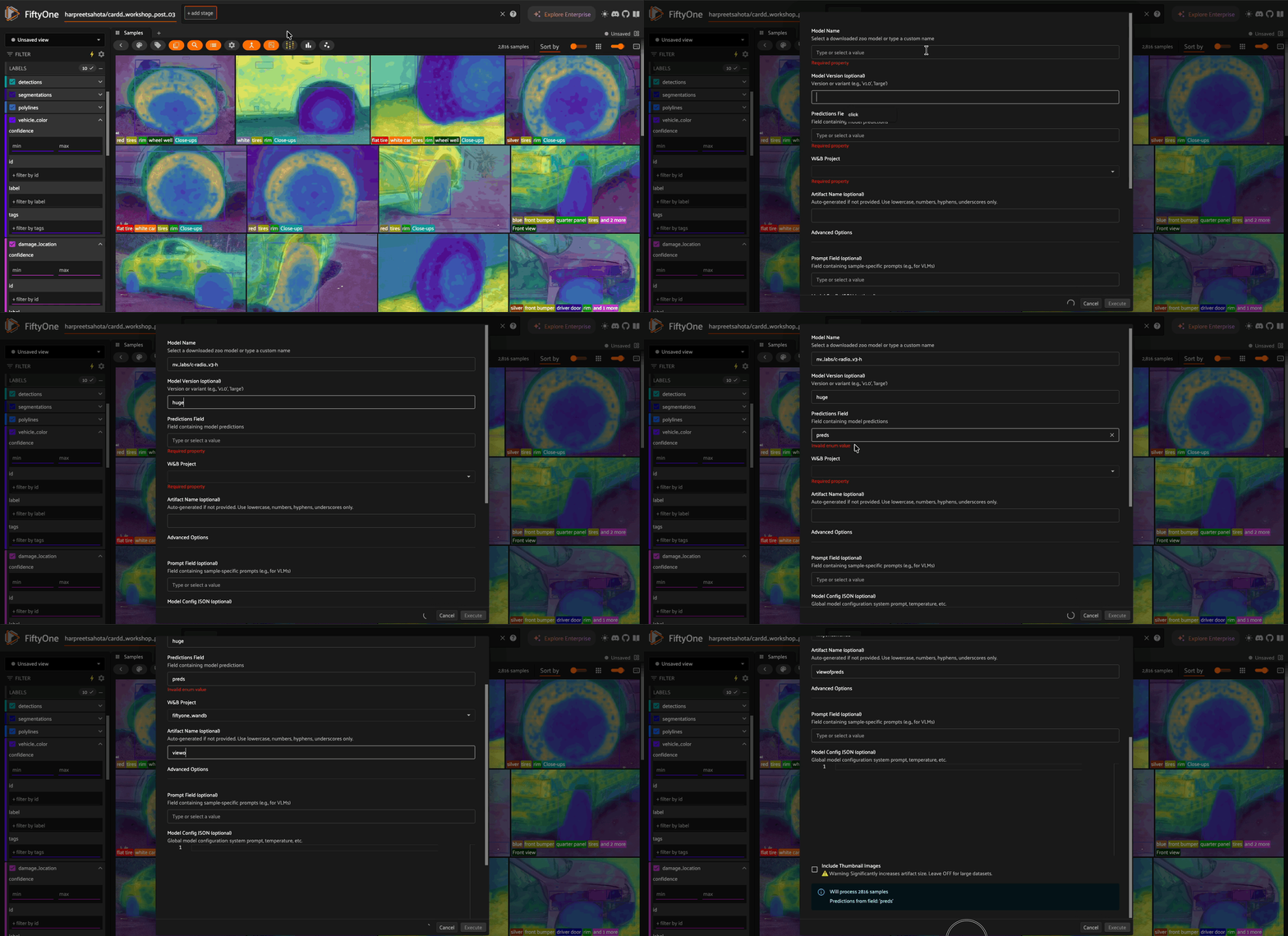
“W&B: Log Model Predictions” - Log inference results
“W&B: Load View from Artifact” - Recreate views
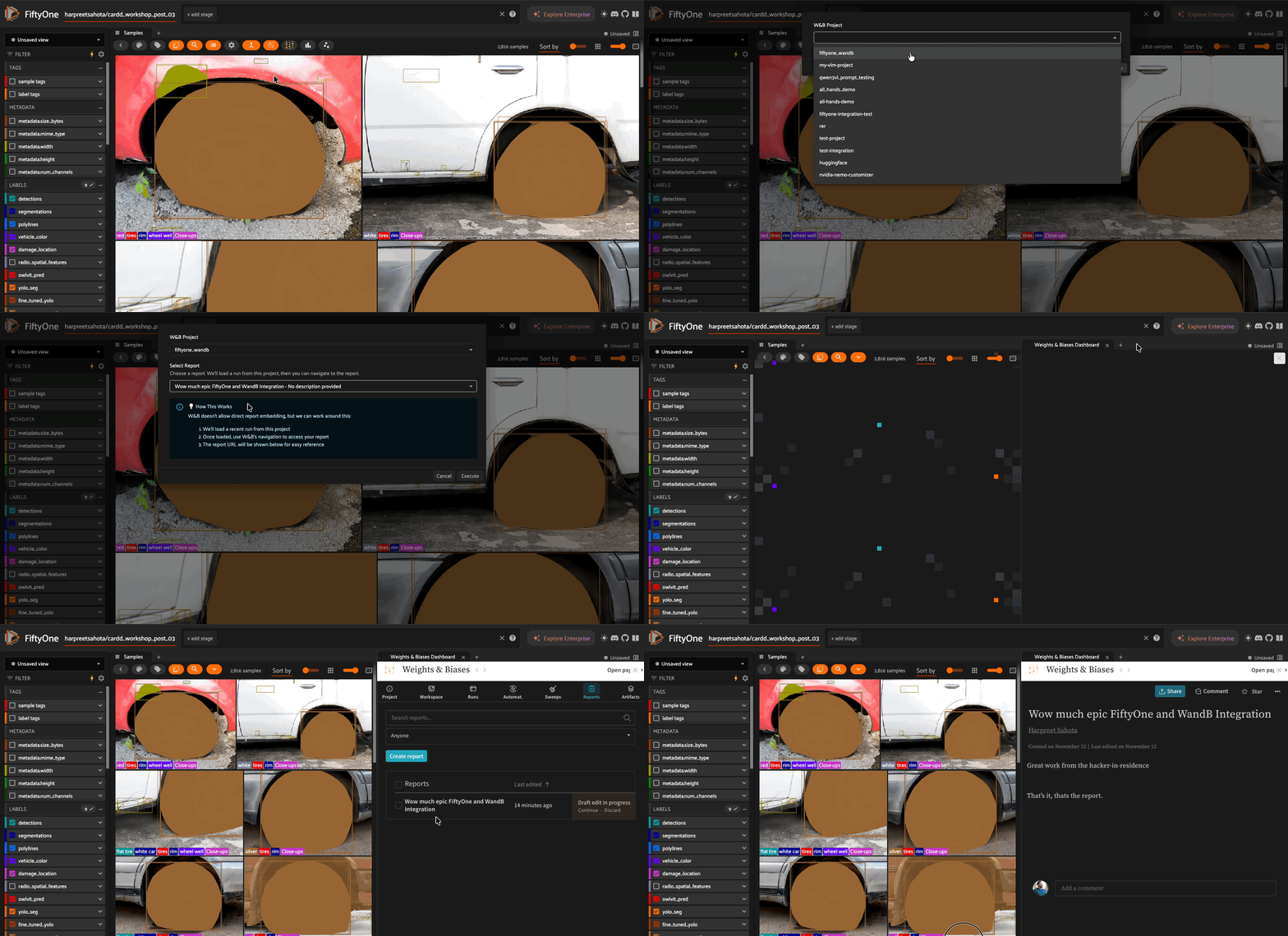
“Show W&B Run” - View training curves alongside your data
“Show W&B Report” - Embed reports in the panel
Plugin Operators#
Core Operators#
Operator |
Purpose |
|---|---|
|
Log training data views as W&B artifacts |
|
Log inference results to W&B |
|
Recreate FiftyOne view from W&B artifact |
|
Link W&B run to FiftyOne dataset |
|
Display W&B run in FiftyOne panel |
|
Display W&B report in FiftyOne panel |
|
Open W&B panel in FiftyOne App |
|
Retrieve run metadata |
Training Workflow Examples#
The plugin also includes example operators for training workflows:
Operator |
Purpose |
|---|---|
|
Train YOLO models with W&B tracking |
|
Apply YOLO models from W&B model registry |
These demonstrate how to build end-to-end training pipelines with full data-model lineage. See the notebook for usage examples.
Future plans: We’re working on adding support for Hugging Face SFT Trainer workflows. Contributions welcome!
Supported Label Types#
The plugin automatically handles all 15 FiftyOne label types:
Type |
Format in W&B Table |
|---|---|
Classification |
|
Detection |
|
Detections |
|
Polyline |
|
Polylines |
|
Keypoint |
|
Keypoints |
|
Segmentation |
|
Heatmap |
|
TemporalDetection |
|
TemporalDetections |
|
GeoLocation |
|
GeoLocations |
|
Regression |
|
Best Practices#
1. Log Training Views Early#
# Log right after wandb.init()
wandb.init(project="my-project")
log_view(view, project="my-project", run_id=wandb.run.id, include_labels=True)
# Train...
wandb.finish()
2. Use Descriptive Artifact Names#
# Good: descriptive name
log_view(view, artifact_name="coco_train_high_quality_v2", ...)

# Less ideal: auto-generated
log_view(view, ...)  # Creates "training_view_abc123"
3. Version Your Data#
# Track data improvements over time
log_view(view_v1, artifact_name="training_data_v1", ...)
# ... improve data curation ...
log_view(view_v2, artifact_name="training_data_v2", ...)
Troubleshooting#
“FIFTYONE_WANDB_API_KEY not set”#
export FIFTYONE_WANDB_API_KEY="your-key"
# Or: wandb login
“wandb is not installed”#
pip install wandb
“Could not find W&B run”#
Verify project name is correct
Ensure run ID exists in W&B
Check you have access to the project
Run must be finished before calling
log_fiftyone_view_to_wandb
Large datasets are slow#
For large datasets with include_labels=True, the operator automatically delegates to a background process. You’ll see a progress bar in the FiftyOne App.
To keep artifacts small:
Set
include_labels=False(lightweight mode)Use
include_images=Falsewhen logging predictionsFilter your view before logging
Links#
Contributing#
Have a training workflow you’d like to add? PRs are welcome! The YOLO operators serve as examples of how to integrate your own fine-tuning pipelines with full W&B tracking.
License#
This plugin is licensed under the Apache 2.0 license.