#### NOTE
This is a **community plugin**, an external project maintained by its respective author.
Community plugins are not part of FiftyOne core and may change independently.
Please review each plugin’s documentation and license before use.

# ShowUI Model Integration for FiftyOne
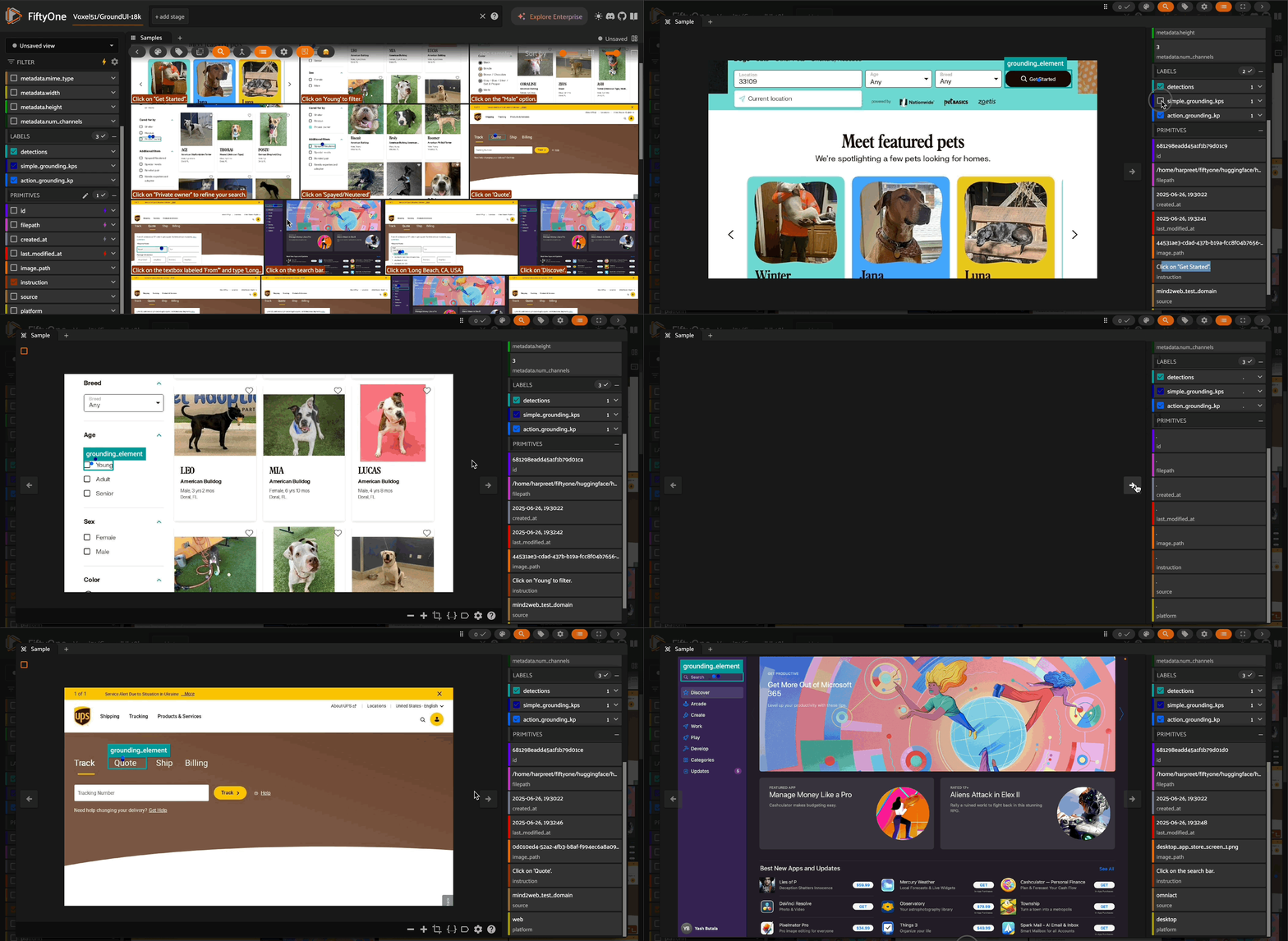
This repository provides a FiftyOne model integration for ShowUI, a vision-language model designed for GUI understanding and interaction. ShowUI can perform two main operations: simple grounding (locating UI elements) and action grounding (determining actions to take on UI elements).
 ## Features
- **Simple Grounding**: Locate UI elements based on text descriptions
- **Action Grounding**: Determine specific actions to take on UI elements
- **FiftyOne Integration**: Seamless integration with FiftyOne datasets and workflows
- **GPU Quantization Support**: Optional 4-bit quantization for CUDA devices
- **Multi-Action Support**: Handles multiple actions in a single output
- **Smart Position Handling**: Automatic positioning for actions without explicit coordinates
## Installation
Make sure you have the required dependencies:
```bash
pip install fiftyone torch transformers qwen-vl-utils pillow opencv-python matplotlib numpy
```
## Quick Start
### Load Dataset and Model
```python
import fiftyone as fo
from fiftyone.utils.huggingface import load_from_hub
import fiftyone.zoo as foz
# Load samples from the GUI Act dataset
dataset = load_from_hub(
"Voxel51/GroundUI-18k",
max_samples=100,
shuffle=True,
overwrite=True
)
# Register the model source
foz.register_zoo_model_source("https://github.com/harpreetsahota204/ShowUI", overwrite=True)
# Load the ShowUI model
model = foz.load_zoo_model(
"showlab/ShowUI-2B",
quantized=True # only for GPU
# install_requirements=True, # uncomment to install requirements
)
```
### Usage Patterns
#### Using Dataset Fields
You can use existing fields from your dataset by specifying the field name:
```python
dataset.apply_model(model, prompt_field="", label_field="")
```
#### Using a Single Prompt
Apply the same prompt across all samples:
```python
model.prompt = "Locate the elements of this UI that a user can interact with."
dataset.apply_model(model, label_field="one_prompt")
```
### Operation Modes
#### Simple Grounding
Locates UI elements and returns coordinates:
```python
model.operation = "simple_grounding"
dataset.apply_model(
model,
prompt_field="instruction", # use a field from the dataset
label_field="simple_grounding_kps"
)
```
**Output Format**: `[0.14, 0.53]` - normalized x,y coordinates
#### Action Grounding
Determines actions to take on UI elements:
```python
model.operation = "action_grounding"
dataset.apply_model(
model,
prompt_field="instruction", # use a field from the dataset
label_field="action_grounding_kp"
)
```
**Output Format**: `{'action': 'CLICK', 'value': 'element', 'position': [x,y]}`
## Model Operations
### Simple Grounding
- **Purpose**: Locate UI elements based on text descriptions
- **System Prompt**: “Based on the screenshot of the page, I give a text description and you give its corresponding location. The coordinate represents a clickable location [x, y] for an element, which is a relative coordinate on the screenshot, scaled from 0 to 1.”
- **Output**: Normalized coordinates as `[x, y]`
### Action Grounding
- **Purpose**: Determine specific actions for web/mobile UI automation
- **System Prompt**: Comprehensive prompt defining 11 action types (CLICK, INPUT, SELECT, HOVER, ANSWER, ENTER, SCROLL, SELECT_TEXT, COPY, SWIPE, TAP)
- **Output**: Action dictionary with action type, value, and position
## FiftyOne Integration
The model outputs are automatically converted to FiftyOne Keypoints with intelligent positioning:
### Standard Actions
- **Simple Grounding**: Creates keypoints with label “grounding_point”
- **Actions with positions**: Creates keypoints with action-specific labels (e.g., “click”, “input”) and includes the action value
### Special Position Handling
- **SCROLL actions**: Automatically positioned at `[0.95, 0.5]` (far right, middle of screen)
- **ANSWER actions**: Automatically positioned at `[0.5, 0.5]` (center of screen)
- **ENTER/COPY actions**: Positioned at `[0.5, 0.5]` (center of screen)
- **SWIPE/SELECT_TEXT actions**: Support dual coordinates `[[x1,y1], [x2,y2]]` for start/end positions
### Multi-Action Support
The integration automatically handles multiple actions in a single output, such as:
```default
{'action': 'CLICK', 'value': None, 'position': [0.14, 0.1]},{'action': 'INPUT', 'value': '10023', 'position': [0.14, 0.1]}
```
Each action is converted to a separate keypoint.
## Configuration Options
- **quantized**: Enable 4-bit quantization (CUDA only)
- **operation**: Set to “simple_grounding” or “action_grounding”
- **prompt**: Set a default prompt for all samples
- **system_prompt**: Override the default system prompt
## Device Support
- **CUDA**: Full support with optional quantization
- **MPS (Apple Silicon)**: Supported without quantization
- **CPU**: Supported without quantization
## Example Workflow
```python
# Load your dataset
dataset = load_from_hub("Voxel51/GroundUI-18k", max_samples=50)
# Load model
model = foz.load_zoo_model("showlab/ShowUI-2B", quantized=True)
# Simple grounding
model.operation = "simple_grounding"
model.prompt = "Find the login button"
dataset.apply_model(model, label_field="login_locations")
# Action grounding
model.operation = "action_grounding"
model.prompt = "How to click the submit button?"
dataset.apply_model(model, label_field="submit_actions")
# View results in FiftyOne App
session = fo.launch_app(dataset)
```
## Action Types Supported
1. **CLICK**: Click on an element - position `[x,y]`
2. **INPUT**: Type text into an element - position `[x,y]`, value contains text
3. **SELECT**: Select a value for an element - position `[x,y]`
4. **HOVER**: Hover over an element - position `[x,y]`
5. **ANSWER**: Answer a question - position auto-set to `[0.5, 0.5]`, value contains answer
6. **ENTER**: Perform enter operation - position auto-set to `[0.5, 0.5]`
7. **SCROLL**: Scroll the screen - position auto-set to `[0.95, 0.5]`, value contains direction
8. **SELECT_TEXT**: Select text content - position `[[x1,y1], [x2,y2]]` for start/end
9. **COPY**: Copy text - position auto-set to `[0.5, 0.5]`, value contains text to copy
10. **SWIPE**: Swipe on mobile screens - position `[[x1,y1], [x2,y2]]` for start/end
11. **TAP**: Tap on mobile elements - position `[x,y]`
## Position Formats
- **Single Point**: `[x, y]` - Most actions (CLICK, INPUT, SELECT, HOVER, TAP)
- **Dual Points**: `[[x1,y1], [x2,y2]]` - Range actions (SWIPE, SELECT_TEXT)
- **Auto-Positioned**: Actions without explicit coordinates get smart default positions
- **None**: Some actions legitimately have no position, handled automatically
## Notes
- All coordinates are normalized to [0,1] range
- Position coordinates represent relative locations on the screenshot
- Actions without positions are automatically given meaningful default locations for visualization
- The model supports both web and mobile UI screenshots
- Multiple actions in a single output are automatically parsed and separated
# Citation
```bibtex
@misc{lin2024showui,
title={ShowUI: One Vision-Language-Action Model for GUI Visual Agent},
author={Kevin Qinghong Lin and Linjie Li and Difei Gao and Zhengyuan Yang and Shiwei Wu and Zechen Bai and Weixian Lei and Lijuan Wang and Mike Zheng Shou},
year={2024},
eprint={2411.17465},
archivePrefix={arXiv},
primaryClass={cs.CV},
url={https://arxiv.org/abs/2411.17465},
}
```
## Features
- **Simple Grounding**: Locate UI elements based on text descriptions
- **Action Grounding**: Determine specific actions to take on UI elements
- **FiftyOne Integration**: Seamless integration with FiftyOne datasets and workflows
- **GPU Quantization Support**: Optional 4-bit quantization for CUDA devices
- **Multi-Action Support**: Handles multiple actions in a single output
- **Smart Position Handling**: Automatic positioning for actions without explicit coordinates
## Installation
Make sure you have the required dependencies:
```bash
pip install fiftyone torch transformers qwen-vl-utils pillow opencv-python matplotlib numpy
```
## Quick Start
### Load Dataset and Model
```python
import fiftyone as fo
from fiftyone.utils.huggingface import load_from_hub
import fiftyone.zoo as foz
# Load samples from the GUI Act dataset
dataset = load_from_hub(
"Voxel51/GroundUI-18k",
max_samples=100,
shuffle=True,
overwrite=True
)
# Register the model source
foz.register_zoo_model_source("https://github.com/harpreetsahota204/ShowUI", overwrite=True)
# Load the ShowUI model
model = foz.load_zoo_model(
"showlab/ShowUI-2B",
quantized=True # only for GPU
# install_requirements=True, # uncomment to install requirements
)
```
### Usage Patterns
#### Using Dataset Fields
You can use existing fields from your dataset by specifying the field name:
```python
dataset.apply_model(model, prompt_field="", label_field="")
```
#### Using a Single Prompt
Apply the same prompt across all samples:
```python
model.prompt = "Locate the elements of this UI that a user can interact with."
dataset.apply_model(model, label_field="one_prompt")
```
### Operation Modes
#### Simple Grounding
Locates UI elements and returns coordinates:
```python
model.operation = "simple_grounding"
dataset.apply_model(
model,
prompt_field="instruction", # use a field from the dataset
label_field="simple_grounding_kps"
)
```
**Output Format**: `[0.14, 0.53]` - normalized x,y coordinates
#### Action Grounding
Determines actions to take on UI elements:
```python
model.operation = "action_grounding"
dataset.apply_model(
model,
prompt_field="instruction", # use a field from the dataset
label_field="action_grounding_kp"
)
```
**Output Format**: `{'action': 'CLICK', 'value': 'element', 'position': [x,y]}`
## Model Operations
### Simple Grounding
- **Purpose**: Locate UI elements based on text descriptions
- **System Prompt**: “Based on the screenshot of the page, I give a text description and you give its corresponding location. The coordinate represents a clickable location [x, y] for an element, which is a relative coordinate on the screenshot, scaled from 0 to 1.”
- **Output**: Normalized coordinates as `[x, y]`
### Action Grounding
- **Purpose**: Determine specific actions for web/mobile UI automation
- **System Prompt**: Comprehensive prompt defining 11 action types (CLICK, INPUT, SELECT, HOVER, ANSWER, ENTER, SCROLL, SELECT_TEXT, COPY, SWIPE, TAP)
- **Output**: Action dictionary with action type, value, and position
## FiftyOne Integration
The model outputs are automatically converted to FiftyOne Keypoints with intelligent positioning:
### Standard Actions
- **Simple Grounding**: Creates keypoints with label “grounding_point”
- **Actions with positions**: Creates keypoints with action-specific labels (e.g., “click”, “input”) and includes the action value
### Special Position Handling
- **SCROLL actions**: Automatically positioned at `[0.95, 0.5]` (far right, middle of screen)
- **ANSWER actions**: Automatically positioned at `[0.5, 0.5]` (center of screen)
- **ENTER/COPY actions**: Positioned at `[0.5, 0.5]` (center of screen)
- **SWIPE/SELECT_TEXT actions**: Support dual coordinates `[[x1,y1], [x2,y2]]` for start/end positions
### Multi-Action Support
The integration automatically handles multiple actions in a single output, such as:
```default
{'action': 'CLICK', 'value': None, 'position': [0.14, 0.1]},{'action': 'INPUT', 'value': '10023', 'position': [0.14, 0.1]}
```
Each action is converted to a separate keypoint.
## Configuration Options
- **quantized**: Enable 4-bit quantization (CUDA only)
- **operation**: Set to “simple_grounding” or “action_grounding”
- **prompt**: Set a default prompt for all samples
- **system_prompt**: Override the default system prompt
## Device Support
- **CUDA**: Full support with optional quantization
- **MPS (Apple Silicon)**: Supported without quantization
- **CPU**: Supported without quantization
## Example Workflow
```python
# Load your dataset
dataset = load_from_hub("Voxel51/GroundUI-18k", max_samples=50)
# Load model
model = foz.load_zoo_model("showlab/ShowUI-2B", quantized=True)
# Simple grounding
model.operation = "simple_grounding"
model.prompt = "Find the login button"
dataset.apply_model(model, label_field="login_locations")
# Action grounding
model.operation = "action_grounding"
model.prompt = "How to click the submit button?"
dataset.apply_model(model, label_field="submit_actions")
# View results in FiftyOne App
session = fo.launch_app(dataset)
```
## Action Types Supported
1. **CLICK**: Click on an element - position `[x,y]`
2. **INPUT**: Type text into an element - position `[x,y]`, value contains text
3. **SELECT**: Select a value for an element - position `[x,y]`
4. **HOVER**: Hover over an element - position `[x,y]`
5. **ANSWER**: Answer a question - position auto-set to `[0.5, 0.5]`, value contains answer
6. **ENTER**: Perform enter operation - position auto-set to `[0.5, 0.5]`
7. **SCROLL**: Scroll the screen - position auto-set to `[0.95, 0.5]`, value contains direction
8. **SELECT_TEXT**: Select text content - position `[[x1,y1], [x2,y2]]` for start/end
9. **COPY**: Copy text - position auto-set to `[0.5, 0.5]`, value contains text to copy
10. **SWIPE**: Swipe on mobile screens - position `[[x1,y1], [x2,y2]]` for start/end
11. **TAP**: Tap on mobile elements - position `[x,y]`
## Position Formats
- **Single Point**: `[x, y]` - Most actions (CLICK, INPUT, SELECT, HOVER, TAP)
- **Dual Points**: `[[x1,y1], [x2,y2]]` - Range actions (SWIPE, SELECT_TEXT)
- **Auto-Positioned**: Actions without explicit coordinates get smart default positions
- **None**: Some actions legitimately have no position, handled automatically
## Notes
- All coordinates are normalized to [0,1] range
- Position coordinates represent relative locations on the screenshot
- Actions without positions are automatically given meaningful default locations for visualization
- The model supports both web and mobile UI screenshots
- Multiple actions in a single output are automatically parsed and separated
# Citation
```bibtex
@misc{lin2024showui,
title={ShowUI: One Vision-Language-Action Model for GUI Visual Agent},
author={Kevin Qinghong Lin and Linjie Li and Difei Gao and Zhengyuan Yang and Shiwei Wu and Zechen Bai and Weixian Lei and Lijuan Wang and Mike Zheng Shou},
year={2024},
eprint={2411.17465},
archivePrefix={arXiv},
primaryClass={cs.CV},
url={https://arxiv.org/abs/2411.17465},
}
```