#### NOTE
This is a **community plugin**, an external project maintained by its respective author.
Community plugins are not part of FiftyOne core and may change independently.
Please review each plugin’s documentation and license before use.

# Nanonets-OCR2 for FiftyOne
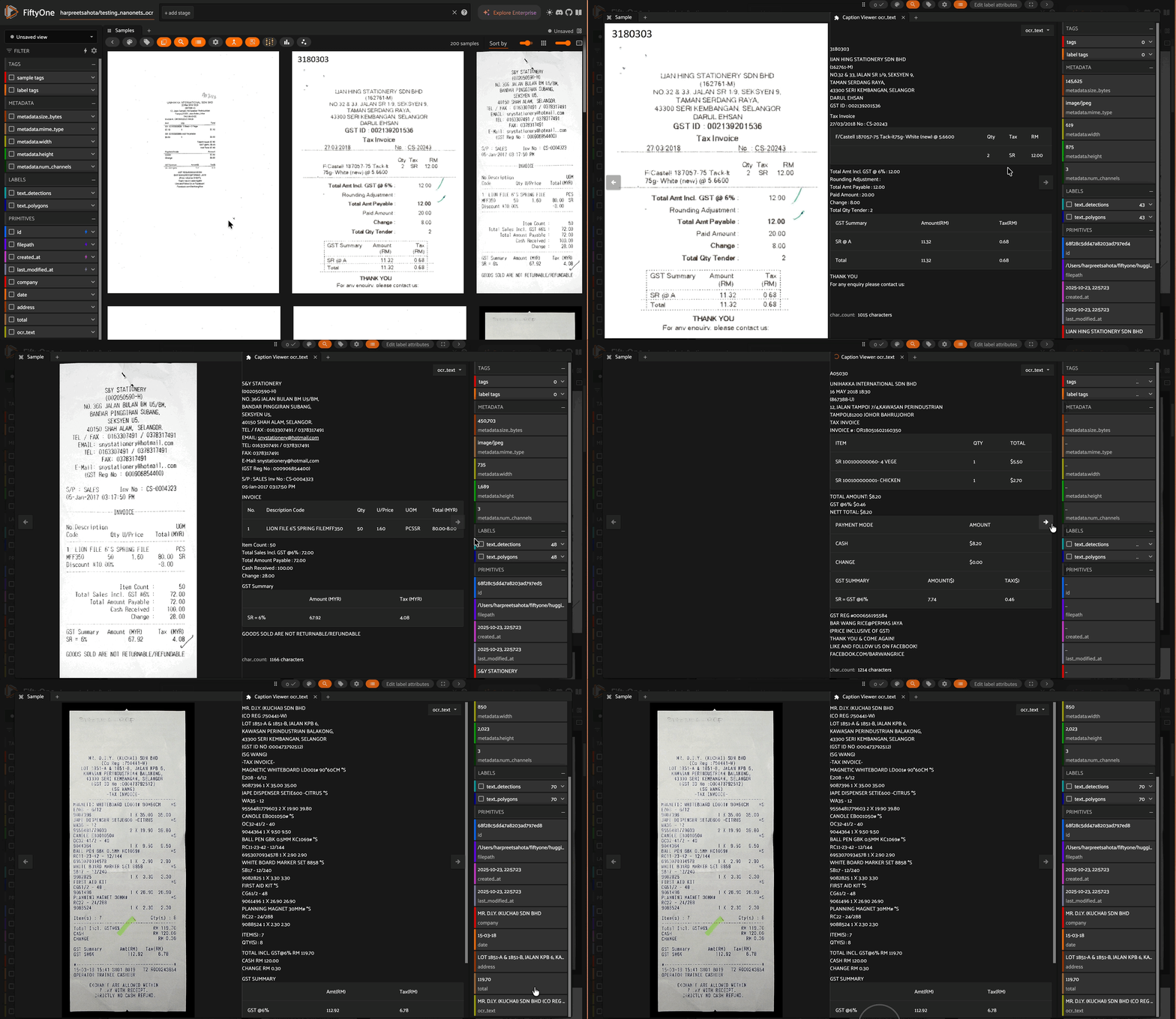
A FiftyOne Zoo Model integration for [Nanonets-OCR2](https://huggingface.co/nanonets/Nanonets-OCR2-3B), a powerful vision-language model that transforms documents into structured markdown with intelligent content recognition and semantic tagging.
## Features
Nanonets-OCR2 goes beyond traditional OCR by providing:
- **LaTeX Equation Recognition**: Converts mathematical formulas to LaTeX syntax
- **Intelligent Image Description**: Describes images within documents using `![]() ` tags
- **Signature Detection**: Isolates signatures with `` tags
- **Watermark Extraction**: Detects watermarks with `` tags
- **Smart Checkbox Handling**: Converts checkboxes to Unicode symbols (, , )
- **Complex Table Extraction**: Outputs tables in HTML format
- **Flow Charts & Org Charts**: Extracts as Mermaid code
- **Handwritten Documents**: Trained on handwritten text across multiple languages
- **Multilingual Support**: English, Chinese, French, Spanish, Portuguese, German, Italian, Russian, Japanese, Korean, Arabic, and more
- **Visual Question Answering**: Provides answers directly from documents
## Installation
```bash
pip install fiftyone
```
## Usage
```python
import fiftyone as fo
import fiftyone.zoo as foz
from fiftyone.utils.huggingface import load_from_hub
# Load your dataset
dataset = load_from_hub("Voxel51/scanned_receipts", max_samples=200)
# Register the model source
foz.register_zoo_model_source(
"https://github.com/harpreetsahota204/nanonets_ocr2",
overwrite=True
)
# Load the model
model = foz.load_zoo_model("nanonets/Nanonets-OCR2-3B")
# Apply OCR to your dataset
dataset.apply_model(model, label_field="ocr_text")
# Launch the App to view results
session = fo.launch_app(dataset)
```
## Structured Output
The model returns text with semantic markup:
```markdown
Regular text extracted naturally
Inline equation: $E = mc^2$
` tags
- **Signature Detection**: Isolates signatures with `` tags
- **Watermark Extraction**: Detects watermarks with `` tags
- **Smart Checkbox Handling**: Converts checkboxes to Unicode symbols (, , )
- **Complex Table Extraction**: Outputs tables in HTML format
- **Flow Charts & Org Charts**: Extracts as Mermaid code
- **Handwritten Documents**: Trained on handwritten text across multiple languages
- **Multilingual Support**: English, Chinese, French, Spanish, Portuguese, German, Italian, Russian, Japanese, Korean, Arabic, and more
- **Visual Question Answering**: Provides answers directly from documents
## Installation
```bash
pip install fiftyone
```
## Usage
```python
import fiftyone as fo
import fiftyone.zoo as foz
from fiftyone.utils.huggingface import load_from_hub
# Load your dataset
dataset = load_from_hub("Voxel51/scanned_receipts", max_samples=200)
# Register the model source
foz.register_zoo_model_source(
"https://github.com/harpreetsahota204/nanonets_ocr2",
overwrite=True
)
# Load the model
model = foz.load_zoo_model("nanonets/Nanonets-OCR2-3B")
# Apply OCR to your dataset
dataset.apply_model(model, label_field="ocr_text")
# Launch the App to view results
session = fo.launch_app(dataset)
```
## Structured Output
The model returns text with semantic markup:
```markdown
Regular text extracted naturally
Inline equation: $E = mc^2$
![]() Description of chart showing sales data
CONFIDENTIAL
5
Checkboxes: Complete Incomplete
```
## Citation
```bibtex
@misc{Nanonets-OCR2,
title={Nanonets-OCR2: A model for transforming documents into structured markdown with intelligent content recognition and semantic tagging},
author={Souvik Mandal and Ashish Talewar and Siddhant Thakuria and Paras Ahuja and Prathamesh Juvatkar},
year={2025},
}
```
## Resources
- [Model Card](https://huggingface.co/nanonets/Nanonets-OCR2-3B)
- [GitHub](https://github.com/harpreetsahota204/nanonets_ocr2)
## License
See [LICENSE]() for details.
Description of chart showing sales data
CONFIDENTIAL
5
Checkboxes: Complete Incomplete
```
## Citation
```bibtex
@misc{Nanonets-OCR2,
title={Nanonets-OCR2: A model for transforming documents into structured markdown with intelligent content recognition and semantic tagging},
author={Souvik Mandal and Ashish Talewar and Siddhant Thakuria and Paras Ahuja and Prathamesh Juvatkar},
year={2025},
}
```
## Resources
- [Model Card](https://huggingface.co/nanonets/Nanonets-OCR2-3B)
- [GitHub](https://github.com/harpreetsahota204/nanonets_ocr2)
## License
See [LICENSE]() for details.