#### NOTE
This is a **community plugin**, an external project maintained by its respective author.
Community plugins are not part of FiftyOne core and may change independently.
Please review each plugin’s documentation and license before use.

# Multi Annotator Toolkit
This is a plugin for the [FiftyOne framework](https://github.com/voxel51/fiftyone) that allows analysis of multi-annotated data. It is associated with our WACV publication 1 looking into Label Convergence in Object Recognition as well as analysis of annotation errors/variations.
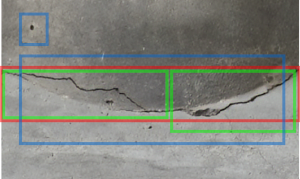
Example of noisy annotation on a concrete structure, annotated by multiple civil engineers. Different colors indicate different annotators.
## Contents
- [Disclaimer](#disclaimer)
- [What can be done with this plugin](#what-can-be-done-with-this-plugin)
- [Examples](#examples)
- [Installation](#installation)
- [Hello World](#multi-annotator-toolkit-hello-world-using-lvis)
- [Add own dataset](#adding-your-own-dataset)
- [Reference](#reference)
## Disclaimer
**The plugin is still under development, at this point only the basic feature are working and have not been tested on
any additional datasets besides LVIS.**
## What can be done with this plugin
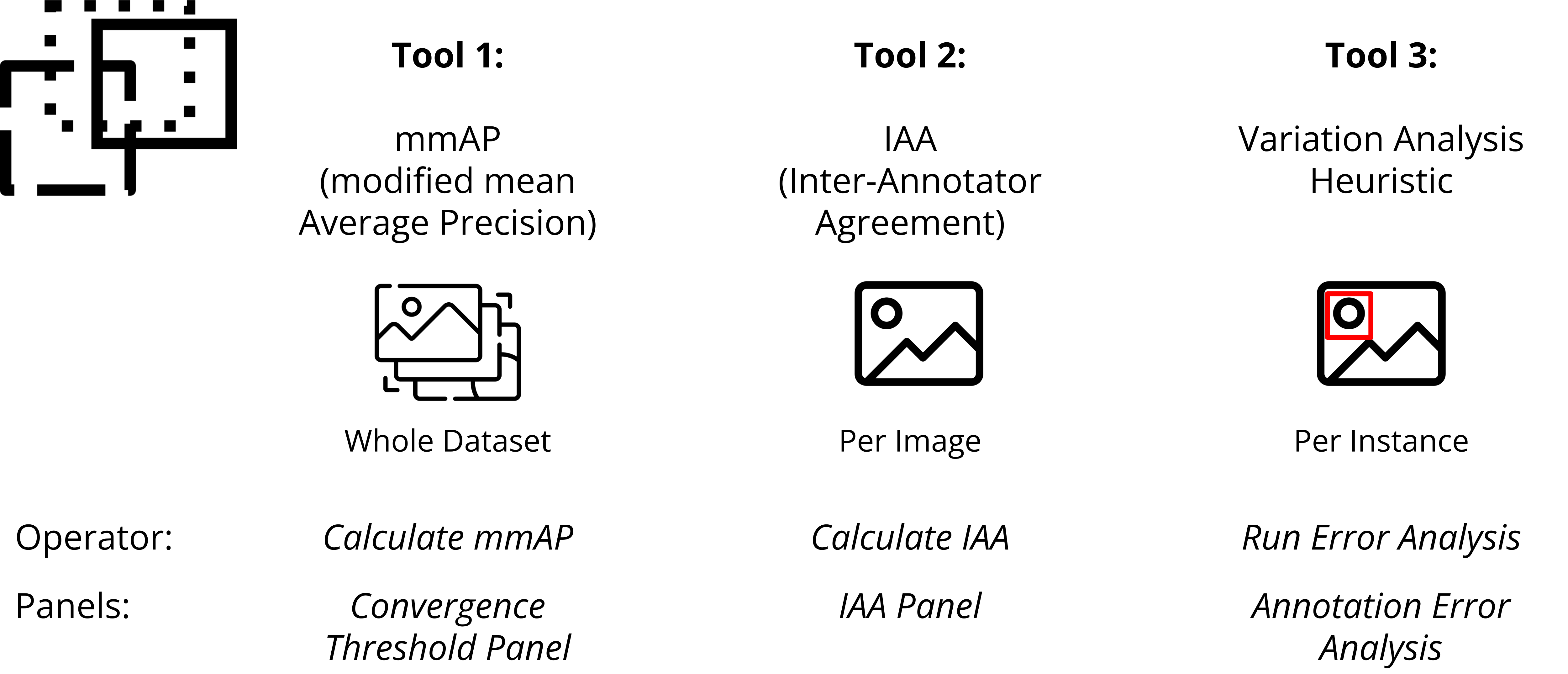
The plugin currently provides multiple functionalities to analyze dataset on three different levels - the whole dataset,
entire images or on a per-class basis.
## Examples
This example shows a user running the per-instance based error-analysis and selecting to visualize a specific variation-type. The stacked histograms show the error distribution for specific localization qualities and tasks.
Another example showing a user running the inter-annotator-calculation and afterwards visualizing images with bad agreement to inspect them. The hisgram can be set to different localization thresholds and tasks.
## Installation
Install fiftyone [as described](https://github.com/voxel51/fiftyone) on the official website.
Install this plugin:
```default
fiftyone plugins download https://github.com/Madave94/multi-annotator-toolkit
```
Check if plugin is installed:
```default
fiftyone plugins list
```
Install plugin dependencies as described in [requirements.txt]() using auto-install:
```default
fiftyone plugins requirements @madave94/multi_annotator_toolkit --install
```
## Multi-Annotator-Toolkit Hello World using LVIS
1. Download the consistency annotations here:
[https://github.com/Madave94/LVIS-Double-Annotations/tree/master/processed_double_annos_v1.0](https://github.com/Madave94/LVIS-Double-Annotations/tree/master/processed_double_annos_v1.0)
\\\\
`wget https://github.com/Madave94/LVIS-Double-Annotations/blob/master/processed_double_annos_v1.0/lvis_v1.0_val_doubly_annos_subset200.json`
2. Download the necessary LVIS images using [COCO 2017 Val images](https://cocodataset.org/#download):
\\\\
`wget http://images.cocodataset.org/zips/val2017.zip`
3. Unpack LVIS images and put them together in a folder with the annotations.
4. Copy this example into a jupyter-notebook, **change the data_root variable** and run it:
5. In case you are running an object detection dataset (only bounding boxes) change label_types to [“detections”].
```default
import fiftyone as fo
import fiftyone.operators as foo
print(fo.list_datasets())
name = "LVIS-Multi-Annoated-Subset"
if fo.dataset_exists(name):
fo.delete_dataset(name)
data_root = "/path/to/downloaded/folder/" # <---- change this
labels_path = data_root + "lvis_v1.0_val_doubly_annos_subset200.json"
dataset = fo.Dataset.from_dir(
dataset_type=fo.types.COCODetectionDataset,
data_path=data_root + "images",
labels_path=labels_path,
name = name,
extra_attrs = True,
use_polylines =True,
label_types=["detections", "segmentations"] <---- maybe change this
)
# Loads the multi-annotated data
load_multi_annotated_data = foo.get_operator("@madave94/multi_annotator_toolkit/load_multi_annotated_data")
await load_multi_annotated_data(dataset, labels_path)
# calculates inter-annotat agreement for object detection (bounding box) and instance segmentation (polygon)
calculate_iaa = foo.get_operator("@madave94/multi_annotator_toolkit/calculate_iaa")
await calculate_iaa(dataset, "bounding box", [0.3, 0.4], run_sampling=True)
await calculate_iaa(dataset, "polygon", [0.7, 0.8], run_sampling=True, subset_n=100, sampling_k=50, random_seed_s=50)
# calculates mmAP for object detection (bounding box) and instance segmentation (polygon)
calculate_mmap = foo.get_operator("@madave94/multi_annotator_toolkit/calculate_mmap")
await calculate_mmap(dataset, "bounding box", [0.5, 0.55, 0.6, 0.65, 0.7, 0.75, 0.8, 0.86, 0.9, 0.95], dataset_scope="Partial", sampling_k=10)
await calculate_mmap(dataset, "polygon", [0.4, 0.45, 0.5, 0.55], dataset_scope="Partial", sampling_k=15)
# runs error analysis
run_error_analysis = foo.get_operator("@madave94/multi_annotator_toolkit/run_error_analysis")
await run_error_analysis(dataset, "bounding box", [0.6, 0.7])
await run_error_analysis(dataset, "polygon", [0.4, 0.5])
session = fo.launch_app(dataset, auto=False)
```
Ensure to change the path to the downloaded and unpacked folder. This example will load the multi-annotated and run a
inter-annotator-agreement calculation.
## Adding your own Dataset
Coming soon.. for now please request the description from [David Tschirschwitz via e-mail](mailto:david.tschirschwitz@uni-weimar.de).
You can already add your own dataset with some technical knowledge and formatting your data correctly. Please follow the docstring
description in `__init__.py` for the function `LoadMultiAnnotatedData`.
## Reference
[1] Tschirschwitz David and Rodehorst Volker . “Label Convergence: Defining an Upper Performance Bound in
Object Recognition through Contradictory Annotations” *Proceedings of the IEEE/CVF Winter Conference on Applications of
Computer Vision (WACV)*. 2025. [Link](https://arxiv.org/abs/2409.09412)