#### NOTE
This is a **community plugin**, an external project maintained by its respective author.
Community plugins are not part of FiftyOne core and may change independently.
Please review each plugin’s documentation and license before use.

# FiftyOne Tile
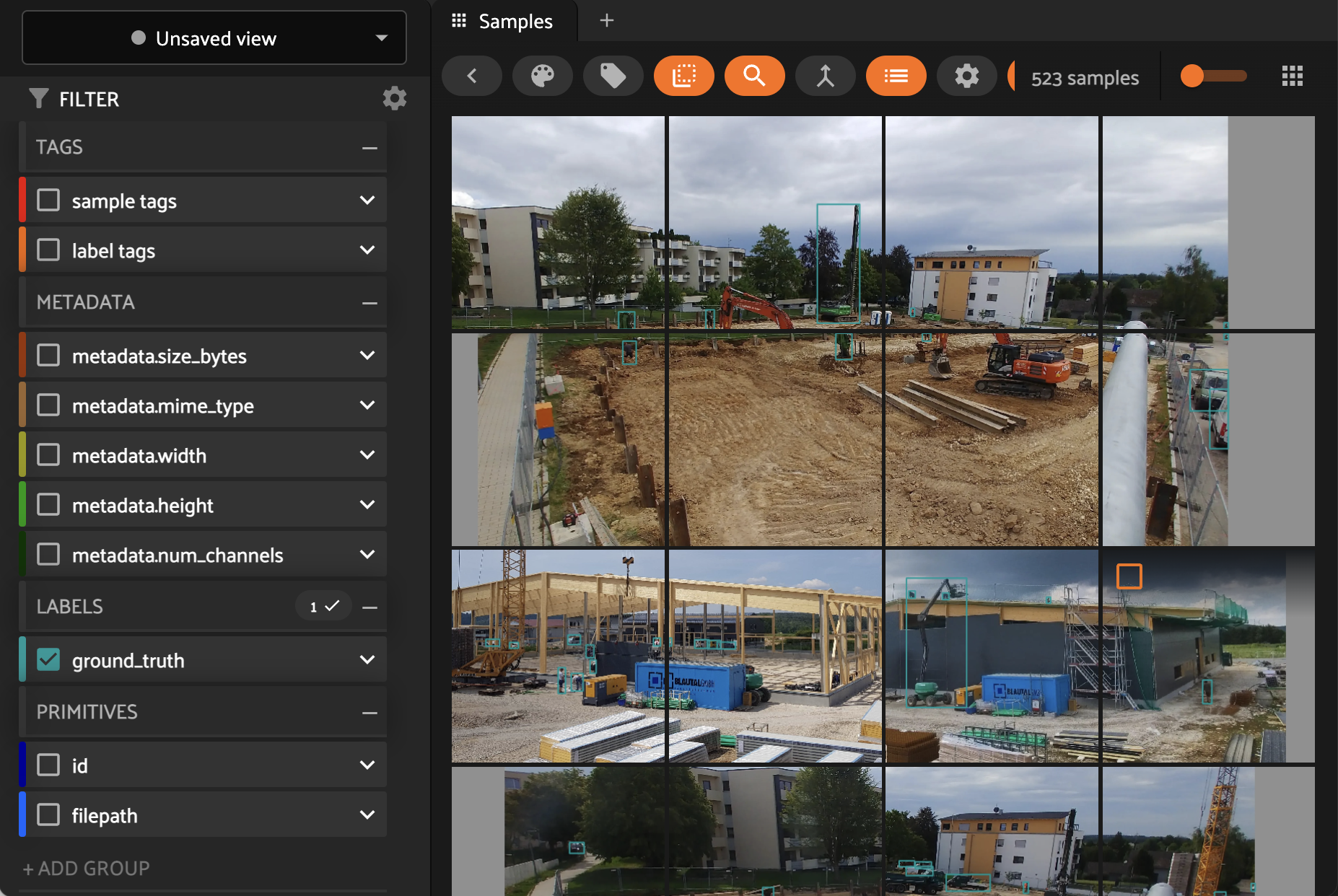
Tile your images to squares (e.g. 960x960 pixels) in FiftyOne directly.
Tested with with bounding boxes (without orientation) only.
Tiles will be saved to `destination`-dataset.
As detections might be split over tiles boundaries, they might need refinement.
- `intersecting` label tag marks affected detections.
- `intersection` sample field stores average detection intersection.
- `intersection` detection field stores label intersections.
Where `1` means detection is not split and `0.1` means detection is visible only by 10% on this tile:
```default
dataset.filter_labels("ground_truth", F("intersection") < 0.95)
dataset.sort_by(F("intersection"), reverse=False)
```
## Walkthrough
1. If `resize` is set: Resize image to given width and keep aspect ratio before tileing
2. Add space around the image to make it a multiple of tiles size and place image in a random within the new boundaries.
3. Make tiles with the given `tile_size` and transfer available detections to the tiles.
- Overlap tiles by `padding` value (in pixels)
- Omit labels at image’s borders if the don’t reach in the image by `threshold` value (in pixels)
4. If `save_empty` is set, tiles without detections will be kept, if not omited.
5. If `runs` is > 1: repeat those steps n times and keep those with least detections being split by tileing.
 ## Installation
[Make sure OpenCV is installed](https://docs.opencv.org/4.x/da/df6/tutorial_py_table_of_contents_setup.html)
```shell
fiftyone plugins download https://github.com/mmoollllee/fiftyone-tile/
```
## Python SDK
You can use the compute operators from the Python SDK!
```python
import fiftyone as fo
import fiftyone.operators as foo
dataset = fo.load_dataset("existing-dataset")
make_tiles = foo.get_operator("@mmoollllee/tile/make_tiles")
make_tiles(
dataset,
output_dir="filepath/to/save/tiles", # Required
name="task-title", # Optional identifier for this task's logs
destination="destination_dataset_name", # defaults to current dataset name with '_tiled' suffix
labels_field="ground_truth", # which labels to transfer to the tiles (Default: ground_truth)
resize=1200, # resize the image before tiling (default: None)
tile_size=960, # (default: 960)
padding=20, # Overlap tiles by given value (default: 32),
threshold=0.15, # Omit labels at the edged if smaller than given percentage (default: 0.15)
save_empty=False, # Keep tiles without labels (default: False),
test=False, # Run Tiling only for 5 samples and make destination dataset non-persistent
runs=1, # repeat n times and keep only those with least detections being split by tileing.
log_level=2 # 0 = no output, 1 = only total output, 2 = samples output, 3 = even more
)
```
## Sources
Powered by code of these repos:
- [WALDO](https://github.com/stephansturges/WALDO/blob/master/playground/run_local_network_on_images_onnxruntime.py#L54)
- [yolo-tiling](https://github.com/slanj/yolo-tiling/blob/main/tile_yolo.py)
## Installation
[Make sure OpenCV is installed](https://docs.opencv.org/4.x/da/df6/tutorial_py_table_of_contents_setup.html)
```shell
fiftyone plugins download https://github.com/mmoollllee/fiftyone-tile/
```
## Python SDK
You can use the compute operators from the Python SDK!
```python
import fiftyone as fo
import fiftyone.operators as foo
dataset = fo.load_dataset("existing-dataset")
make_tiles = foo.get_operator("@mmoollllee/tile/make_tiles")
make_tiles(
dataset,
output_dir="filepath/to/save/tiles", # Required
name="task-title", # Optional identifier for this task's logs
destination="destination_dataset_name", # defaults to current dataset name with '_tiled' suffix
labels_field="ground_truth", # which labels to transfer to the tiles (Default: ground_truth)
resize=1200, # resize the image before tiling (default: None)
tile_size=960, # (default: 960)
padding=20, # Overlap tiles by given value (default: 32),
threshold=0.15, # Omit labels at the edged if smaller than given percentage (default: 0.15)
save_empty=False, # Keep tiles without labels (default: False),
test=False, # Run Tiling only for 5 samples and make destination dataset non-persistent
runs=1, # repeat n times and keep only those with least detections being split by tileing.
log_level=2 # 0 = no output, 1 = only total output, 2 = samples output, 3 = even more
)
```
## Sources
Powered by code of these repos:
- [WALDO](https://github.com/stephansturges/WALDO/blob/master/playground/run_local_network_on_images_onnxruntime.py#L54)
- [yolo-tiling](https://github.com/slanj/yolo-tiling/blob/main/tile_yolo.py)