#### NOTE
This is a **community plugin**, an external project maintained by its respective author.
Community plugins are not part of FiftyOne core and may change independently.
Please review each plugin’s documentation and license before use.

# FiftyOne Remote Zoo Model: NVIDIA Locate Anything

A [FiftyOne](https://github.com/voxel51/fiftyone) remote Model Zoo integration
for NVIDIA’s [LocateAnything-3B](https://huggingface.co/nvidia/LocateAnything-3B),
an open-vocabulary grounding VLM from the
[Eagle](https://github.com/NVlabs/Eagle) family. Learn more about the
[FiftyOne Model Zoo in the Voxel51 docs](https://docs.voxel51.com/model_zoo).
**Image + video support, 7 operations, and an Eagle JSONL dataset importer for
evaluating against Rex-Omni-EvalData benchmarks (DocLayNet, COCO, LVIS,
ScreenSpot-Pro, etc.).**
## Table of Contents
- [Installation](#installation)
- [Quick Start](#quick-start)
- [Operations](#operations)
- [Examples](#examples)
- [Reusing a loaded model](#reusing-a-loaded-model-across-calls)
- [Using the FiftyOne App](#using-the-fiftyone-app)
- [Video inference](#video-inference)
- Loading Eagle / Rex-Omni eval bundles
- [Configuration reference](#configuration-reference)
- [Limitations](#limitations)
- [License notice](#license-notice)
---
## Installation
Install the runtime dependencies the model requires. `lmdb`, `peft`,
`opencv-python-headless`, and `decord` are not optional: the HF model’s
`modeling_locateanything.py` and `processing_locateanything.py` files
hard-import them at module-load time.
### Easiest: via `requirements.txt`
The repo ships a `requirements.txt` that uses PEP 508 environment markers to
pick the correct `decord` (or `eva-decord` on arm64 macOS) for your platform:
```bash
pip install -r requirements.txt
```
Linux / Windows
```bash
pip install fiftyone "transformers>=4.57.1,<4.58" "tokenizers>=0.22.0" \
torch torchvision huggingface-hub Pillow timm numpy \
lmdb peft "opencv-python-headless>=4.10" decord
```
macOS (Apple Silicon / arm64)
`decord` has no arm64 macOS wheel; use the maintained `eva-decord` fork instead
(it registers as the `decord` module so the rest of the code is unchanged):
```bash
pip install fiftyone "transformers>=4.57.1,<4.58" "tokenizers>=0.22.0" \
torch torchvision huggingface-hub Pillow timm numpy \
lmdb peft "opencv-python-headless>=4.10" eva-decord
```
### Via `uv`
```bash
uv add fiftyone "transformers>=4.57.1,<4.58" "tokenizers>=0.22.0" \
torch torchvision huggingface-hub Pillow timm numpy \
lmdb peft "opencv-python-headless>=4.10"
# Then add the right decord on your platform:
uv add decord # Linux / Windows
uv add eva-decord # macOS
```
### Auto-install via FiftyOne (alternative)
FiftyOne can install the manifest’s required packages for you. After
`register_zoo_model_source`, you have two options:
```python
# Install any missing packages
foz.install_zoo_model_requirements("nvidia/LocateAnything-3B")
# OR: check first, install only if anything is missing
foz.ensure_zoo_model_requirements("nvidia/LocateAnything-3B")
```
`ensure_zoo_model_requirements` is the safer default for repeat runs because
it skips the install step entirely when everything is already present.
**`decord` is not included in the manifest’s auto-install list** because the
correct distribution name is platform-dependent (`decord` on Linux/Win,
`eva-decord` on arm64 macOS), and FiftyOne’s package checker doesn’t honor
PEP 508 environment markers. Install one of those two manually before running
inference (`requirements.txt` and the per-platform sections above handle this
correctly).
---
## Quick Start
```python
import fiftyone as fo
import fiftyone.zoo as foz
# 1. Register the model source (one time per environment)
foz.register_zoo_model_source(
"https://github.com/Burhan-Q/fiftyone-locate-anything",
overwrite=True,
)
# 2. Download the model weights (~4 GB, one time)
foz.download_zoo_model(
"https://github.com/Burhan-Q/fiftyone-locate-anything",
model_name="nvidia/LocateAnything-3B",
)
# 3. Load and run inference
dataset = foz.load_zoo_dataset("quickstart")
model = foz.load_zoo_model(
"nvidia/LocateAnything-3B",
operation="detect",
classes=["person", "car", "dog"],
)
dataset.apply_model(model, label_field="detections")
session = fo.launch_app(dataset)
```
After step 1 and 2 are done once, each subsequent script only needs
`foz.load_zoo_model(...)`. The registration and weights persist across
sessions.
---
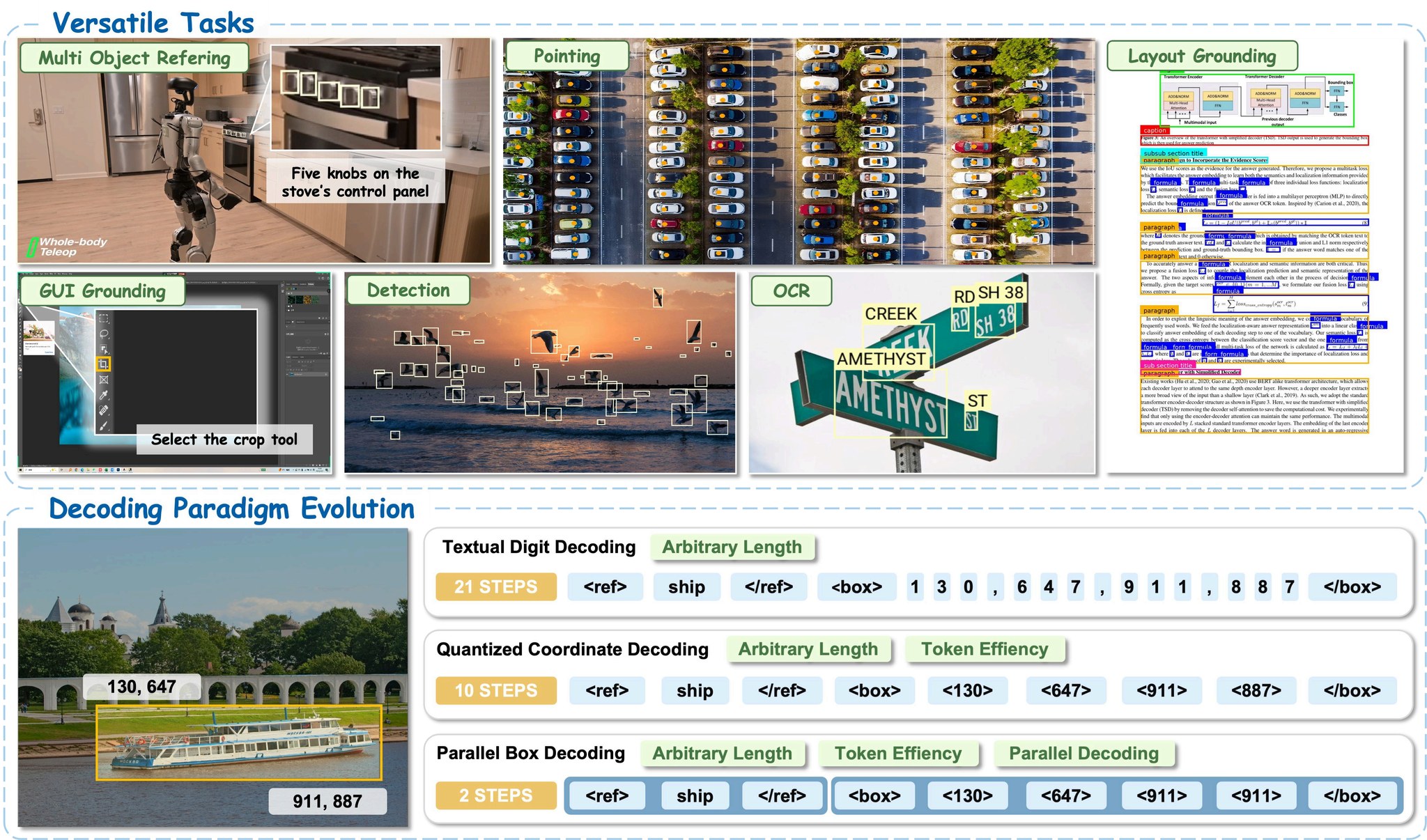
## Operations
| Operation | Required arg | Output |
|------------------|------------------------------------------------------------------|-----------------|
| `detect` | `classes=[...]` | `fo.Detections` |
| `grounding` | `prompt="..."` (`single_instance=True` for one) | `fo.Detections` |
| `point` | `prompt="..."` | `fo.Keypoints` |
| `scene_text` | *(none)* | `fo.Detections` |
| `layout` | optional `classes=[...]` (default: title/paragraph/figure/table) | `fo.Detections` |
| `text_grounding` | `prompt="..."` (referring to text in image) | `fo.Detections` |
| `gui_box` | `prompt="..."` (GUI element region) | `fo.Detections` |
---
## Examples
Each example below assumes you’ve already run the registration + download
steps from [Quick Start](#quick-start).
### Detect specific classes
```python
model = foz.load_zoo_model(
"nvidia/LocateAnything-3B",
operation="detect",
classes=["car", "person", "traffic light"],
)
dataset.apply_model(model, label_field="detections")
```
### Phrase grounding with per-sample prompts
```python
model = foz.load_zoo_model(
"nvidia/LocateAnything-3B",
operation="grounding",
)
dataset.apply_model(model, label_field="grounded", prompt_field="caption")
```
### Document layout
```python
model = foz.load_zoo_model(
"nvidia/LocateAnything-3B",
operation="layout",
)
dataset.apply_model(model, label_field="layout")
# Default classes: title, paragraph, figure, table
```
### Pointing (e.g., GUI element)
```python
model = foz.load_zoo_model(
"nvidia/LocateAnything-3B",
operation="point",
prompt="the submit button",
)
dataset.apply_model(model, label_field="ui_point")
```
### GUI region grounding (vs point)
```python
model = foz.load_zoo_model(
"nvidia/LocateAnything-3B",
operation="gui_box",
prompt="the file menu",
)
dataset.apply_model(model, label_field="ui_box")
```
### Scene text / OCR localization
```python
model = foz.load_zoo_model(
"nvidia/LocateAnything-3B",
operation="scene_text",
)
dataset.apply_model(model, label_field="text")
```
### Text grounding (find a specific phrase in the image)
```python
model = foz.load_zoo_model(
"nvidia/LocateAnything-3B",
operation="text_grounding",
prompt="invoice number",
)
dataset.apply_model(model, label_field="text_location")
```
---
## Reusing a loaded model across calls
The model class exposes property setters for every user-tunable attribute, so
you can mutate a single loaded instance between `apply_model` calls instead of
calling `load_zoo_model` again (which would reload ~4 GB of weights).
```python
model = foz.load_zoo_model(
"nvidia/LocateAnything-3B",
operation="detect",
classes=["car", "person"],
)
dataset.apply_model(model, label_field="detect_results")
# Switch operation, prompt, or any generation param in place:
model.operation = "grounding"
model.prompt = "the red car"
dataset.apply_model(model, label_field="grounded_results")
model.operation = "scene_text"
dataset.apply_model(model, label_field="text_results")
```
Settable attributes:
| Attribute | Validation |
|-----------------------------------------------------------------------------|-----------------------------------|
| `operation` | One of the 7 supported operations |
| `classes`, `prompt`, `single_instance` | None |
| `generation_mode` | `"hybrid"` / `"fast"` / `"slow"` |
| `max_new_tokens`, `do_sample`, `temperature`, `top_p`, `repetition_penalty` | None |
| `frames`, `fps`, `every_nth` (video model only) | None |
`model_path` and `media_type` are NOT settable — changing them requires a new
`load_zoo_model` call.
---
## Using the FiftyOne App
You can drive the model interactively from the App via the **Apply Model**
operator, with no notebook code required for each run. The `resolve_input`
form in `__init__.py` is what FiftyOne renders for the operator’s parameters.
End-to-end flow:
```python
import fiftyone as fo
import fiftyone.zoo as foz
# One-time setup (skip if already done)
foz.register_zoo_model_source(
"https://github.com/Burhan-Q/fiftyone-locate-anything",
overwrite=True,
)
foz.download_zoo_model(
"https://github.com/Burhan-Q/fiftyone-locate-anything",
model_name="nvidia/LocateAnything-3B",
)
dataset = foz.load_zoo_dataset("quickstart")
session = fo.launch_app(dataset)
```
Then in the App:
1. Open the **operators palette** (press the backtick ``` key, or click the
lightning-bolt icon in the toolbar).
2. Search for **“Apply Model”** and select it.
3. Pick **`nvidia/LocateAnything-3B`** from the model list. The form below appears.
4. Fill in the form (see fields table below).
5. Choose a **label field** name (e.g. `predictions`) and whether to run
**delegated** (background) or immediate.
6. Click **Execute**. Predictions stream into the chosen field on each sample.
### Form fields
| Field | Default | Notes |
|---------------------------|-----------|--------------------------------------------------------------------------|
| Media Type | `image` | `image` or `video` |
| Operation | `detect` | One of the 7 operations |
| Classes (comma-separated) | *(empty)* | For `detect` / `layout`. Comma-split into a list by the loader. |
| Prompt | *(empty)* | For `grounding` / `point` / `text_grounding` / `gui_box` |
| Single Instance | `False` | Grounding only; switches to the “single instance” template |
| Generation Mode | `hybrid` | `hybrid` / `fast` / `slow` |
| Max New Tokens | `2048` | |
| Use Sampling | `True` | |
| Temperature | `0.7` | Only used when sampling |
| Top-p | `0.9` | Only used when sampling |
| Repetition Penalty | `1.1` | |
| Video: # Sampled Frames | *(empty)* | Empty = every frame (recommended). Set N to pick N evenly-spaced frames. |
| Video: Target FPS | *(empty)* | Sample at this rate; overrides frame count |
| Video: Every Nth Frame | *(empty)* | Decimation factor; overrides frames and fps |
### Per-sample prompts from the App
The form takes a single static prompt. If you want a different prompt per
sample (e.g., the value of a `caption` field), the App route doesn’t expose
that directly. Use the notebook pattern with `prompt_field=...` from
[Examples](#examples) instead.
---
## Video inference
The model is image-only at the core; the video model decodes frames and runs
the image inference path per frame, returning `{frame_num: label}` so FiftyOne
merges results into `sample.frames[N].field`.
```python
video_model = foz.load_zoo_model(
"nvidia/LocateAnything-3B",
media_type="video",
operation="detect",
classes=["person", "car"],
# No sampling args: process every frame at native rate (recommended).
# frames=8, # or pick N evenly-spaced frames
# fps=2.0, # or sample at a target FPS
# every_nth=15, # or take every Kth frame
)
video_dataset.apply_model(video_model, label_field="dets")
# Per-frame results land in sample.frames[N].dets
```
**Default is every-frame at native rate.** When no sampling argument is set,
inference runs on every frame so the App plays back with continuous overlays.
Set `frames`, `fps`, or `every_nth` to subsample (e.g., for long videos or
quick previews).
Frame extraction backend probe order: `decord` → `cv2` → `torchvision.io`.
---
## Loading Eagle / Rex-Omni eval bundles
Eagle ships eval data as JSONL in ShareGPT format with
`[label]...` ground-truth tokens. The importer is in
`dataset.py` inside the registered zoo source.
```python
import importlib.util
from pathlib import Path
import fiftyone as fo
# Resolve the source's on-disk path. FiftyOne's `register_zoo_model_source`
# stores it at `//`, where the manifest
# name `@Burhan-Q/fiftyone-locate-anything` becomes the subpath `@Burhan-Q/fiftyone-locate-anything`.
_SOURCE = Path(fo.config.model_zoo_dir) / "@Burhan-Q" / "fiftyone-locate-anything"
_spec = importlib.util.spec_from_file_location(
"fiftyone_locate_anything_dataset", _SOURCE / "dataset.py",
)
_dataset_mod = importlib.util.module_from_spec(_spec)
_spec.loader.exec_module(_dataset_mod)
load_eagle_jsonl = _dataset_mod.load_eagle_jsonl
ds = load_eagle_jsonl(
jsonl_path="~/data/rex_omni/DocLayNet/annotations.jsonl",
image_root="~/data/rex_omni/DocLayNet/images",
name="doclaynet-eval",
)
# ds[i].ground_truth is fo.Detections; ds[i].prompt is the human turn
```
> **Why the dynamic import?** The directory `@Burhan-Q/fiftyone-locate-anything`
> contains `@` and `-` characters; neither is valid in a Python identifier,
> so `from @Burhan-Q.fiftyone-locate-anything import ...` won’t parse. The
> `importlib.util.spec_from_file_location` pattern above bypasses Python’s
> normal package machinery and works regardless of the on-disk name.
Compatible eval bundles:
- [`Mountchicken/Rex-Omni-EvalData`](https://huggingface.co/datasets/Mountchicken/Rex-Omni-EvalData)
(COCO, LVIS, Dense200, VisDrone, DocLayNet, M6Doc, TotalText, HierText, RefCOCOg, HumanRef)
- [`likaixin/ScreenSpot-Pro`](https://huggingface.co/datasets/likaixin/ScreenSpot-Pro)
---
## Configuration reference
All `foz.load_zoo_model(...)` kwargs:
| Kwarg | Default | Notes |
|----------------------|------------|-------------------------------------------------------------------|
| `media_type` | `"image"` | `"image"` or `"video"` |
| `operation` | `"detect"` | One of 7 ops above |
| `classes` | `None` | Required for `detect`; optional for `layout` |
| `prompt` | `None` | Required for prompt-based ops |
| `single_instance` | `False` | Grounding only |
| `generation_mode` | `"hybrid"` | `"hybrid"` / `"fast"` / `"slow"` |
| `max_new_tokens` | `2048` | |
| `do_sample` | `True` | |
| `temperature` | `0.7` | |
| `top_p` | `0.9` | |
| `repetition_penalty` | `1.1` | |
| `frames` | `None` | Video: # evenly-spaced frames. `None` = every frame (native rate) |
| `fps` | `None` | Video: target sampling FPS (overrides `frames`) |
| `every_nth` | `None` | Video: sample every Kth frame (overrides others) |
For per-sample prompts (instead of a single static `prompt=`), pass
`prompt_field="field_name"` to `dataset.apply_model(...)`.
---
## Limitations
- **No confidence scores**: the model emits no per-detection scores;
`fo.Detection.confidence` is `None`. Affects mAP tie-breaking.
- **Single-image inference** at the model level; no native batching.
- **bf16 on CUDA; fp16 on MPS; fp32 on CPU.** Apple Silicon works but is slower.
- **Video is frame-by-frame**: no temporal modeling, no cross-frame tracking.
- **Layout taxonomy is 4 classes** (`title`, `paragraph`, `figure`, `table`);
for other layouts use `detect` with your own class list.
---
## Known-working dependency pins
The Eagle pyproject pins specific versions. If you hit issues with the looser
ranges in our manifest, try:
```default
transformers==4.57.1
tokenizers==0.22.0
```
---
## License notice
LocateAnything-3B weights are released under the **NVIDIA License (non-commercial
research only)**. This wrapper is MIT, but the model it loads is not free for
commercial use.