#### NOTE
This is a **community plugin**, an external project maintained by its respective author.
Community plugins are not part of FiftyOne core and may change independently.
Please review each plugin’s documentation and license before use.

# Caption Viewer - Intelligent VLM Output Viewer for FiftyOne
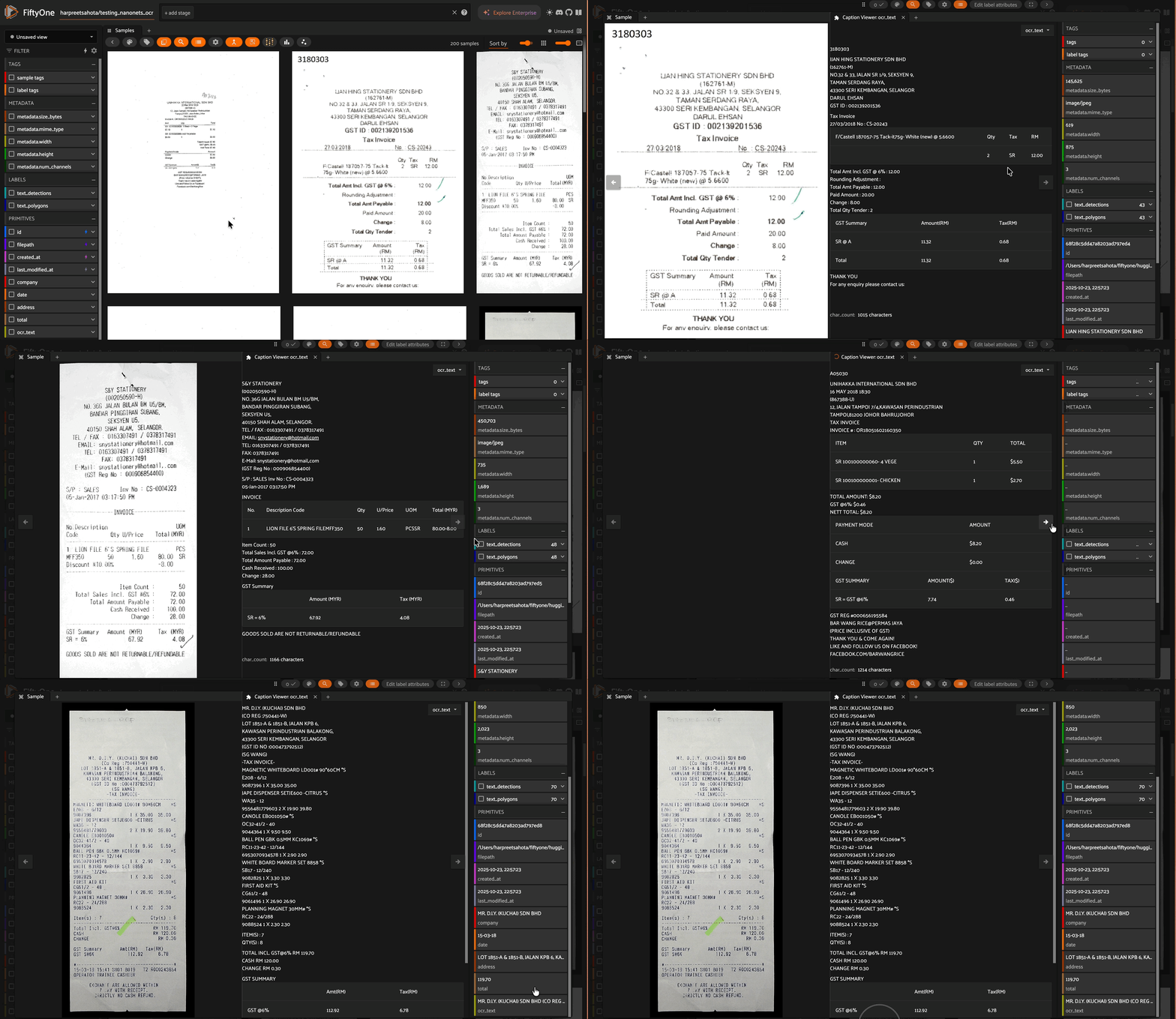
> **Note**: This plugin is based on and inspired by the original [caption-viewer](https://github.com/mythrandire/caption-viewer) by [@mythrandire](https://github.com/mythrandire). This enhanced version adds intelligent content processing for Vision Language Model outputs.
A FiftyOne plugin that intelligently displays and formats VLM (Vision Language Model) outputs and text fields. Perfect for viewing OCR results, receipt analysis, document processing, and any text-heavy computer vision workflows.
---
## Features
### Intelligent Content Processing
- **HTML Table Conversion** - Automatically converts HTML tables to beautiful markdown tables
- **JSON Formatting** - Detects and pretty-prints JSON content in code blocks
- **Escape Sequence Handling** - Properly renders newlines (`\n`) and tabs (`\t`) from VLM outputs
- **Security Sanitization** - Removes potentially dangerous scripts and event handlers
- **Plain Text Support** - Handles regular text fields seamlessly
### User Experience
- **Character Count** - Displays the length of the content
- **Markdown Rendering** - Renders formatted markdown for optimal readability
- **Empty State Handling** - Clear notices for empty or missing field values
- **Auto-Updates** - Automatically refreshes when navigating between samples
- **Multiple Instances** - Open multiple panels to compare different fields
---
## Installation
```bash
# Install from GitHub
fiftyone plugins download https://github.com/harpreetsahota204/caption_viewer
```
Or with `--overwrite` if updating:
```bash
fiftyone plugins download https://github.com/harpreetsahota204/caption_viewer --overwrite
```
---
## Use Cases
### Receipt Processing with OCR/VLMs
Perfect for viewing receipt analysis outputs where the VLM extracts structured data with line breaks:
**Input (from VLM/OCR):**
```default
'Store Name\n123 Main Street\nCity, State 12345\n\nItem 1: $10.00\nItem 2: $15.00\nTotal: $25.00'
```
**Output (rendered in panel):**
```default
Store Name
123 Main Street
City, State 12345
Item 1: $10.00
Item 2: $15.00
Total: $25.00
```
### Document Analysis with HTML Tables
When VLMs output HTML tables (common for invoice/document parsing):
**Input:**
```html
| Item | Quantity | Price |
|---|
| Coffee | 2 | $7.00 |
| Muffin | 1 | $2.75 |
```
**Output (rendered as markdown):**
```default
| Item | Quantity | Price |
| --- | --- | --- |
| Coffee | 2 | $7.00 |
| Muffin | 1 | $2.75 |
```
### JSON Structured Data
Automatically formats JSON outputs from VLMs:
**Input:**
```json
{"invoice_number":"INV-001","date":"2024-01-15","items":[{"name":"Widget","price":10.99}]}
```
**Output (pretty-printed):**
```json
{
"invoice_number": "INV-001",
"date": "2024-01-15",
"items": [
{
"name": "Widget",
"price": 10.99
}
]
}
```
### Captions and Annotations
Display any text field such as image captions, descriptions, or notes with proper formatting.
---
## Quick Start
### Example: OCR Receipt Dataset
```python
import fiftyone as fo
from fiftyone.utils.huggingface import load_from_hub
# Load a dataset with OCR text (example using Hugging Face Hub)
dataset = load_from_hub("harpreetsahota/testing_nanonets_ocr")
# Or load an existing dataset
# dataset = fo.load_dataset("your-dataset-name")
# Launch the FiftyOne App
session = fo.launch_app(dataset)
```
**Then in the FiftyOne App:**
1. Click on any sample to open the modal view
2. Click the `+` button to add panels
3. Select **“Caption Viewer”** from the panel list
4. In the panel menu (), select the field you want to view (e.g., `ocr_text`)
5. Navigate through samples using the arrow keys or clicking samples
The plugin will automatically:
- Render `\n` as actual line breaks
- Convert HTML tables to markdown
- Pretty-print JSON
- Show character counts
- Handle empty fields gracefully
---
## Usage Guide
### Basic Usage
1. **Open a dataset** in FiftyOne with StringField data
2. **Click on a sample** to open the modal view
3. **Add the Caption Viewer panel**:
- Click the `+` button in the panel area
- Select “Caption Viewer” from the list
4. **Select a field** from the dropdown menu ( icon in top-right)
5. **Navigate through samples** to see formatted content
### Advanced Features
#### Multiple Panel Instances
Open multiple Caption Viewer panels to compare different fields side-by-side:
- Open first panel for `ocr_text`
- Click `+` again and add another Caption Viewer
- Open second panel for `description` or other fields
#### Field Selection
The plugin automatically detects all `StringField` types in your dataset:
- Captions
- Descriptions
- OCR outputs
- VLM responses
- Annotations
- Any custom string fields
---
## Technical Details
### Processing Pipeline
1. **Security Sanitization** - Removes `