# Step 1: Loading a Detection Dataset in FiftyOne
In our first step, we will be covering how you can load an object detection dataset into FiftyOne. Detection datasets usually come in a standard format that FiftyOne can load in one or two lines for you, making creating datasets fast and easy! However, not all datasets come in a known format and sometimes we have to add the detections on manually ourselves. With just a few more steps, FiftyOne still makes loading custom datasets easy.
Let’s take a look first at loading a common format.
## Loading a Common Format Detection Dataset
Detection datasets can come in many forms, but usually stick to a standard. For quick ingestion, FiftyOne is familiar with COCO, VOC, YOLO, KITTI, and FiftyOne formatted datasets. Check out each one to confirm the folder and file setup matches what your structure is. While uncommon, certain datasets tools will rename or move certain files, such as `data.yaml` in a YOLO dataset instead of `dataset.yaml`.
Once you have found the correct format of your dataset, we can follow the same pattern for each type:
Check out the docs for each format to find optional parameters you can pass for things like train/test split, subfolders, or labels paths.
## Loading a Custom Format Detection Dataset
Sometimes datasets don’t come in a common format or maybe you are just adding some additional labels to an existing dataset. Adding detections to these datasets is still easy with FiftyOne. We will learn how to do this by looping over our datasets and adding a new label field to each sample.
Let’s begin by first loading in a dataset. We will use a [dice detection dataset](https://www.kaggle.com/datasets/nellbyler/d6-dice) from [Kaggle](https://www.kaggle.com/). We start by downloading from `kaggle_hub`, and loading in *just* the images first.
We can see our images have loaded in the app but no annotations yet:
Now the annotations in the dataset are custom, with each image filepath having a corresponding label file in the `Annotations` folder like the following:
```none
Images
- IMG_000.jpg
- IMG_001.jpg
...
Annotations
- IMG_000.txt
- IMG_001.txt
...
```
We can loop through our samples, grab the corresponding txt file for our sample, and load in the detections for each one. But first, we need to discuss how a [FiftyOne Detection Label](https://docs.voxel51.com/user_guide/using_datasets.html#object-detection) works!
The [Detections](https://docs.voxel51.com/api/fiftyone.core.labels.html#fiftyone.core.labels.Detections) class represents a list of object detections in an image. The detections are stored in the [detections](https://docs.voxel51.com/api/fiftyone.core.labels.html#fiftyone.core.labels.Detections.detections) attribute of the [Detections](https://docs.voxel51.com/api/fiftyone.core.labels.html#fiftyone.core.labels.Detections) object.
Each individual object detection is represented by a [Detection](https://docs.voxel51.com/api/fiftyone.core.labels.html#fiftyone.core.labels.Detection) object. The string label of the object should be stored in the [label](https://docs.voxel51.com/api/fiftyone.core.labels.html#fiftyone.core.labels.Detection.label) attribute, and the bounding box for the object should be stored in the
[bounding_box](https://docs.voxel51.com/api/fiftyone.core.labels.html#fiftyone.core.labels.Detection.bounding_box) attribute.
Lastly, bounding boxes in FiftyOne are always in the following format, normalized to be bounded by [0,1] relative to the image’s dimensions:
```none
[, , , ]
```
With that explained, let’s wrap up by adding detections to our dataset!
Our custom dice dataset has a custom annotation format that looks like:
```none
class x_center y_center length width
```
On top of being in an incorrect bounding box format, the class is off by one for each dice since it starts at 0. So `class` 0 == `side 1` on dice. Let’s look at how we can adjust our annotations and add to FiftyOne!
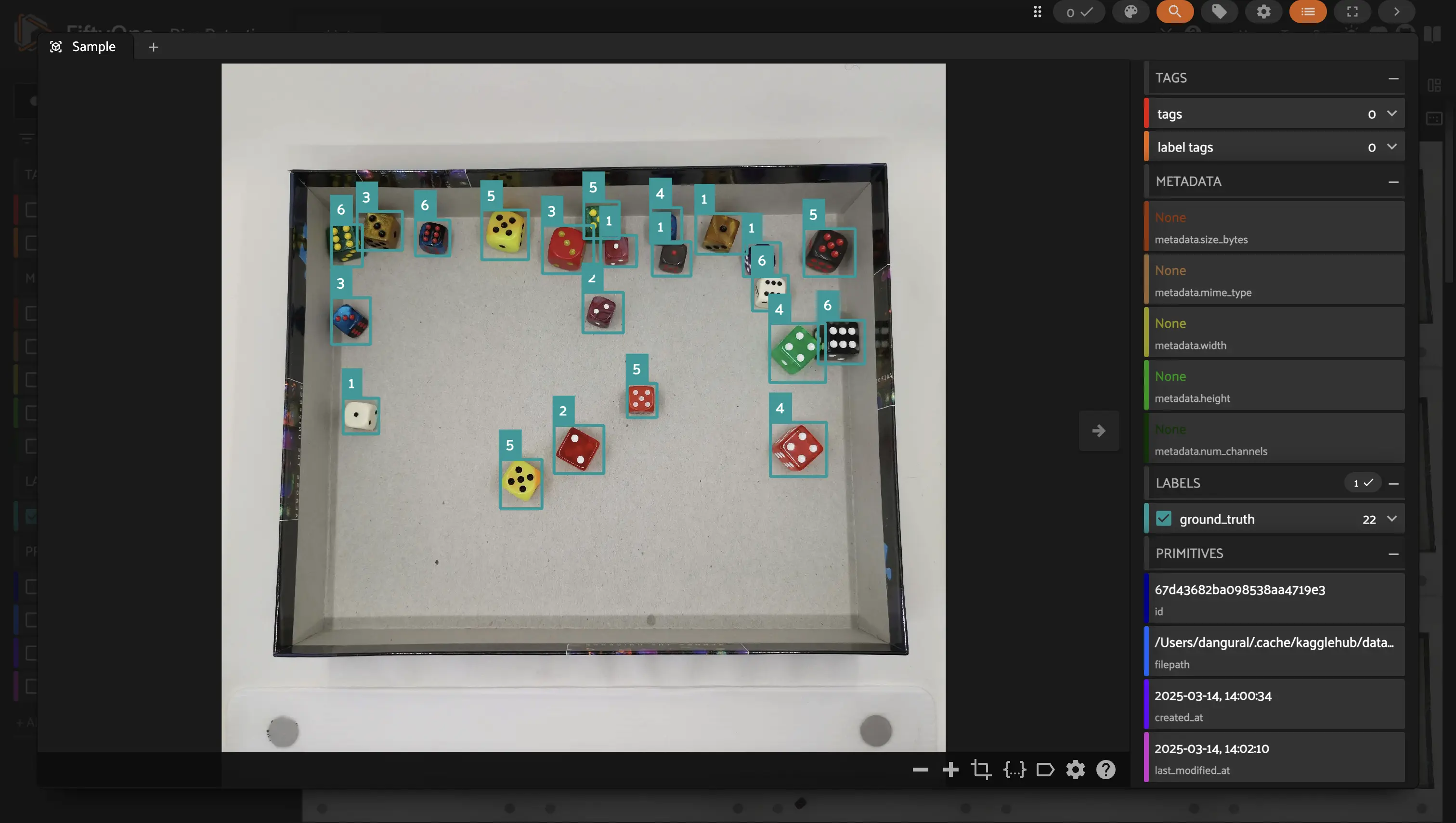
Once it is all done, we can view our dataset to confirm that we were able to load our custom detections!
## Summary
Great work! You’ve learned how to load detection datasets into FiftyOne using both standard formats (COCO, VOC, YOLO) and custom formats by manually adding `fo.Detection` objects.
Next up: **Step 2 - Visualizing and Analyzing Detection Data**
 Run in Google Colab
 View source on GitHub
 Download notebook