# 3D Visualization for Defect Inspection
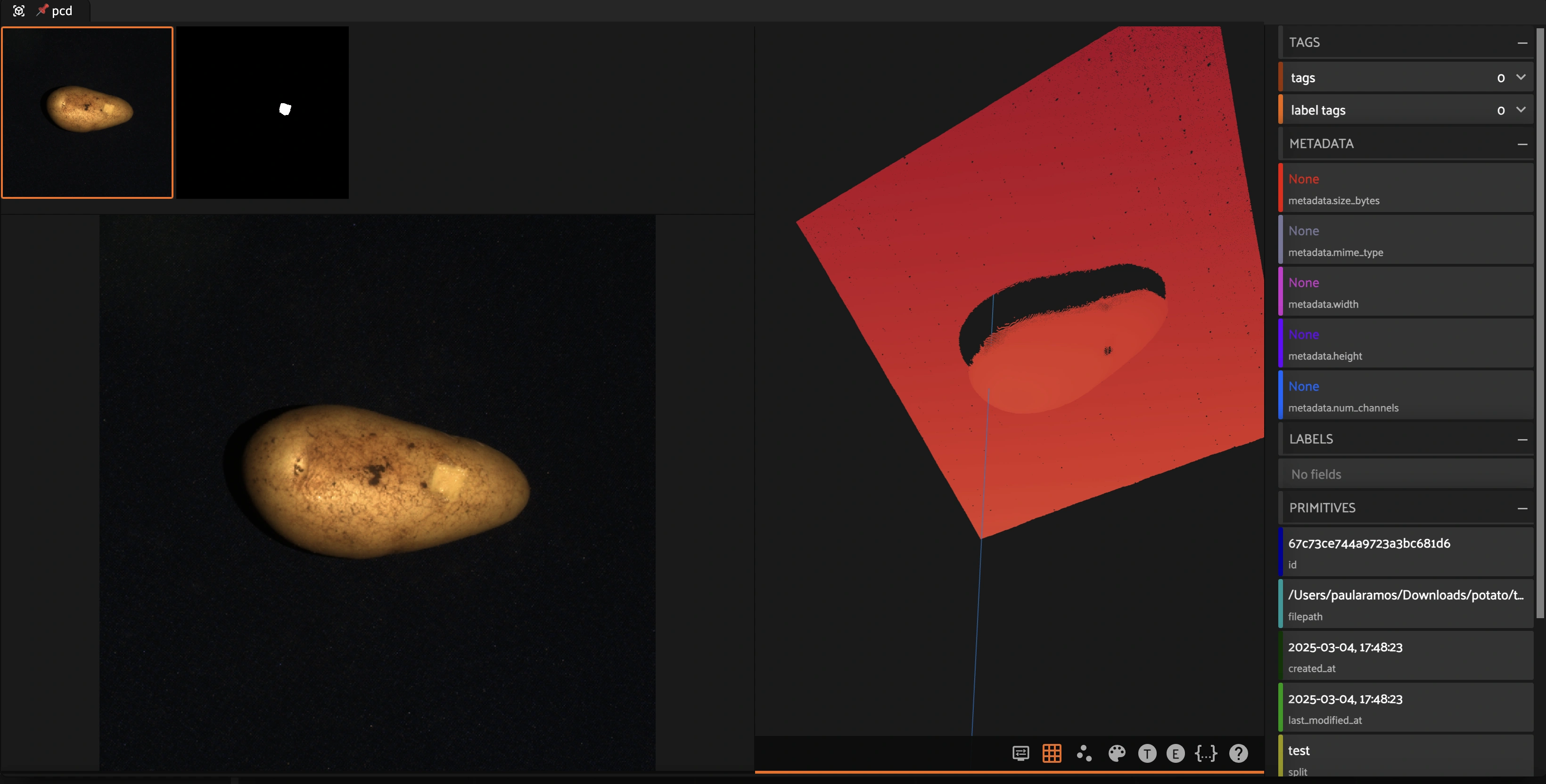
This notebook demonstrates how to integrate the **MVTec 3D Anomaly Detection Dataset** into FiftyOne. The dataset contains high-resolution 3D scans of objects, including **point cloud data** and **RGB images**, which are useful for anomaly detection tasks.
## Learning Objectives:
- Convert TIFF to PCD format for visualization in FiftyOne.
- Create a Grouped Dataset in FiftyOne
- Leverage FiftyOne for visualization and analysis.
### Key Features:
- **3D Representation**: The dataset provides XYZ point cloud representations stored as TIFF files.
- **RGB and Mask Images**: Each sample includes an RGB image and a corresponding segmentation mask.
- **Anomalous and Normal Samples**: The dataset includes both normal and defective objects for anomaly detection research.
- **Grouped Datasets in FiftyOne**: FiftyOne supports the creation of grouped dataset which contain multiple modalities
To make this dataset compatible with FiftyOne, we need to **convert TIFF files into PCD (Point Cloud Data) format** for visualization.
## Converting TIFF to PCD for Visualization
MVTec 3D provides **XYZ coordinate data stored in TIFF format**, which must be converted to **PCD format** to be visualized in FiftyOne. The function below:
1. Loads the TIFF file as a **NumPy array**.
2. Reshapes it into **Nx3 (XYZ points) format**.
3. Saves it as a **PCD file** using Open3D.
Additionally, another function includes **color segmentation** from masks to highlight anomalies.
The next three cells are for your reference, so you can take a look at how to convert from TIFF to PCD.
For the TIFF example, please select one sample from the [MVTec 3D-AD dataset](https://www.mvtec.com/company/research/datasets/mvtec-3d-ad/).
## Creating a Grouped Dataset in FiftyOne
FiftyOne allows creating **grouped datasets**, where multiple data modalities (e.g., RGB images, segmentation masks, and point clouds) can be linked together under a common identifier. This enables:
- **Synchronized visualization**: Easily switch between different representations of the same object.
- **Multi-modal analysis**: Combine insights from images, masks, and 3D data.
This notebook demonstrates how to create a grouped dataset where each sample includes:
- An **RGB image**
- A **segmentation mask**
- A **3D point cloud (PCD)**
We will use `potato` object from the [MVTec 3D Dataset](https://www.mvtec.com/company/research/datasets/mvtec-3d-ad/), here are the modified subset of the dataset.
You can download the subset here [Potato MVTec 3D](https://huggingface.co/datasets/pjramg/potato_mvtec3d). Please download the dataset to disk and add samples in FiftyOne as I am showing you in the following cell.
Note: Loading this dataset using the Hugging Face hub won’t work because it is not saved in FiftyOne format.
### Create the Dataset instance in FiftyOne
### Read the MVTec Directory (potato object) and creating pairs of metadata before grouping dataset in FiftyOne
### Creating the grouped dataset in FiftyOne
 Run in Google Colab
 View source on GitHub
 Download notebook